

Closed (outdated)
Project:
CAPTCHA
Version:
6.x-2.x-dev
Component:
Image Captcha (image_captcha)
Priority:
Normal
Category:
Support request
Assigned:
Unassigned
Reporter:
Created:
19 Dec 2008 at 18:51 UTC
Updated:
17 Jan 2018 at 01:26 UTC
Jump to comment: Most recent, Most recent file





Comments
Comment #1
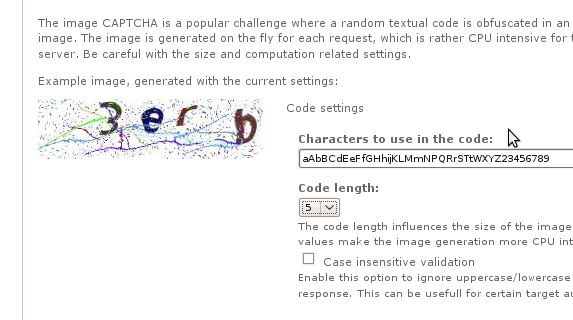
soxofaan commentedCan give some screenshots of both successes as failures?
And how do you know it's the first character that is chopped off?
Comment #2
philsward commentedI thought about creating a new issue for this, and maybe I should (or it might be a duplicate) but I would love to see a feature of 'redrawing' the image from the user standpoint to resolve issues such as the one posted here.
Is this something that might be feasible?
Update: K, I noticed this has been requested on http://drupal.org/node/180328
I'll leave it at that :)
Comment #3
nilocd commentedI'm having trouble with the image captcha as well... about a quarter of the time there is a character missing (should be 5, only displaying 4).
I've tried numerous different TTF files and different font sizes and spacing but have been unable to get around the problem.
Interestingly, it doesn't happen with the built in font. Could it be something to do with UTF-8?
Anybody else having any trouble with this?
Thanks.
Comment #4
soxofaan commenteddoes it also happen when distortion is disabled?
and if your site/page is online, can you provide a link to it?
Comment #5
nilocd commentedThanks for the quick response! The problem persists when there is no distortion set.
An example of the problem can be seen at: http://www.network-box.co.uk/feedback/contact-us
Comment #6
soxofaan commentedI can reproduce on your site, but I can't reproduce on my setup.
can you provide the phpinfo() page of your setup (you can get this from the status report and following the link on the PHP version number, which will lead to something like example.com/?q=admin/reports/status/php)?
Comment #7
nilocd commentedHi,
Sorry for the slow response, Easter holidays here.
I've attached a HTML document with my phpinfo() output in it.
Thanks.
Comment #8
nilocd commentedAny ideas??
Comment #9
soxofaan commentedat #7:
it appears that your setup uses higher versions (PHP, GD) than mine, so that probably isn't the reason.
what happens when you take larger (or smaller) character spacing in the image CAPTCHA settings?
Comment #10
nilocd commentedI've tried numerous combinations of ttf fonts, character spacing and font sizes, all with the same result (intermittently there is a character missing). Thanks.
Comment #11
soxofaan commentedLet's try something else:
in the file
image_captcha/image_captcha.user.inc, you'll find the following lines somewhere near the bottom:Uncomment the second line to show the bounding box of each character and report your findings.
Comment #12
nilocd commentedHi,
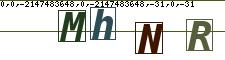
Interesting results - when working the borders look fine, but when the character is missing there are a couple of lines through the whole image. Attached a couple of screenshots.... thanks for your perseverance with this!
Colin.
Comment #13
soxofaan commentedWow, this is really weird.
it looks like the bounding box of the first character is much wider than the canvas, while the height is ok.
Can you leave the bounding box drawing on for some days on you site, so I can try it myself?
Comment #14
nilocd commentedHi,
I've turned the borders back on for now at http://www.network-box.co.uk/feedback/contact-us
Thanks,
Colin.
Comment #15
soxofaan commentedCould you replace the
imagerectangle()call from #11 with the following:if I add something like "?mode=imagecaptchadebug" to the url of your site, I'll see the bounding box values of the first character, but normal users will see the normal image.
Comment #16
nilocd commentedHi,
I've added the code to show debug information when visiting http://www.network-box.co.uk/feedback/contact-us/?mode=imagecaptchadebug
Hope this helps, thanks.
Comment #17
soxofaan commentedApparently, the imagettfbbox returns an invalid value for the x-value of the lower right corner and upper right corner of the character bounding box.
This value is -2147483648 in all cases I've seen, which is -2^31 or 0x80000000 in hexadecimal two's complement notation.
I have absolutely no idea what is going on here. I guess it's a bug in your version of PHP/TTF library, but it's very weird that it only happens sometimes and only for the first character (as far as we observed). I don't have the impression that it depends on the value of the first character itself.
I don't think this is a bug in the image_captcha module itself (that's why I changed the category of this issue to support request).
I googled a bit, but didn't found any pointers to what could be the problem.
I don't know if you have control over your hosting setup, but if you do, I would try to use a different version of PHP or something.
Comment #18
nilocd commentedI do have complete control over my hosting set up (I'm more a Linux sysadmin than a PHP developer) and am going to try experimenting with different versions of GD in particular. A quick question though... as a quick and dirty fix... would it be possible to detect if the bug has occurred while the CAPTCHA image is being generated and if so force the script to try again (and loop through this condition until the image is NOT broken?)
Thanks!
Comment #19
eMPee584 commentedWow soxo you were right.. i tested this through thoroughly and it happens only every few thousand times.. here's a patch with a workaround to catch that single case, and some other fixes (hail E_ALL!)
Comment #20
eMPee584 commenteda bit more tests down the road, this indeed happens more often with non-latin2 characters (using ttf font) but else is quite unpredictable so imho this warrants adding a workaround for buggy GD libs.. it only checks a single integer against being not negative so the overhead is really really negligible. Tests show that usually one regeneration of the bounding box is enough, only very seldomly two. Did not experience higher numbers...
Comment #21
aryanto commentedI think I have the same problem after I updated my CAPTCHA module from version 6.x-1.0-rc2 to 6.x-2.0-rc3, which I just reported on http://drupal.org/node/558904.
Comment #22
aryanto commentedI was tired seeing only 4 characters on my CAPTCHA image more often recently, so I tried the patch provided by eMPee584 (post #19). The patch seems to work as I always see 5 characters.
However, I just patched captcha.module and image_captcha/image_captcha.user.inc files. I don't see it necessary to add the following lines on the captcha.inc file:
Because the next line is already as below:
Perhaps the #19 patch was done based on 6.x-1.0-rc2 version, and I am using 6.x-2.0-rc3.
Comment #23
soxofaan commented(sorry for the delay)
The patch of #19 indeed changes more than just implementing the workaround for this issue (the other changes should be handled separately, e.g.: #545526: undefined indices..).
I worked a bit on the workaround (see attched patch).
For those who are affected by the GD-bug (I'm not, so I cant really check this), please try it out and check if it fixes (workarounds actually) the problem.
Comment #24
aryanto commented@soxofaan
I just would like to understand the patch.
If we knew that it is very likely that the first call result of imagegettfbox is corrupt, why do we need to wait until 5 loops (or 10 loops on #19 patch)?
I tried to limit the loop to only 1 loop as below, and it seems to work fine.
Edit:
Actually, it does not make sense at all to use "for" loop command only for 1 loop (duh!) :)
So I changed the command into the following and it seems to work as well.
Comment #25
soxofaan commented@aryanto:
The problem is that I don't have access to a setup with the problem, so I can't really try things out.
The patch in #23 indeed uses a for loop because #20 reports that two retries could be required.
If you can guarantee that only one retry is actually required, I would be more than happy to rip out that for loop and just do an if construct, like you suggest in #24.
Comment #26
aryanto commented@soxofaan
Just from what I experienced, the first character is usually missing after I clear up my browser's cache or after about 50-60 times refresh of the page containing CAPTCHA image. I did that again after I did #24 (without loop) and I have not experienced the issue.
But I am sorry that I can not guarantee whether only one retry would be enough or not. I will leave the setting with "if" construct as #24 for the moment. Lets see if I still experience the issue or I got complain about the missing character :)
Or maybe to be on the safe side a few loops is good to have, as it does not consume significant server's resources anyway.
Comment #27
hanoiiGot this issue as well, but it seems this is happening on my local linux, haven't seen this happening in the real server (happy about that), but interested in helping in getting this fixed. Workaround might be good, and IMHO, it seems that it would be good to have a loop to make sure a captcha is properly generated, but I'll try to investigate more about this.
Comment #28
hobo commentedI'm seeing this as well.. disabled all noise, color changes etc.. First character seems to be missing most of the time?
bump..
Comment #29
soxofaan commented(please leave at 6.x-2.x-dev, which is "higher" than 6.x-2.0)
More importantly however, if you are affected by this bug:
please describe your webserver setup: operating system, apache version, PHP version, GD version, Freetype version, etc
You can find this info on example.com/?q=admin/reports/status/php (Administer > Reports > Status report > click on the PHP version string in the table)
Comment #30
tkeppens commentedI have the same issue, only here no characters are showing at all. It's working with the built-in font though.
System info:
PHP Version 5.2.8
Apache 2.0 Handler
GD Support enabled
GD Version bundled (2.0.34 compatible)
FreeType Support enabled
FreeType Linkage with TTF library
FreeType Version 1.5
GIF Read Support enabled
GIF Create Support enabled
JPG Support enabled
PNG Support enabled
WBMP Support enabled
XBM Support enabled
Really looking forward to the solution for this. :-)
Thanks in advance!
Comment #31
soxofaan commentedat tkeppens in #30: if no characters are showing at all, it's definitely a different problem. This thread is specifically for the problem when only the first character is missing.
Please submit a new issue for you problem.
Some suggestions to start however: have you tried different fonts? If you are familiar with patching a module, you can also try out the patch from #571344: Mix multiple fonts, which adds font previews on the admin page)
Comment #32
lazly commentedIts looks like working, please test and commit. :)
Thx the work and the patch!
Comment #33
eMPee584 commentedBREAKING NEWS: Fresh data from the field ;-)
i have been running my site with attached debug logging patch applied for a while now and can report back on the occurance pattern of this bug. The patch logs the number of times imagettfbbox() has to be called to get a valid bounding box for every generated captcha. In standard case of success on first try, instead of a '1' a dot is logged. As the appended log shows (from standard debian gd/php 5.2.11-2), there's not a single occurance of a three.. this seems to be caused by the fact that the likelihood of a wrong imagettfbbox result seems to drop drastically for the faster it is being called. So the many twos near the beginning are real data from normal usage, the last 4k or so are sequentially generated examples. Even then sometimes the function has to be called twice, but up to date never three times. So i guess the loop can be cut to an if statement and the workaround committed. As the clustering of twos at the beginnning of the log shows, it is really a relevant wildlife problem.
Comment #34
soxofaan commentedcommitted the 'if'-version of the fix:
http://drupal.org/cvs?commit=312298
thanks all for testing.
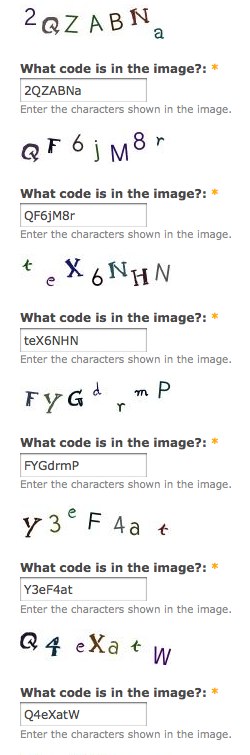
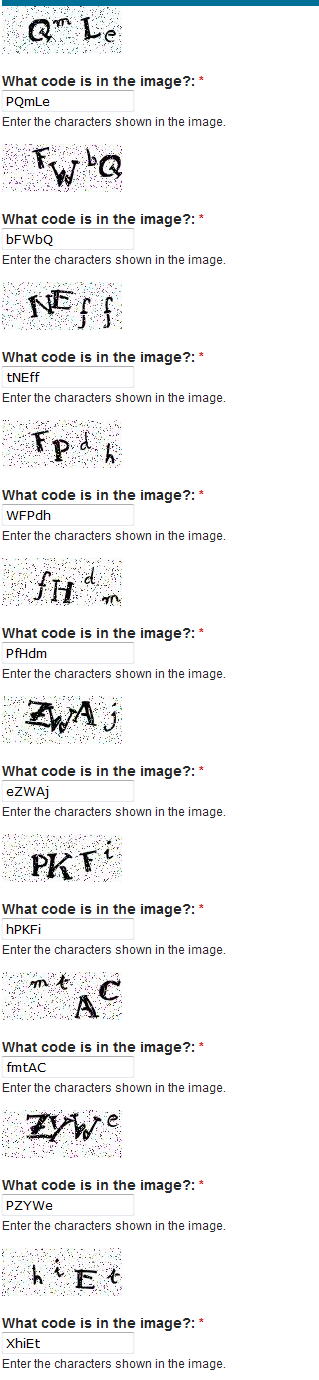
Comment #36
lee20 commentedI am having this issue with 6.x-2.4 and the latest 6.x dev. See attached.
Comment #37
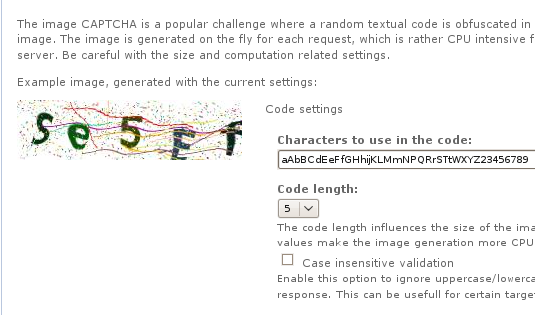
soxofaan commented@lee20: how did you create that image: you pasted several images together, or is it the screenshot of the image CAPTCHA examples page? In the latter case: the first character is always missing then (not just occasionally)? Does changing the font size setting help? Or using another font TTF file?
Comment #38
lee20 commentedIt is a screenshot of the image CAPTCHA examples. The single example on the image captcha configuration page did the same thing.
I didn't try using any other fonts than what are offered by default. I did try a combination of these 3 fonts. Adjusting the font-size seemed to have no affect.
But are you saying that the dropping of the first character is always the case for the examples? I didn't get as far as trying it on the actual forms as I had expected the examples to behave normally. Please clarify.
Comment #39
soxofaan commentedYes, note that below the images, there is a text field each time prefilled with the expected solution.
In all cases of your example, the first character is missing.
Comment #40
lee20 commentedI'm still confused.
The missing first character is by design for the examples? Yes or No? It doesn't make sense to me why that would be.
I understand that the examples are prefilled, but the solution doesn't match the images. So it doesn't make sense to me why the first character would be dropped by design for the example images.
But I guess I'll just see what happens when I enable image captcha for a legit form.
Comment #41
soxofaan commentedNo, of course, the missing first character is not by design :)
but due to a weird bug in some version of GD.
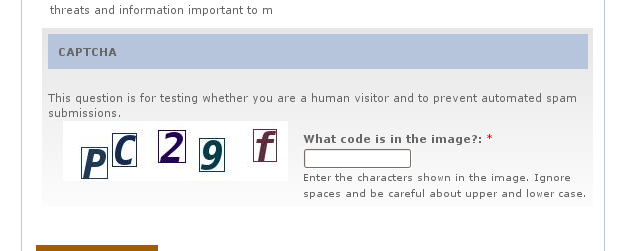
It doesn't happen on my setup (see attachment), so it's hard to debug it.
The strange thing is that the bug happens every time in your case, while it just occurred just occasionally for other victims in this thread.
Comment #42
lee20 commentedThat is strange. I'll toy with the fonts a little more and try to provide information on the PHP version and GD lib that I am using on this site.
The site was previously using ImageMagick, so I wonder if there is some clutter within the Drupal system that may cause the bug rather than an issue with PHP or the GD lib itself.
We just migrated the site to a host that has GD installed so we were looking forward to trading Math Captcha for Image Captcha.
I'll post back with any details that I find.
Comment #43
wundo commented