

Closed (outdated)
Project:
Location
Version:
6.x-3.x-dev
Component:
User interface
Priority:
Normal
Category:
Bug report
Assigned:
Unassigned
Reporter:
Created:
21 Dec 2008 at 15:51 UTC
Updated:
19 Jul 2016 at 12:15 UTC
Jump to comment: Most recent, Most recent file


Comments
Comment #1
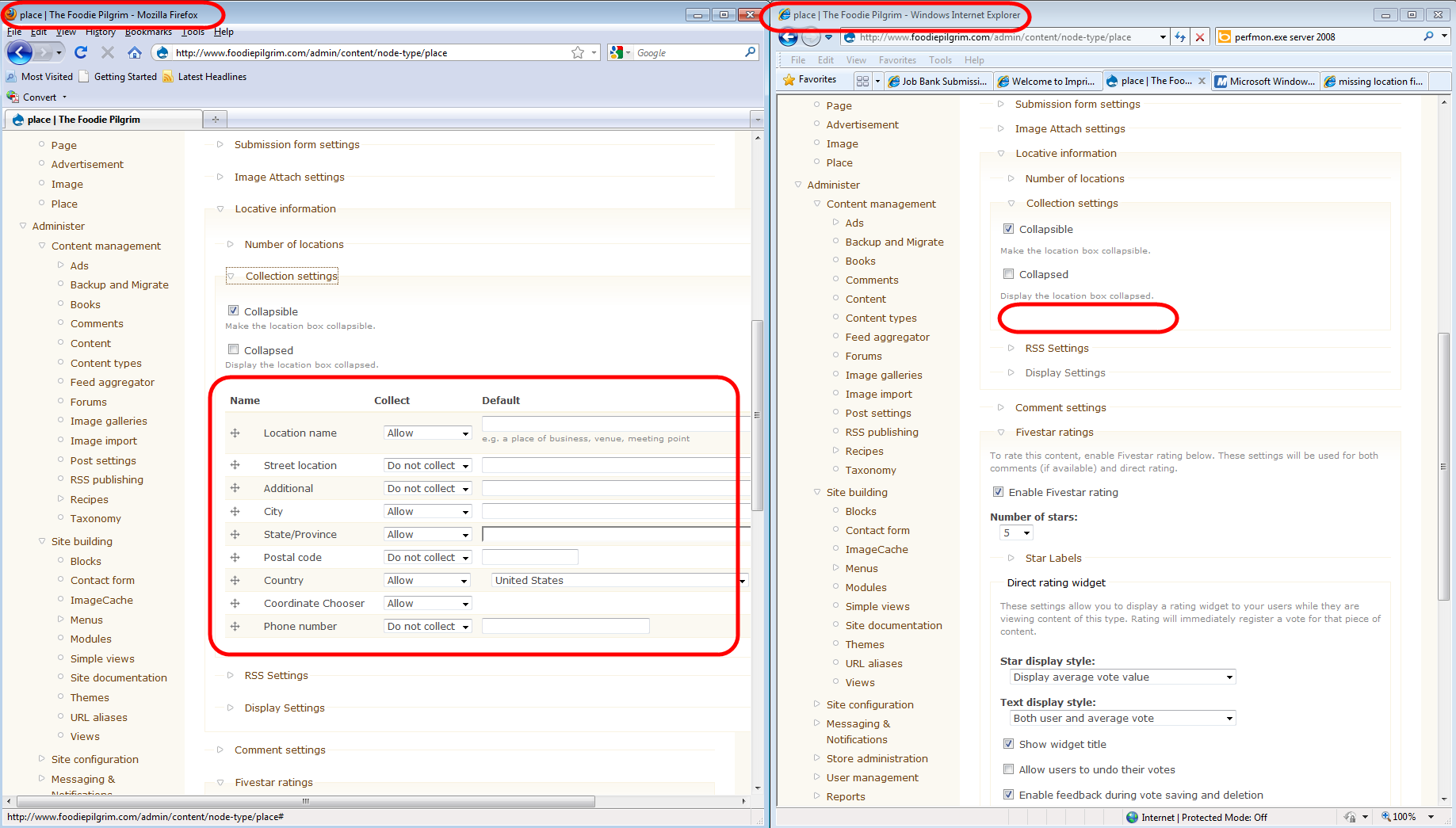
kepesv commentedOk, so this is an IE bug. There is the field list in the "collection settings" in FF3 but there is nothing in the IE7.
Comment #2
yesct commentedtagging.
There have been lots of commits since this was filed. Can someone confirm this is still a problem in the latest dev version?
Comment #3
yesct commentedmarked #362309: collection settings not displayed in IE7 as a duplicate. In comment #1 Feb 15 2009 says still a problem in dev. So still need someone to try the newest dev version.
Comment #4
sportel commentedI am using the latest dev version (6.x-3.x-dev (2009-apr-18)) and having the same issue (I think). Using IE7, the 'Collection settings'-section is empty, when editing the settings for a Location-CCK field.
Comment #5
chadcross commentedI don't think it is just IE. I don't see it when using FF3 and Chrome.
Comment #6
chadcross commentedJust tried upgrading to 6.x-3.x-dev. No change.
Comment #7
yesct commentedComment #8
yesct commented#471250: Fields to specify Allow/Do not collect are missing under collection settings marked as a duplicate of this issue.
Comment #9
green monkey commentedas of today.. yes still an issue
Comment #10
yesct commented@jwells does it still fix it for you to use firefox?
@chadcross are other collapsed field sets empty when you uncollapse them? Do you have the devel module? Maybe try clearing all you caches. I think there might be another issue related to
Empty field sets. I'll see if I can find it.
Comment #11
yesct commentedChadcross does this issues sound like a better description of you problem? #352983: Cannot expand collapsed field sets and thus Unable to Create Locations for New Content Type
Comment #12
keyser79 commentedi am having this same problem
Comment #13
yesct commentedI know this has been going on for a while.. but there were lots of changes in the newest release...
Please check to see if this is still a problem in the new release. If it is, reply with a new summary and set the status back to active.
Comment #14
Ashford commentedLocation 6.x-3.x-dev (downloaded on 10/01)
CCK 6.x-2.8
Drupal 6.19
I have used Location and CCK for many years and I am using the same module settings I have always used. There are no Location Setting options in any of the content_types (admin/content/node-type/story).
I enabled "Content" and "Location". I use the simple method -Google Map text link- instead of inserting the map image into the node. By default, do we need to enable "Location CCK" or "Node Locations" now? I never did before.
Ashford
Comment #15
gaëlgYes, as far as I can see Node Locations is needed. Kind of troubling. This should be mentioned somewhere, most likely in the readme.
Comment #16
mstrelan commentedYet #906968: CCK Location Fields do not save when Node Locations are enabled. requires location_node to be disabled...
Comment #17
Ashford commentedWhat I have discovered so far...
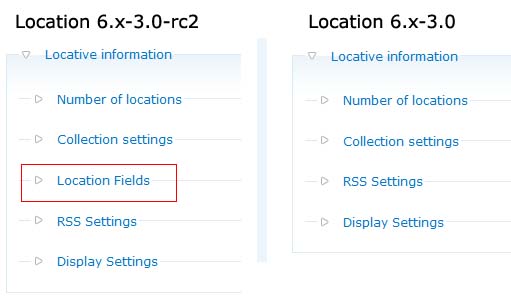
Using the original method, the Locations module manages the location fields -whether to add the fields and what to display. Required module functions are Locations and Node Location. When you enable Node Location, you can click the Edit link for each content_type and you will have a Locative Information setting to add the fields.
Using the CCK method, the CCK module manages the location fields -whether to add the fields and what to display. Required module functions are Locations and Location CCK. When you enable Location CCK, , you can click the Manage Fields link for each content_type and when you Add a Field, you will have a new field_type called 'location'.
Comment #18
Ashford commentedShould I add a Child Page to the module's documentation page to try and explain this?
http://drupal.org/handbook/modules/location
When using the Location module, you must also enable Node Location or the Location CCK on the Modules list. When you create or edit a content_type, the Location settings for your content_type will be in a different place, according to which one you enabled.
-administer
--content
----content_types
------your content_type
----------Location settings are on the main page for your content_type.
-administer
--content
----content_types
------your content_type
----------Manage fields
--------------Add a new field and select location as the field_type; or, edit an existing CCK Location field.
Comment #19
gaëlgClear explanation ! As far as I'm concerned, I believe it indeed could be helpful.
Comment #20
Ashford commentedOriginally, this was reported as a Browser specific problem. In order to mark the Issue as fixed, the developer will need to know if it is definitely a Browser Specific issue or if he/she just needs to update the User Documentation as shown in comment #18.
Could each of you please add an update? What Browser are you using? Did the settings discussed in comment #18 solve your problem?
FireFox 3.6 - works with settings corrected
Comment #21
gaëlgI use Firefox 3.6 too, and had to follow #18.
Comment #22
jsgammato commentedThis is still a browser-specific issue in 6x-3.1.
I have CCK but I am not using it for Locations.
See attached image - Firefox 3.6.13 shows the controls, and IE 8.0.7601 does not.
Comment #23
legolasboClosing old D6 issues as D6 is end of life