

 Come together with the global Drupal community in Rotterdam, 28 Sept – 1 Oct 2026. Sessions, contribution, connection, and Early Bird savings until 8 June.
I'm using Drupal 6.8 and have LMO installed and working in the root/lmo.
I cant get the module admin to open up in drupal, it gives me the error
Fatal error: require() [function.require]: Failed opening required '/init.php' (include_path='.:/hsphere/shared/apache/libexec/php5ext/php') in /hsphere/local/home/mysiteaccount/mywebsiteaddress.us/modules/lmo/lmo.common.inc on line 79


Comments
Comment #1
ckidowDon't move lmo to the drupal root folder! Everything which belongs to the module should be holded into the module folder itself.
Try that:
a) download the whole lmo
b) download the drupal lmo module (this here)
c) unzip the drupal module (after that you will find the "lmo"-module-folder)
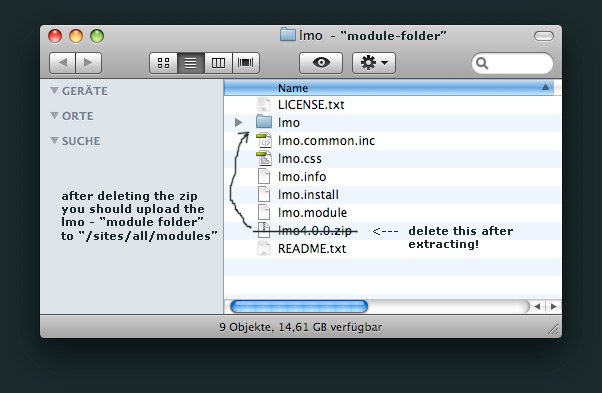
d) unzip the whole lmo (a) into the lmo-module-folder
Tip: Take a look at the attached screens
e) enable the lmo module
f) go to www.yoursite.com/sites/all/modules/lmo/lmo an install the whole lmo (don't forget to delete the install folder after install is finished)
g) go to www.yoursite.com/admin/settings/lmo and put this into the first field: "sites/all/modules/lmo/lmo" and the admin user and password into the second and third field (default-user "admin" and password: "lmo")
h) now you can go to www.yousite.com/lmo and it should work
Comment #2
signal000 commentedPerfect.
Im new to Drupal and switching CMS's. This support has been AWESOME..
No wonder its won so many awards.
Thank you very much for the help.
Bryan
Comment #3
taipsta commentedI dont understand step f:.
I work from cpanel (I have already unzipped the whole LMO in the drupal LMO folder). How do i now install LMO (as per step f,)
Comment #4
janacor commentedAfter that I followed the steps to install, when I put: www.mydomain.com/lmo, the browser shows this error:
warning: require(/var/www/vhosts/******/httpdocs/sites/all/modules/lmo/lmo/config/init-parameters.php) [function.require]: failed to open stream: No such file or directory in /var/www/vhosts/*********/httpdocs/sites/all/modules/lmo/lmo/init.php on line 25.
Any idea of this error ???
Thanks,