

 Come together with the global Drupal community in Rotterdam, 28 Sept – 1 Oct 2026. Sessions, contribution, connection, and Early Bird savings until 8 June.
lightbox2-6.x-1.8 works almost perfectly with image-6.x-1.0-alpha3 on my bilingual site apart from translating using i18n's multilingual variables. The i18n module I'm using is i18n-6.x-1.0-beta6.
I've correctly set up the multilingual variables, namely, lightbox2_node_link_text, lightbox2_image_count_str, and lightbox2_page_count_str in settings.php like what I've done for site_name, site_footer, etc. "This is a multilingual variable." appears beneath the related variable settings on the Lightbox2 admin pages. My settings for the multilingual variables look correct, because if I switch between the site languages, the values of the variables shown on the Lightbox2 admin pages do switch according to the site language correctly.
My problem is that when the lightbox is activated for any image, the Image Count (i.e. "Image !current of !total") and the Image Page Link (i.e. "View Image Details") will always be displayed as the variable values in the language that I last saved on the Lightbox2 admin pages, regardless of the site language. For example, if I've just clicked "Save configuration" on the English Lightbox2 admin page for "View Image Details", then "View Image Details" in English will be displayed in the lightbox no matter what the site language is. Similarly, if I've clicked "Save configuration" on the Lightbox2 admin page in the other language, then "View Image Details" in the other language will be displayed in the lightbox no matter what the site language is.
Clearing the site's cache, clearing my browser's cache, and/or disabling "Optimize JavaScript files" do not solve the problem on IE or Firefox 3. I think they're irrelevant anyway. I've tried to investigate the code as well as the "i18n_variable" table in the database, but I couldn't fix the problem.
Other multilingual variables, e.g. site_name and site_footer, do work properly on my site.
I'd really appreciate if someone could help me solve this problem asap. Many thanks in advance and happy New Year!
| Comment | File | Size | Author |
|---|---|---|---|
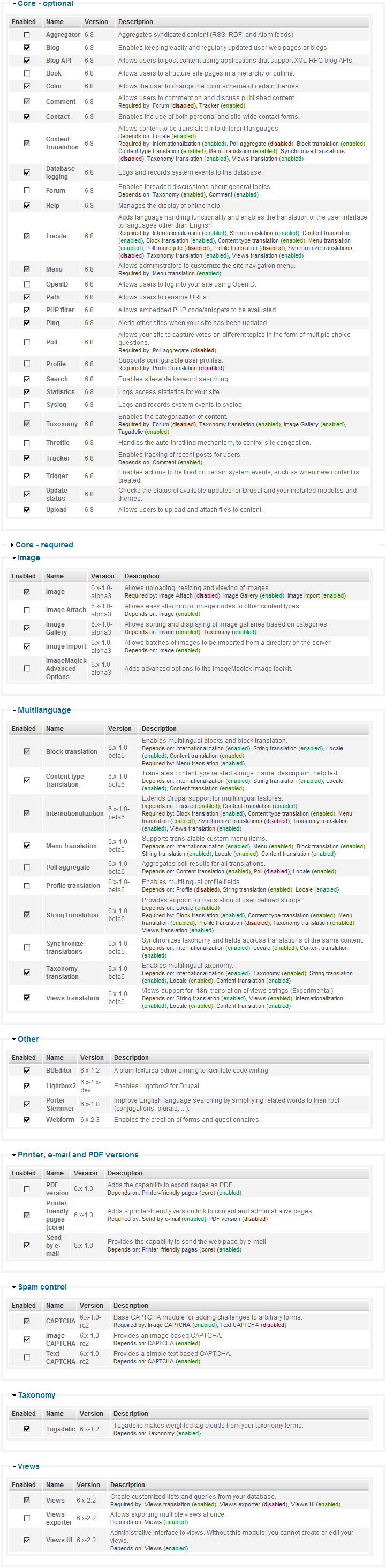
| #5 | modules.png | 253.13 KB | hazart |

Comments
Comment #1
stella commentedHmmm, it works for me. I'm using the latest dev version of the lightbox2 module and i18n 6.x-1.0-beta6 I just followed the instructions at http://drupal.org/node/134002. Then I just needed to clear my browser cache when switching languages.
Cheers,
Stella
Comment #2
hazart commentedThanks for the rapid reply.
I've upgraded my Lightbox2 to the latest dev version of 01 Jan 2009 and tried the configurations again. It still doesn't work and still has the exact problem as described. I've tried clearing browser's and site's cache without success.
I noticed that when I first enabled the multilingual variables for Lightbox2 a few days ago, every time when I tried to save any multilingual variable related configuration on a Lightbox2 admin page, I would get the following error:
user warning: Access denied for user to database query: LOCK TABLES drupal_i18n_variable WRITE in C:\xampp\htdocs\includes\database.mysqli.inc on line 330.
However, it seemed that the changes have been saved without a problem. I didn't remember whether the translation for Lightbox2 worked or not, probably not. Later, after I've assigned the "LOCK TABLES" privillige the database user, the mentioned error has no longer occurred, but the translation problem (still) exists.
I'd really appreciate some feedbacks on this even if it's only a pointer. Thanks again!
Comment #3
stella commentedWhat version of Drupal and i18n module are you using? Which of the i18n modules have you enabled?
Comment #4
stella commentedComment #5
hazart commentedI'm using Drupal 6.8 and i18n 6.x-1.0-beta6. I've enabled the following i18n modules:
Block translation
Content translation
Internationalization
Menu translation
String translation
Taxonomy translation
Views translation
I've attached a list of all my installed and enabled modules. Thanks!
Edit: Apart from the Lightbox2 multilingual variables, all my other multilingual variables work correctly.
Comment #6
stella commentedI think you may need to seek support from i18n module maintainers. I've encountered the same issue with site_name (just added) and faq variables I added previously. How many variables do you have setup to be translated?
See #235076: i18n_variables table empty, option to change variables never appears in forms and #252245: multilingual variables
EDIT: actually got site_name working, i had English configured. When I added German it appeared for all languages, but once I added English one again, they both worked. I had one other language configured for which I didn't specify a site_name text - it seems to use the last one added as the default.
EDIT: What's in your i18n_variable table for those variables?
Comment #7
hazart commentedI've got the following variables in my i18n_variable table:
anonymous
contact_form_information
date_format_long
date_format_long_custom
date_format_medium
date_format_medium_custom
date_format_short
date_format_short_custom
lightbox2_image_count_str
lightbox2_node_link_text
lightbox2_page_count_str
menu_default_node_menu
menu_primary_links_source
menu_secondary_links_source
site_footer
site_mission
site_name
site_slogan
theme_settings
My settings.php ends with the following:
$conf['i18n_variables'] = array(
'site_name',
'site_slogan',
'site_mission',
'site_footer',
'anonymous',
'blog_help',
'story_help',
'user_mail_password_reset_body',
'user_mail_password_reset_subject',
'user_mail_register_admin_created_body',
'user_mail_register_admin_created_subject',
'user_mail_register_no_approval_required_body',
'user_mail_register_no_approval_required_subject',
'user_mail_register_pending_approval_body',
'user_mail_register_pending_approval_subject',
'user_mail_status_activated_body',
'user_mail_status_activated_subject',
'user_mail_status_blocked_body',
'user_mail_status_blocked_subject',
'user_mail_status_deleted_body',
'user_mail_status_deleted_subject',
'theme_settings',
'menu_primary_links_source',
'menu_secondary_links_source',
'menu_default_node_menu',
'contact_form_information',
'date_format_short',
'date_format_short_custom',
'date_format_medium',
'date_format_medium_custom',
'date_format_long',
'date_format_long_custom',
'lightbox2_node_link_text',
'lightbox2_image_count_str',
'lightbox2_page_count_str'
);
Some the multilingual variables defined in my settings.php have not been used in practice so they do not appear in the i18n_variable table. The following are the corresponding Lightbox2 related values in the i18n_variable table (English (default)/Chinese):
s:18:"View Image Details";
s:18:"查看图片详情";
s:24:"Image !current of !total";
s:23:"Page !current of !total";
s:31:"第 !current 张 共 !total 张"; (i.e. Image !current of !total)
s:31:"第 !current 页 共 !total 页"; (i.e. Page !current of !total)
Again, all other multilingual variables, including site_name, works on the site.
I'm now trying to revert the site to the point before I installed Lightbox2. I'll then install the latest dev version (01 Jan 2009) of Lightbox2 straight away and set up the multilingual variables for Lightbox2 from scratch. I'll report back when it's done. Thanks again!
Comment #8
stella commentedCan you provide a link to your site? My contact form is enabled if you wish to do so privately.
Comment #9
hazart commentedI've tried. It doesn't work and exhibits the same problem as described at the top.
Edit: I've PM'ed you! Thanks.
Comment #10
stella commentedTry the newer release: 6.x-1.9.
Cheers,
Stella
Comment #11
hazart commentedI've used the 6.x-1.9 release to update the 6.x-1.8 release installed on my development site and found that the exact problem still exists. But still, thanks for releasing 6.x-1.9 with so many new features and bug fixes!
Comment #12
hazart commentedChanged issue version from 6.x-1.x-dev to 6.x-1.9.
Comment #13
asw20pilot commentedJust to let you know: I am having the same issue as hazart. His descriptions fit my situation. I am also using Lightbox2 version 6.x-1.9.
Regards,
Mikkel
Comment #14
binhcan commentedI have the same issue on Jewell.vn too. Saved the code:
/**
* Multilingual settings
*
* This is a collection of variables that can be set up for each language when i18n is enabled.
* These are the basic ones for Drupal core, but you can add your own here.
*/
$conf['i18n_variables'] = array(
// Site name, slogan, mission, etc..
'site_name',
'site_slogan',
'site_mission',
'site_footer',
'anonymous',
// Different front page for each language
'site_frontpage',
// Primary and secondary links
'menu_primary_links_source',
'menu_secondary_links_source',
// Contact form information
'contact_form_information',
// For theme variables, read more below
'theme_settings',
'theme_garland_settings',
);
into the settings.php files (FILES) but unable to translate any site information.'
hichic
Comment #15
petrovichby commentedhazart, +1.
At my site, Image counter shows wrong translation. This is the translation which was saved last. However, other Lightbox2 multilingual variables (for example, lightbox2_download_link_text and lightbox2_node_link_text) render the correct translation. This is true for all 3 languages used at my site.
I use Drupal 6.10, Lightbox2 6.x-1.9, I18n 6.x-1.0.
settings.php:
Comment #16
pieterbezuijen commented+1
Comment #17
balabushka commentedProblem still exists
Comment #18
sharlak commentedHi, we are having the same problem here. When I try doing
I get last saved language only, for example:
It seems that last saved strings override the previous one. If I make the inserts manually in the database and clear cached data it works...
Comment #19
klonosI didn't read the issue from the start, but part of the problem (if not the problem itself) is this: #769260: Access denied to database query: LOCK TABLES i18n_variable WRITE in database.mysql.inc, line 330
The warning is there, but setting the site name -for example- works just fine.
Comment #20
stella commentedI don't think this is anything to do with the lightbox2 module. It works here for me, but for translating of the strings I would encourage you to open a support request against the i18n module.