

 The 2026 Drupal Business Survey is open. Your response will help shape the future of the Drupal business ecosystem.
Hi!
First of all, thank you for such a useful module.
A nice feature for Flag would allowing the flagging to be made with a checkbox instead of the links for flagging and unflagging. Is this possible?
Thanks,
Tiago
| Comment | File | Size | Author |
|---|---|---|---|
| #56 | 2025-12-25_12-38.png | 10.1 KB | ivnish |
| #56 | 2025-12-25_12-37.png | 10.64 KB | ivnish |
| #49 | Screen Shot 2017-01-05 at 3.32.23 PM.png | 78.28 KB | morbus iff |
| #25 | flag.tpl_.zip | 1.2 KB | Andrew Gorokhovets |
| #10 | flags_checkbox.png | 18.01 KB | tiago.gmarques |


Comments
Comment #1
mooffie commentedSee the 'views_bulk_operations' module.
Comment #2
mooffie commented(Re-open if your problem wasn't solved.)
Comment #3
tiago.gmarques commentedI am going to check this module.
At first glance it seems to me that to achieve what I want, I first need to create a view of the flags associated with the node and then with this 'views_bulk_operations' allow the flag to be activated with a checkbox. Is this it?
Thanks for your assistance,
Tiago
Comment #4
mooffie commentedYes. VBO would show you a dropdown of actions to apply to the checked items, among them "flag ..." and "unflag ...".
Comment #5
tiago.gmarques commentedThanks.
I am going to try it. If it works fine I might create an entry about this in the documentation.
Comment #6
mitchell commentedDo other people think a checkbox makes sense for flag?
This implementation would need to abstract out single and batch operations. VBO already has/uses a batch api, but it has issues supporting any object versus only nodes and users. Flag supports this. Another VBO limitation is its use of a views style to add the checkbox operator. Flag solves this by using fields to add operators to views.
Comment #7
sirkitree commentedI think it sounds potentially useful for bulk operations.
Comment #8
sirkitree commentedI think it sounds potentially useful for bulk operations.
Comment #9
sirkitree commentedhrm, got some kinda weird error there upon submission.. sorry for the double post.
Comment #10
tiago.gmarques commentedNot only for bulk operations. I think it is more of a matter of taste in the flags display.
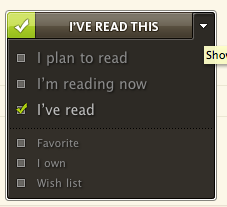
In the attachment I included an example of a kind of flags taken from www.shelfari.com
For these kind of flags I think that the traditional flag and unflag links just don't work. But as I have said before it is just a matter of taste.
Comment #11
mooffie commentedmitchell wrote:
What do you mean?
I once asked you to explain your thoughts on checkboxes, but you didn't.
slider_13 wrote:
Why do you think "the traditional flag and unflag links just [won't] work" to mimic what's in this screenshot? See theme/README.txt, or the handbook. It's possible to use images instead of text for these links.
Comment #12
mitchell commentedI actually see a couple gaps in my statement after looking at slider_13's screenshot, because checkbox would be useful for two separate features. In his case, it seems that the checkboxes would serve the exact same function as the text links. I brought this up to quicksketch about the possibility of using the Icon module to replace text links with pre/post flag images. In this case, I think slider_13 simply wants an administrative option to select a checkbox instead of naming traditional flag and unflag links. One more thing to note about the screenshot; this implementation offers a list of independent flags (and not or).
The case I'm thinking about would apply the same flag to several items in a views output; the checkboxes wouldn't respond immediately, but rather collect a list of nodes and then apply them once another button, maybe in the header or footer, is pressed. The flag building page could allow users to set up an exposed list of actions to perform on the checked objects, in addition to setting up the 'flag/unflag' links and the 'perform flag operation on these items' links.
Comment #13
tiago.gmarques commentedAs I have said before, ultimately, it is just a matter of taste. In my case I have three flags displayed in a block in three separate lines as the default flag/unflag links. I think that with a checkbox they look prettier, but that's just my opinion.
I had read that I could use images for the links. However, I know practically nothing of CSS to do that. I am just looking for a way to display flags in an elegant way using only Drupal built in options. However, I do intend to learn CSS and PHP to maximise my Drupal experience.
On the other hand, I think that the goal of Drupal is to allow the building of powerful websites with minimum programming. If there is a way to change the look of the flags display by the module itself, great. If not but I can use another module to that, no problem. But to change things myself by programming, I am not ready for that, yet.
Comment #14
mitchell commentedSome history of this idea after looking at the theming handbook:
#172291: Image links and effects
#166177: Show the Views Bookmarks link (mark/unmark) as an (mark/unmark) image
How to show images instead of text (CSS theming guide for flag)
Comment #15
tiago.gmarques commentedI have been playing with the VBO module and I believe this is not quite what I am looking for. I do not wish to flag several nodes simultaneously. What I want is to display my flags in a certain node with a checkbox, just like this:
flag_name_1 |_| (checkbox)
flag_name_2 |_| (checkbox)
flag_name_3 |_| (checkbox)
instead of using the traditional flag/unflag link. When I click the checkbox, the flag is automatically activated, just as I had clicked the 'flag link'. On the other hand, when I uncheck the checkbox, the flag is automatically deactivated.
(I previously was slider_13 but I have changed my username meanwhile)
Comment #16
mitchell commentedI don't think I was on the right track in this issue. Moofie pointed out:
This could, however, be made easier with included display options.
Comment #17
quicksketchWe actually already have different display types (confirmation, JavaScript, plain). So the checkbox just needs to be another display type. However, we get into trouble in that checkboxes would not work without JavaScript (unlike all the other existing types). It's easy for a link to work without JavaScript, it just reloads the page. Checkboxes on the other hand are troublesome because you actually need a form to submit them without JavaScript.
A possibility is to use the standard links as usual, then use JavaScript to replace the links with checkboxes. I like the idea of using checkboxes, as their meaning is pretty clear without the use of descriptive text or images, plus they match the user's browser interface.
Comment #18
mooffie commentedA different solution than adding this as a 'Display Type' is to do this in the Views integration: The "Flag Ops" field would have a "Display as checkbox" option. The view will be wrapped in a form, and we will also need an "Update" button.
A view is a natural setting for checkboxes because you probably want the data displayed in a tabular format.
Note that I'm no longer using Drupal, so I won't be able to help here.
Comment #19
mitchell commentedbump
Comment #20
mitchell commentedComment #21
mitchell commentedThis is now provided by Flag Form.
Comment #22
quicksketchFlag Form only works with node-based displays (understandably so, the way it works). The intentions I had for this issue were to create a checkbox that worked exactly like the normal links, only it was a checkbox instead. This way you could have a list of "Sessions" for example, that had a checkbox for "I'm attending". Checking the box would submit an ajax request just like the normal links do now.
Flag Form is definitely neat, but I don't think it's the same use-case as this issue.
Comment #23
dgastudio commentedsubscribe. need checkboxes too.
Comment #24
ajayg commented-1 for this.
I followed these instractions http://drupal.org/node/305066. I am using two icons from one of the GPLed icon library one showing a "not checked checkbox" and other showing "checked checkbox." I made sure the http link included both icon and the link next to it so icon is clickable too.
So this is working perfectly and from usability point works like a checkbox.
So why add additional code when you can achive same thing with theming? The only issue I can see is the checkboxes may not match your browser's interface right of the box with above instractions. That also can be corrected with some conditions around css perhaps.
Comment #25
Andrew Gorokhovets commentedYou can change your flag.tpl.php file in 45 line, like
Now you need named field in http://site-name/?q=admin/build/flags/edit/flag-name
like
Flag link text: no-checked
And
Unflag link text: checked
And flush your cache.
Comment #26
quicksketchHah! Now that's very, very clever! I'm not sure if this would be safe/accessible across all browsers but it certainly is a straight-forward implementation.
Comment #27
Andrew Gorokhovets commentedThanks. It works perfectly.
The same we can do this the image.
Just put
Comment #28
ngmaloney commentedI recently had to implement a flag link as a checkbox in a D7 view. I opted to go the Javascript route. Below is my code. It appends a checkbox to each flag span, hides the anchor text, and simulates clicking on the links when the checkbox is clicked. The scoping will need to be changed but the logic should be the same:
Comment #29
mcarrera commentedsubscribe
Comment #30
James_Stallings commentedsubscribe
+1 to ngmaloney
Comment #31
mstrom81 commentedngmaloney, where does that code reside?
Thanks.
Comment #32
ngmaloney commented@mstrom81 you can add it to either your theme or a custom module. Ex: Save it to your theme folder as sites/all/themes/mytheme/js/alter_flag_links.js and in mytheme.info add the following line.
scripts[] = js/alter_flag_links.js
Comment #33
Orange Studio commented@ngmaloney Thank you for sharing this code. I really need to have flags as check boxes in views, D7.
Comment #34
joachim commentedUpping the version. This is a low priority though as far as I'm concerned (as in, please submit patches!). I'd also be quite happy for it to live in a separate module.
Comment #35
tommyk commentedAnother quick and dirty solution is to use the following characters in the link text fields:
☐ and ☑
Some CSS might be necessary to account for size and font variation, but it's working great for me!
Comment #36
drone commentedHere's improved and shortened version of the code snippet from #28:
Comment #37
jayjaydluffy commentedthanks drone for your #36 code.
the original flag text/label is gone though, but adding
$(this).append(flag_link.text());below$(this).prepend(checkbox);would do the job.Comment #38
joachim commentedIt would be great if instead of pasting snippets, someone took this and made a patch, so I can commit it to the module and everyone benefits.
Rather than JS alteration though, it should be a new link type.
Comment #39
bharata commentedI would say, in addition to "pasting snippets".
At least there's something here to get people going...
But I do agree, a patch with a new display style would be the BEST!
Thanks everyone for all the input!
Comment #40
joachim commentedSnippets just encourage everyone to hack their modules.
If you are going to post a snippet, please take a few minutes to read the docs on how to make a patch.
Comment #41
TomasBru commentedIf I need to change two or more flags (your_flag_class) to checkboxes - what syntax will be? Thanks.
Comment #42
ziccidus commentedJust a quick reminder: if you don't have jQuery NoConflict running, your browser will not recognize the $, so be sure to wrap it in a function as so:
Comment #43
johnhorning commented@TommyK
Love your idea! (using ☐ and ☑ in the link text fields)
Comment #44
lunk rat commented#36 is the right idea, but only works when flag Link type: is set to JavaScript toggle. The approach in #36 will completely break your flag if you use "Normal link" or "Confirmation form" as the link type. My use-case requires confirmation form.
I would love to submit a patch that adds a proper working "Single On/Off checkbox" as a flag link type—I would love it even more if someone else were to submit one ;)
Comment #45
mjross commentedOn a flag's edit page (e.g., admin/structure/flags/manage/node_flag), the "Display checkbox on entity edit form" option sounds to me as though it specifies the use of checkboxes instead of links. But when I enable it, it does not seem to change anything. Am I misinterpreting the purpose of that option?
Comment #46
joachim commented> Display checkbox on entity edit form
It says that it puts a checkbox on the *edit form*. Not on the entity display.
Comment #47
mas0h commentedScript in #36 doesn't work anymore with the new 7.x-3.5 version. any fix for this?
EDIT: sorry that was because I have enabled nice messages module and it was the cause of this.
Comment #48
Christopher Riley commentedSorry to beat a dead horse but if we do not have the ability to do this cleanly from the UI why do we not just do it within css and add a background checkbox to the a record?
Comment #49
morbus iffUnfortunately, I'm not here to provide a patch, but rather, a Drupal 8 version of this:
which creates the attached before/after display.
Comment #50
morbus iffMight as well bump this up to 8.x.
Comment #51
morbus iffUpdated to the latest dev release:
Comment #52
torgospizzaFor anyone still looking for a 7.x-3.x solution, please take a look at #2918788: Add an ajax "Checkbox" Flag Link Type. We needed this feature on RiffTrax.com — so I followed @joachim's advice and created a new Flag Link type. Testing and feedback is appreciated.
Comment #53
morbus iff@torgosPizza: Awesome stuff, thanks. It works/looks exactly the way the above JS works under the D8 version. Great! (Incidentally: huge fan of RiffTrax, and not just cos you use my achievements.module ;)
Comment #54
ivnish7 years without any activity. I think we can close it as outdated. Please reopen if needed.
Comment #55
morbus iffThis is still a desirable feature.
Comment #56
ivnishIn 2025 this simple task could be resolved with CSS only.
My flag machine name is "test_flag"
CSS code