

Closed (fixed)
Project:
Lightbox2
Version:
6.x-1.8
Component:
User interface
Priority:
Normal
Category:
Support request
Assigned:
Unassigned
Reporter:
Created:
4 Jan 2009 at 00:21 UTC
Updated:
7 Aug 2009 at 01:38 UTC
Jump to comment: Most recent file

Comments
Comment #1
stella commentedCan you try the latest dev release to see if that fixes the problem?
Cheers,
Stella
Comment #2
Mojo commentedYes, now it seems like everithing is OK.
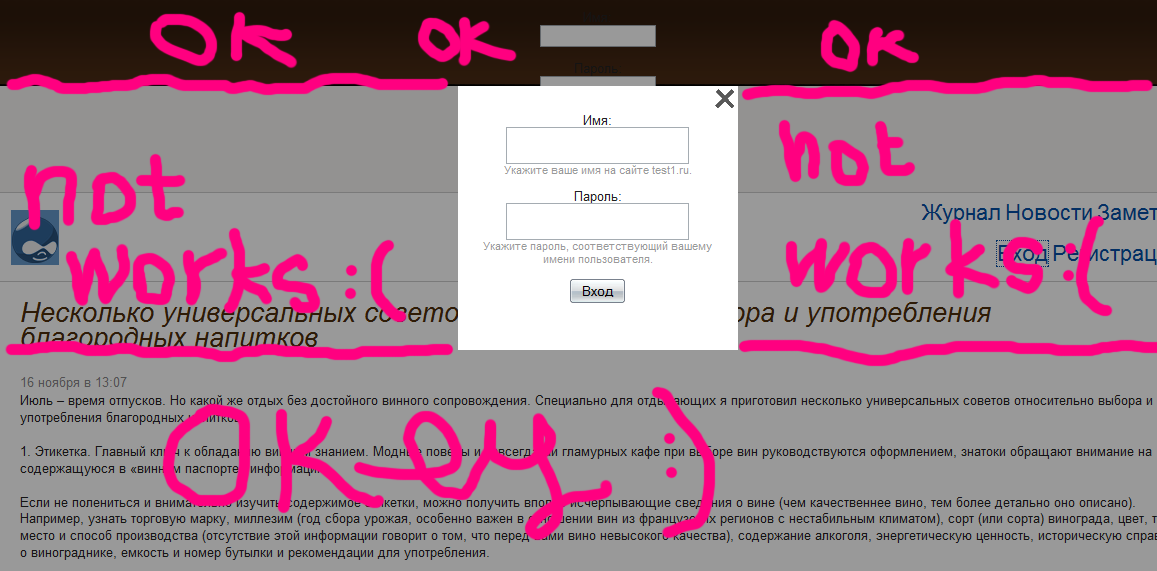
Some more bugs: LightBox window closes only if you click below or above it (see screenshot for details).
Thanks a lot fo support!
Regards, Andrey.
Comment #3
Mojo commentedBy the way, Esc button still not works in login window ;-)
Comment #4
stella commentedThat's by design. Keyboard shortcuts can't be supported as sometimes lightmodals contain forms (e.g. login form). For example, if the keys to close the lightbox were 'c' and 'x' and their username was 'nickname', then the lightbox would close as they typed in the 'c'.
Likewise the disabling of the clicking on the overlay, either side of the modal window, to close the lightbox is also disabled, for similar reasons.
You'll find that both of these features work as expected when disabling images, videos, etc.
Cheers,
Stella
Comment #6
ajlowndes commentedhow did you get the login box to work using lightmodal? I have been working on this for days, but I can't figure it out from the (ONE) example given in the lightbox readme. In stella's example she references "search.php". what is in this file? what would be in a similar "login.php"?
Comment #7
stella commented@ajlowndes: please open a separate support request for your issue. This ticket is now closed. In the example, "search.php" is just an example. If you want the Drupal login box to open in a lightmodal then please enable the option on admin/settings/lightbox2. Note it will only work with links like 'user/login' and not those like 'user'.
Comment #8
scott_earnest commented(I know this ticket is closed, but this information may help someone)
This work for me with lightmodal:
<a href="javascript:void(null);" onclick="javascript:Lightbox.end('forceClose');">Close Lightbox.</a>