

Closed (fixed)
Project:
FlashVideo
Version:
6.x-1.x-dev
Component:
Code
Priority:
Normal
Category:
Support request
Assigned:
Unassigned
Reporter:
Created:
5 Jan 2009 at 00:42 UTC
Updated:
7 Jan 2009 at 21:25 UTC
Jump to comment: Most recent file

Comments
Comment #1
attheshow commentedDear shah,
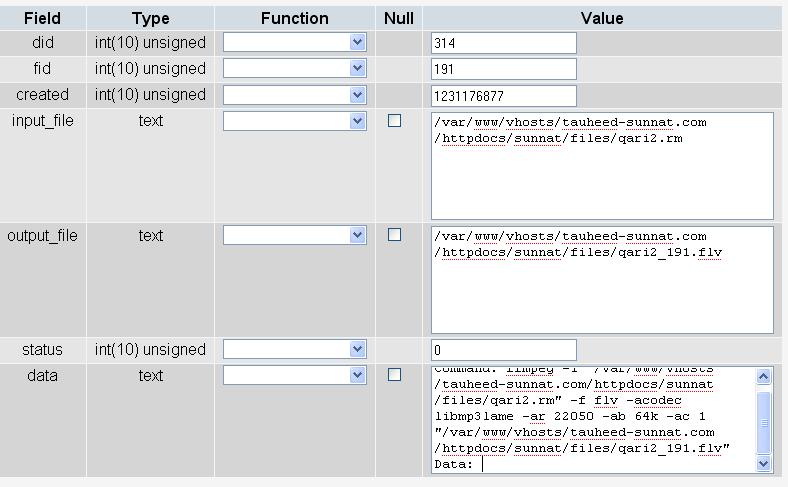
This is just a visual report of the commands being run by FlashVideo. There are no errors in what you've posted above. Is everything working ok?
Comment #2
shah_waliuallah commentedNo i cannot get the module (script) to convert the real media file to .flv
If the command is run from putty then it does convert.
All i get is Video is currently not available.
I have checked the FFmpeg is installation and also the mp3 codec are installed.
Any help.
Comment #3
attheshow commentedOk, that makes sense. You might take a look in your database at the "ffmpeg_data" table and look to see if any errors are being recorded there.
If you're still not seeing what the error is, I recommend taking this approach for further testing.
Comment #4
shah_waliuallah commentedffmpeg -i "/var/www/vhosts/tauheed-sunnat.com/httpdocs/sunnat/files/qari2.wmv" -f flv -acodec libmp3lame -ar 22050 -ab 64k -ac 1 "/var/www/vhosts/tauheed-sunnat.com/httpdocs/sunnat/files/qari2.flv"
Hi this is the code that i use in putty
and this is the command i put in flashvideo ffmped setting, is this correct
-i @input -f flv -acodec libmp3lame -ar 22050 -ab 64k -ac 1 @output
in that table here is a output .flv but when i check the folder there is no output of .flv file
Comment #5
shah_waliuallah commentedHi i get this when i excute php code in devel
sh: /usr/local/bin/ffmpeg -i /var/www/vhosts/tauheed-sunnat.com/httpdocs/sunnat/files/qari2.rm -f flv -acodec mp3 -ab 64 -ac 1 /var/www/vhosts/tauheed-sunnat.com/httpdocs/sunnat/files/qari2.flv: No such file or directory
Comment #6
attheshow commentedshah,
My understanding of that error message is that the FFMPEG binary is not located at /usr/local/bin/ffmpeg on your Drupal server.
If you take a look on your server and find out that it's in a different location, you'll need to make the adjustment in the "ffmpeg Path" box in the FlashVideo Global Settings (/admin/settings/flashvideo/edit/global). Hopefully this will fix the issue for you.
Comment #7
shah_waliuallah commentedHi
Thanks alot its been resolved.
It looks like there were a few issues.
1. I was trying to convert real media files, and it looks like i do not have a codec to convert real media files, when i try wmv files they convert.
2. The player name is case sensative, i had player instead of Player.
3. There was a path error, not sure why as i checked that many times.
Thats resolved, next part how do i get the flashvideo module to convert real media file .rm to .flv?
Is that possible?
The quality is pretty low, will try dash player, see if that improves the quality.
Thanks again.
Comment #8
attheshow commentedshah,
I'm sure that Real Media conversion to .flv is dependent upon your ffmpeg installation's ability to do that conversion. If you can run a conversion command from the Unix command line and get it to work, FlashVideo should be able to convert it successfully as well.
Comment #9
attheshow commentedClosing this issue out since it looks like you've opened a new issue for the Real Media conversion issue #355582: Real Media .rm. That's probably a good idea.
Comment #10
shah_waliuallah commentedThanks for your help