Active
Project:
e-Commerce
Version:
5.x-3.6
Component:
product
Priority:
Normal
Category:
Support request
Assigned:
Unassigned
Reporter:
Created:
8 Jan 2009 at 07:39 UTC
Updated:
29 Jan 2009 at 18:25 UTC
Jump to comment: Most recent file


I have gone through the process of adding a product, these are as follow:-
-> Create content
-> Product
-> Collection of Products
-> Added a products (say: Test) and entered two existing product ids (say: 7,8) under 'Product IDs'.
At the time of shopping I am not able to see any the any type of detail of 'bundle of these two product (7,8)' with product 'Test'.
can you please tell me that
1. Am I doing something wrong, or
2. Do I need to code myself, or
3. How I get such info while implementing shopping cart.
many thanks
| Comment | File | Size | Author |
|---|---|---|---|
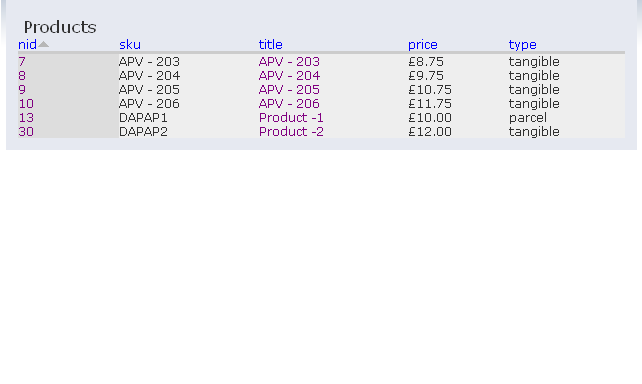
| #4 | product_list.PNG | 10 KB | gyanendra |
| #4 | add_collection_product.PNG | 11.48 KB | gyanendra |


Comments
Comment #1
ainigma32 commentedThis sounds like a question about either e-commerce or ubercart. Which one are you using?
- Arie
Comment #2
gyanendra commentedI am using e-commerce.
Comment #3
ainigma32 commentedReassigning to the correct queue.
- Arie
Comment #4
gyanendra commentedsorry Arie, I did not get your clue.
for understanding purpose I am attaching two attachment (product_list.PNG, add_collection_product.PNG).
Gyani
Comment #5
gordon commentedTaking a quick look at this, e-Commerce 5.x-3.x can't really do this without doing some major theming. However FYI I have been doing some work on e-Commerce 6.x-4.x with the integration for Views 2 this is now actually quite easy.
Comment #6
gyanendra commentedThanks Gordon, I will check it. But my constraint is that I can't use 6.x-4.x.
So I need to use only 5.x
Comment #7
pomata commentedHi gordon
Can you please enlight me how to do that?
Thanks
P