

Closed (fixed)
Project:
TinyMCE
Version:
6.x-1.1-dev
Component:
Miscellaneous
Priority:
Minor
Category:
Support request
Assigned:
Reporter:
Created:
8 Jan 2009 at 10:25 UTC
Updated:
22 Feb 2009 at 16:10 UTC
Jump to comment: Most recent file


Comments
Comment #1
cloxzime commentedOpss...correction!
*later = latest
Comment #2
TheresaB-1 commentedI too am having this same issues along with some of the buttons not showing up even though they are selected i.e. the insert flash button.
Comment #3
gildedgod commentedTheresaB, it's because module was designed for older version of TinyMCE. As example, newest versions have plug-in "media" instead of "flash".
Short HOW-TO "Actualization of TinyMCE WYSIWYG Editor module":
1. Install module and latest TinyMCE package as it described in module readme.
2. Check the folder "/modules/tinymce/tinymce/jscripts/tiny_mce/plugins/", copy names of all folders (every folder holds single plug-in) listed there. As example, mine is:
3. Open "/modules/tinymce/plugin_reg.php" in any text editor. Here you'll find something like this:
Every plug-in declaration consists of 3 parts:
It's easy and clean to understand - just copy this line and replace "advhr" with you plug-ins names.
This line defines on wich toolbar this button will be placed and which buttons it will be. Check right names of buttons you can here http://wiki.moxiecode.com/index.php/TinyMCE:Plugins. Order of buttons in toolbars defined by declarations order. There is 3 toolbars at all: theme_advanced_buttons1, theme_advanced_buttons2, theme_advanced_buttons3.
This line is very important. Every plug-in holds it's own html elements, and to properly assign elements to plug-ins and to allow TinyMCE to work with it, you need to declare them. Check, what extended_valid_elements defined for every plug-in you can here again: http://wiki.moxiecode.com/index.php/TinyMCE:Plugins. As example, here we can find advhr extended_valid_elements : "hr[class|width|size|noshade]" - exactly as it is already defined.
So, all you need to do is:
It's a simpy 5 minutes work. Because of TinyMCE updates often project maintainer just not able to keep this actual.
Comment #4
gildedgod commentedHere is "plugin_reg.php" with actualized plug-ins info. It's a raw work, i didn't check all plug-ins, dependencies and infos, so there is no guarantee that this "patch" will give you all TinyMCE abilities, but it works. With it to embed flash you should use "media" button instead of old "flash" plug-in, it's pretty nice and simply to use.
Comment #5
gildedgod commentedBy the way, for pagebreak to work with drupal we need to set this parameter:
pagebreak_separator : "<!--break-->"I don't know how to preform this with "TinyMCE WYSIWYG Editor" module. Anybody?
Comment #6
TheresaB-1 commentedgildedgod, I want to have your children!
Thank you so very much for taking the time to explain this and so succinctly as well. You are a godsend and now that you have explained it I can run with this and mark off another pain-in-my-a** milestone.
I will also take a look into the pagebreak issue and see what i can find.
Once more thank you so very mush.
Comment #7
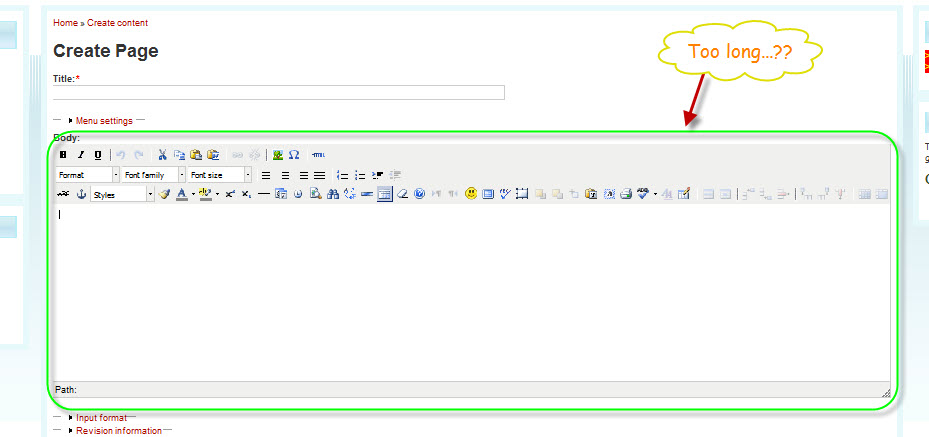
cloxzime commentedFrom what you had explained, I can imagine on how to manage the toolbar eventhough my toolbar still in 3 level which the 3rd level the longest than others.
Thanks anyway!
p.s If you have any idea on how to shorten the toolbar, please share the technique with us here.
Comment #8
cloxzime commentedOkay, after trying to modify some errors arised. So, that was not quite good when editing the plugin_reg.php etc..
Perhaps, you all cannot see what I am trying to say. So, take a look at the attachment below. I show you the way I want it to be.
Thx 4 ur help!
Comment #9
gildedgod commentedTheresaB, the easiest way to implement drupal-alike pagebreak using this module is to modify TinyMCE plugin. All you need is:
1) navigate to "modules\tinymce\tinymce\jscripts\tiny_mce\plugins\pagebreak\"
2) delete "editor_plugin.js"
3) rename "editor_plugin_src.js" to "editor_plugin.js"
4) open "editor_plugin.js" with any text editor and find line:
5) Change "
<!-- pagebreak -->" to "<!--break-->" and save6) Clear cache in your browser
That's all.
cloxzime, there is only 3 rows: theme_advanced_buttons1, theme_advanced_buttons2, theme_advanced_buttons3; and that's all. So, you just should equally distribute your buttons between them.
4all, and there is new module - http://drupal.org/project/wysiwyg - where TinyMCE plugins info is up to date, so, you can simple use it instead of this module.
By the way, it can also be customized by editing modules\wysiwyg\editors\tinymce.inc file: just navigate to the end of this file (function "wysiwyg_tinymce_plugins") and you will find an array with similar structure.
Comment #10
gildedgod commented