

Closed (fixed)
Project:
Add Another
Version:
6.x-1.x-dev
Component:
Code
Priority:
Minor
Category:
Feature request
Assigned:
Unassigned
Issue tags:
Reporter:
Created:
13 Jan 2009 at 10:43 UTC
Updated:
17 May 2017 at 13:18 UTC
Jump to comment: Most recent, Most recent file


Comments
Comment #1
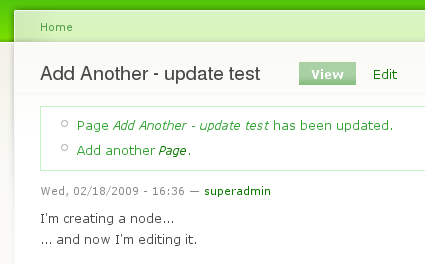
andrewmacpherson commentedThe "Add Another" message is only being generated for node inserts (creating new content) and not on node updates (editing existing content).
I'm unsure whether this should be given "by design" status... or count as a feature request? It wouldn't take much of a change to implement.
Comment #2
MatthijsG commentedYou can consider this as a feature request :-) The 'add another' is already a step forward. This would be a minor step extra.
Comment #3
robin monks commentedI tend to agree, this is a feature request. I'll assign it minor for now, and perhaps try to put something into 6.x-dev later today to make it happen.
Robin
Comment #4
andrewmacpherson commentedI noticed that the issue queue had only one issue remaining open, so I took another look at this.
It turned out to be a very easy job; just a
case 'update':(without abreak;) placed beforecase 'insert':.Screen-shots depict the new behaviour.
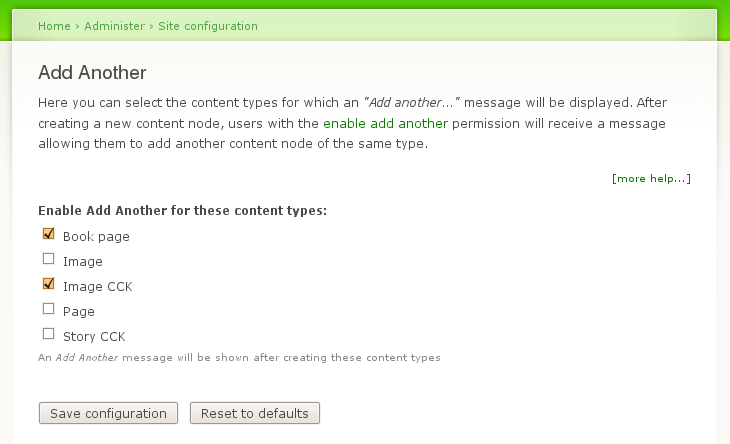
Do we need to make this behaviour configurable with an admin setting? e.g.:
If so, should it be per node-type, or the same behaviour for all 'add another'-enabled node-types?
The patch also includes a few minor coding-standards corrections, discovered by the coder module.
Lets see if we can get all the issues closed :-)
Comment #5
robin monks commentedThing is though, I don't see the add another message after every message being useful. The user case goes something like this:
1) User has lots of nodes to make
2) User makes a node
3) User notices they made an error, edits the node.
4) User saves updated node, but not add another message is gone.
In this case, we need to be smarter. Perhaps we only show the message on update if the node is less than 5min (300sec) old?
In that case, 4 becomes:
4) User saves the node, clicks add another, repeats from 2.
Thoughts?
Comment #6
andrewmacpherson commentedThat's interesting. I hadn't thought about a time element in the scenario, but I take your point that the addanother message isn't always appropriate. A quick "ooops!" correction whilst creating a bunch of nodes is certainly a different scenario to an editorial update later in the work-flow.
I'm concerned that time-dependent behaviour might seem to be inconsistent, and irritate/confuse users: "Why doesn't it always give me that option?" Perhaps they'll spend 4mins reviewing/correcting one new node, then 6mins reviewing the next, then back to 4mins...
Comment #7
robin monks commentedWe need some way to clear the work flow as soon as the user makes their next node. Not sure what the best way is to do that, especially in a multi-user environment with minimal DB interaction.
Comment #8
ampersat commentedI know this issue is fairly old, but what I'd love to see is a link that says something like: "Add a new " or "Create a new ".
Ideally, the link would always be there (for users with the proper permissions). However, if the link is only there after an action such as create or edit, that would be better than nothing. For consistency, I don't think a timeout (as mentioned above) is a good idea.
Comment #9
robin monks commentedI believe the add another tab in the 6.x development version solves this issue. 6.x-1.5 will be out soon as well including this change.
Comment #12
andrewmacpherson commentedCleaning up my own "assigned" feed.