 The 2026 Drupal Business Survey is open. Your response will help shape the future of the Drupal business ecosystem.
Ability to print a view :)
Thanks
| Comment | File | Size | Author |
|---|---|---|---|
| #4 | linkvisibility.png | 37.14 KB | mshepherd |

 The 2026 Drupal Business Survey is open. Your response will help shape the future of the Drupal business ecosystem.
Ability to print a view :)
Thanks
| Comment | File | Size | Author |
|---|---|---|---|
| #4 | linkvisibility.png | 37.14 KB | mshepherd |

Comments
Comment #1
jcnventuraThe ability to print a view is already there. Just add the path of that view to the list of non-content pages in the advanced link options.
Comment #2
1kenthomas commentedThank you; didn't discover that; perhaps it could be mentioned on the project page; and thanks for your time once again!
Comment #3
TSE commentedsorry for reopening, but in which "advanced link options." do you mean. Where do i find them ?
ThX in Advance...
PS Using D5, Ubercart 1.x, Views 5.x-1.6
EDIT: I just took an viewsURL lets say www.xxx.abc/offlinecatalog and inserted "printpdf" so that the Url gets www.xxx.abc/printpdf/offlinecatalog
seems to work, if noone have a better idea, then its closed again ;)
Comment #4
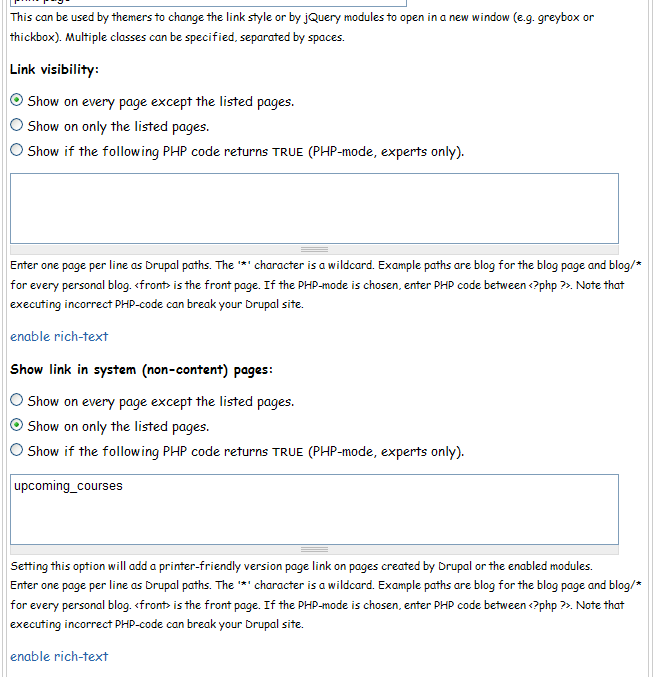
mshepherd commentedIn case someone runs into this same prob, you can specify non-node pages (like views) to adopt the printer friendly links/icons on the module's admin page at /admin/settings/print. Look down the page for 'Show link in system (non-content) pages'. You can do this for print, email and pdf variants too. Attached image showing how I've got it set up to put the icons onto a view page.
Comment #5
phasmaphobic commentedThis... I just can't get this to work. Using Drupal 6.19, Views 6.x-2.11, and Print 6.x-1.12.
I'm doing exactly what you guys recommend. I have a page view called "releasenotes" that I have put in that box. Saved. Reloaded. Nothing. I cannot figure out how to get the print link to appear, no matter how I configure the settings.
Comment #6
jshorb commentedPhasmaphobic:
When you look at the URL for your 'releasenotes' page, there is likely something before that page. For instance, on the Views page that I believe comes with the installation of View 2, there is a Taxonomy term View. When looking at the Views Edit page, under "Page Settings" there is a Path description: "Path: taxonomy/term/%" for the taxonomy Views. Your URL would be:
http://[your.site.com]/[path/to/drupal]/taxonomy/term/2
In the box mentioned above by mshepherd, add the text: "taxonomy/term/*" and the Printer Friendly link shows up just fine. This does need to be done separately for "Web page" "e-mail" and "PDF" as each will display their own links according to their own rules.
Hope that helps.
Comment #7
jshorb commentedOkay, just a little more information. I don't typically use the "PDF" function - just the print and send e-mail functions. For some reason, the "PDF" link won't show up on some non-content pages.
I got around this by putting a blank node-as-block (http://drupal.org/project/nodeasblock) at the bottom of the content panel. Then, by placing this otherwise empty block on every page I want, and by adding "PDF" to show on those pages (the actual pages, not the empty node page) in the "Content Corner" location, it shows up!
Anyone who knows why the PDF link won't show up in the "Links" area, please post here. There doesn't seem to be a reason for it not to. I changed to "needs work" and marked the other [#3819998] the other as a duplicate.
Comment #8
-Mania- commentedThis doesn't seem to work for Views blocks. :/
Comment #9
opsidao commentedIn a related question, what is the naming convention to theme the printing of a view? Usually, for a content type like "example_type" i would use print.example_type.tpl.php for the tamplate file. Now, if I have a view called, say, "all_registrations", what file name should I use?
thanks and sorry for the possible issue hijack!
Comment #10
jcnventura@jshorb: I can't reproduce your PDF links in Views pages problem
@-Mania-: what do you mean Views blocks? You want a link inside the block? That's a bit strange, but if you really want that, use PHP in the header of footer of your view block and call the print*_insert_link() functions.
@opsidao: you can't theme a view by changing the template name.. you'll have to use PHP to sort it out.
Comment #11
mshepherd commented@opsidao a nice looking summary of theming views http://www.group42.ca/theming_views_2_the_basics
Comment #12
hunziker commentedI have setup a new project that converts a view into a PDF document. Each field can be positioned on the document relative to the page, to another field or relative to the footer / header. This can be setup all in the admin interface by adding a new display to an existing view.
You can find the project here:
Views PDF
Here you find an example of use:
http://pdf.use-cases.customweb.ch/
Here is a PDF sample document:
http://pdf.use-cases.customweb.ch/invoice/pdf/1
Comment #13
-Mania- commentedI mean a lot of times I create Views listings in a block and place it in a specific page. This is pretty common practice. However when printing that page the data in the block is not included in the print.
Comment #14
jcnventura@-Mania-: yes, that's on purpose.. Normally blocks are not content (I know that's not necessarily true in all cases).
Comment #15
summit commentedSubscribing, greetings, Martijn
Comment #16
mbmasuda commentedHello,
When trying to send an email containing a link to the page being viewed (as opposed to sending inline HTML) I discovered that the title is blank if the page is created by Views and the send an email form was accessed via http://localhost/printmail/path/to/the/page. In other words, the email that arrives contains this HTML:
I found the reason for the blank title is that on line 534 of print.module in the function
_print_get_title()it returns thelink_titlefrom themenu_linkstable in the db andlink_titleis blank for rows created by Views (as far as I could tell). To work around this issue, I took the original code:and changed lines 533 to 537 to make it look like this:
This change checks to see if the
link_titleis blank, and if it is, it substitutes the URL of the page being emailed. I hope this helps someone.Comment #17
mshepherd commented@mbmasuda - the module developer & the wider Drupal community is more likely to review your modification if you create a new issue for it, attach a patch, and tag it as 'needs review'
Comment #18
jcnventuraIndeed :)
Comment #19
tlangston commentedNot working as described. I have followed the instructions for adding a link to non-content pages and nothing shows up anywhere on the view page. Drupal 6.20/6.x-1.12
Comment #20
tlangston commentedsubscribing
Comment #21
Roze-1 commentedSubscribing, having same issue with the print non-content pages views page
Comment #22
dogboy72 commentedWhile views using views attach seem to be tricky(don't print), views attached with the node relationships module (the included backref views) works just fine.
For me, this came in handy as I have a content type with multiple node references that are used to attach views to the node. In my case I don't want to print ALL of the views, just one along with the node itself. So for the views I don't want to print I use views attach and for the other node relationships and the automatic back references they create.
Comment #23
jcnventura@mbmasuda: Link title is not empty, when created by views. I finally tested it (yes, after one year...).
It's possible some change in the code made this problem go away..
Comment #24
jcnventuraNo answer in two weeks. Closing the issue.