

 Come together with the global Drupal community in Rotterdam, 28 Sept – 1 Oct 2026. Sessions, contribution, connection, and Early Bird savings until 8 June.
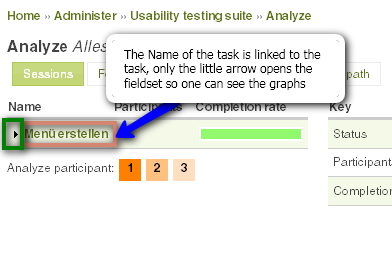
The pretty Graphs that analyze completion rate are only accessible at the moment if you click the tiny arrow in front of the task name. The Name of the task is linked to the task itself, which does not make sense in this place. Please change the link so a click on the task names also opens the fieldset to view the graphs. Screenshot attached.
| Comment | File | Size | Author |
|---|---|---|---|
| #1 | uts_analysis.patch | 2.9 KB | boombatower |
| UTS-Graphs.png | 22.21 KB | eigentor |

Comments
Comment #1
boombatower commentedThis should do it.
Comment #2
boombatower commentedCommitted.