

Closed (fixed)
Project:
Drupal core
Version:
6.22
Component:
menu system
Priority:
Normal
Category:
Support request
Assigned:
Unassigned
Reporter:
Created:
14 Jan 2009 at 18:34 UTC
Updated:
8 Feb 2020 at 12:14 UTC
Jump to comment: Most recent, Most recent file



Comments
Comment #1
lupus78 commentedI have the same issue here! Tell us what we miss!
Comment #2
web506 commentedIs there anybody out there? =) I urgently need help on this one, now the menus them selves are gone from the design as well, ... please
the menu disappeared, I cant create menus, there are no menus at all in drupal, first the menu settings a week after, the menus it self, there are not in blocks, and not in links like admin/build/menu they are totally lost, not in content types anywhere, please help us on this one started with drupal 6 upgraded to 6.8 now 6.9, no menus since 6.8
Comment #3
vm commentedassigning yourself the issue doesn't help get help.
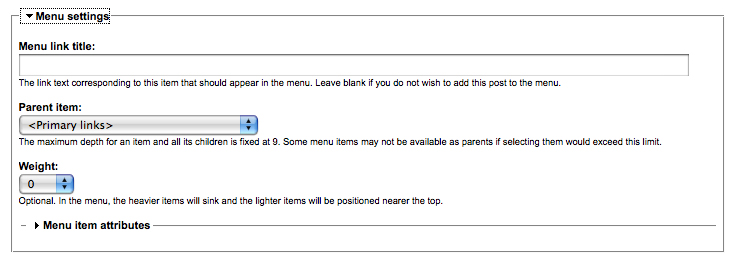
According to your image the issue seems to be you are missing the menu settings collapsed menu. I'll have to look into what may make that happen, it's certainly new to me.
Comment #4
web506 commentedthanks, I am new to this so I dont know how to assign or who to assign, I really appreciate your help, here is the database screenshot
But now I am also missing all the menus in thew website.
Comment #5
vm commentedI have no idea what the image is supposed to show me? I know what it is, but I don't understand what you want me to do with the image?
Have you tried emptying the contents of the cache tables in the database? I don't even see any cache tables listing in your image. you can also try clearing cache in administer -> performance.
Comment #6
web506 commentedI tried this clearing cache in administer -> performance but nothing happen.
I don't know what else to do, Will I have to re do the website again?
If I remove Drupal, and leave the database in as it is now, will this bring back all my info without having this problem?
Or there is a chance of having the same issue because the problems comes from a setting saved in the database?
Comment #7
vm commentedI doubt the problem is with a file. So removing the files wouldn't accomplish anything as far as I know.
I'm not sure what else could cause this issue.
Comment #8
owen32 commented- just found the same problem on 1 of 2 sites -
- no option to set the menu when creating new content or editing existing content - the 2 sites are both running drupal v6.9 - both running the same set of modules - one has the menu option under Title and the other??? - other than the theme, the 2 sites were setup the same way - checking under theme, it indicates primary & secondary links are enabled, yet there are no options to add items to them - under Site Building, there is no link for Menus -
- I'm trying to track the difference now between the 2 sites-
Just Checked: NO differences between the 2 sites other than the themes - I changed to a common theme and still no "Menus" under Site Building nor option listed under Title for setting menu -
DUH - I should have checke permissions -
Administer | By Module | Menu | Configure permissions
now I have option!
Comment #9
vm commentedmarking as fixed.
Comment #10
web506 commentedDUH - I should have checke permissions -
Administer | By Module | Menu | Configure permissions
now I have option!
I dont see it listed under Administer | By Module | Menu | Configure permissions
I changed it to Garland, now the menus are back, but the site building | menu not there , and menu settings in create content not there either.
Comment #11
web506 commentedComment #12
ainigma32 commentedLook under /admin/user/permissions#module-menu and make sure the administer menu is checked.
Please post back if that works for you.
- Arie
Comment #13
claudiu1m commentedHello,
I have the same problem, but I do not think activating "administer menu" is the solution. Activating it means that the users will have the possibility to mess up all menus in the site in any way they want (using the direct link to admin/build/menu.
I also use the module: "Menu Settings for Content Types" that allows to customize what menus are available to users (only) when editing content.
I think the question remains: Is there a way for the "Menu Settings" to appear in Create Content Forms, but not give users the right to administer menus?
Comment #14
twenty2nd commentedLike the others, I'm having the same problem. It started a few hours ago after installing ImageAPI, ImageCache, Imagefield, and Filefield modules. But I don't quite think that these modules had something to do with the disappearing menus. I've used them before, same Drupal version (6.9), and never had problems with the menu settings.
Now, my menus are missing from both the admin/sitebuilding area, and the content types. I'm using the Teleport module, and even that can't locate my menu settings.
I first noticed the problem when my Administration Menu became disabled automatically. Thinking that maybe I turned it off by accident, I enabled it again. After doing that, I realized that custom menus from my sidebar had already gone missing, same with other areas where menu settings are usually found.
But note that the primary and secondary links, as well as the navigation menu didn't disappear.
I've installed and reinstalled modules, changed themes and updated permissions, trying to find what may have caused the problem, but to no avail.
I would really love to know what may be causing this, and would be very grateful if someone could point me to a fix.
Many thanks,
Cecille
Comment #15
VValdo commentedI can confirm this same problem.
drupal 6.10... the menu administration item is gone from the administration page.. won't come back.
W
Comment #16
lquessenberry commentedI am having the exact same issue with a site. Menus settings are missing from the Create Content forms. I can't explain it. it was working one day, and then.... POOF! no menus. I can still create them through the menu admin screen and assign nodes to menus etc... The only problem I am having is that they are missing when I create nodes. It doesn't matter what type either.
Comment #17
lquessenberry commentedI had the category module and pblog module installed. I uninstalled them both and my menu settings came back. I reinstalled pblog, and menu settings were still there. I wasn't using the category module, so I am happy with it being gone. I can now use my menus again.
Comment #18
jpbn commentedThe settings are there, (that is the words are there) but the link does not work and will not show the item. One page shows the menu settings but they will not close.
other page does only show the words and these don't work.
The links down this page don't work either : (Input format
Revision information
Authoring information
Publishing options)
I did add a new theme after I noticed this, that did not help.
I tried disable some modules: When wysiwyg 6.x-2.0 is disabled the settings are working.
Comment #19
jpbn commentedComment #20
mahaoath commentedHello,
I do have the same problem on my www.watyaichaimongkol.ac.th site too !!
I just knew that I lost admin/build/menu every where last night. I use admin-menu module and dhtml menu module in my site . What I've tried are
1 changing theme back to Garland.
2 Uninstall DHTML Menu and Admin Menu.
3 Clear all cache
but problem still.
Hope someone could help.
Comment #21
mahaoath commentedFinally I can pass this problem .
I found the menu module had been disabled ( not by me ! but by bug ) and shown on the uninstall page ( screenshot attached ).
There was nothing about the menu module on /admin/build/modules/list so I couldn't re-enable it.
I re-upload only menu module's files to my site ( /subdomains/www/html/modules ) and it's work !!!
Now I can enable the menu module and manage my menu again.
Comment #22
vm commentedComment #24
desiree commentedI have the same problem as the others. One day the menu from the create content form went missing and is still missing. All solutions proposed here did not fix the problem. Menu is in the module list and is checked. Clean install of Drupal 6.8 updated to 6.14.
Comment #25
vm commentedwhat do you mean "menu from the create content form" ? you mean the list of content types? at yoursite.com/node/add? if so, I don't know that they are part of the menu module.
Comment #26
desiree commentedYes when I create a blog for example (mysite.com/?q=node/add/blog, right after the title and before the body, there used to be a menu option where admin could name/titled the menu, select under which category it is to be created and the level (-50 to 50). But the menu option has completely disappeared and this menu tool which used to be available when creating a node is no longer available. Please see the pics others have submitted above.
Comment #27
savinsur commentedSame here. What gives? I was playing around with positioning to sleuth out where it went
and I noticed that the uc_minimum was showing up in what should have been the menu choice area.
Anyone else using this from ubercart?
( Product Minimum Set a minimum quantity for products in a cart necessary for checkout.)
Comment #28
vm commentedanyone tried clearing the menu_cache tables manually in the database? or with the aid of admin_menu.module or devel.module?
Comment #29
savinsur commentedI've manually cleared all cache tabels, still no joy.
Just to confirm:
admin/content/types ---> choose product or blog (whatever)
Then Manage Fields: Menu settings / Menu module form. <------ this is not displaying on the creation form page (creating a new blog or product).
It looks like the attached image.
Comment #30
savinsur commentedLooks like I found the fix;
http://drupal.org/node/367708
CATEGORIES must be deactivated. Clear Cache, Go into the Content Type, Manage Fields , SAVE the manage fields page , FIXED!
Comment #31
vm commentedMarking as fixed at this point in time.
Comment #33
mmilo commentedI've received this problem as well - it only seems to occur for one content type. The 'Menu Settings' fieldset has suddenly disappeared.
I'm logged in via the root ($user->uid = 1) user. I've cleared out the cache tables as well, no help.
If I look at
/admin/content/node-type/page-section/fields, 'Menu Settings' is listed under my fields. However, if I try to create a new node / edit an existing node, the fieldset doesn't appear.Thanks!
Comment #34
mmilo commentedWhoops. Seems Form Defaults disabled it.
Comment #35
UberPuppy commentedWhen you say Form Defaults disabled it, can you tell us how you found this out?
I've got menu settings disabled as well. I'm perfectly happy to believe it's been switched off by another module, but I could do with some pointers on how to find out which module might be doing it. Any suggestions?
Comment #36
mmilo commentedUnfortunately I can't recall -how- I found it. However, the problem likely lies in a module's hook_form_alter somewhere.
Good luck!
Comment #37
johnlinux commentedJust found out how to deal with this...Category Menu disables that feature. Just disabled it and BOOM!! came back
Comment #38
Josh68 commentedI'm brand new to Drupal and was going through a tutorial when I noticed that the menu settings weren't available from "Create Page" (aka, "node/add/page"). I read through this and the related thread, but found no relevant answers. At least in my case, I ended up going into "Structure/Content Types/Page/Edit/Menu Settings" and selecting one or more available menus, and now Menu Settings show up as part of my "Create Page" - "node/add/page" dialogue. I'm sure the same will be true for other content types.
I'm not sure this has anything to do with the issue, but before looking around carefully, I successfully defined a new Main Menu (even though I think one already existed), and then also read here (https://drupal.org/node/1050770) that in many installations of 7 there may be two main menus available. I just bring this up because I wonder what the default, out-of-the-box menu setting is supposed to be available when you create a new node of any kind.
Comment #39
d3stusi commentedI had this problem with only a few roles and found out that i needed to grant them "administer menu" permission in my permissions for their role. This fixed the problem and allowed me to see the menu settings in the post page correctly again.
Comment #40
vm commentedComment #41
howfar commentedwow I read these with twenty minutes still does not find the result, but thank you
Howfar
Comment #42
antony.lovric commentedthx, that was my problem (post #38).....DOH!
Comment #43
iarc13 commentedI disabled and re-enabled menu_ui. This worked for me.