Closed (fixed)
Project:
Acquia Marina
Version:
6.x-1.9
Component:
Code
Priority:
Normal
Category:
Support request
Assigned:
Reporter:
Created:
15 Jan 2009 at 04:37 UTC
Updated:
6 Jan 2010 at 20:10 UTC
Jump to comment: Most recent file


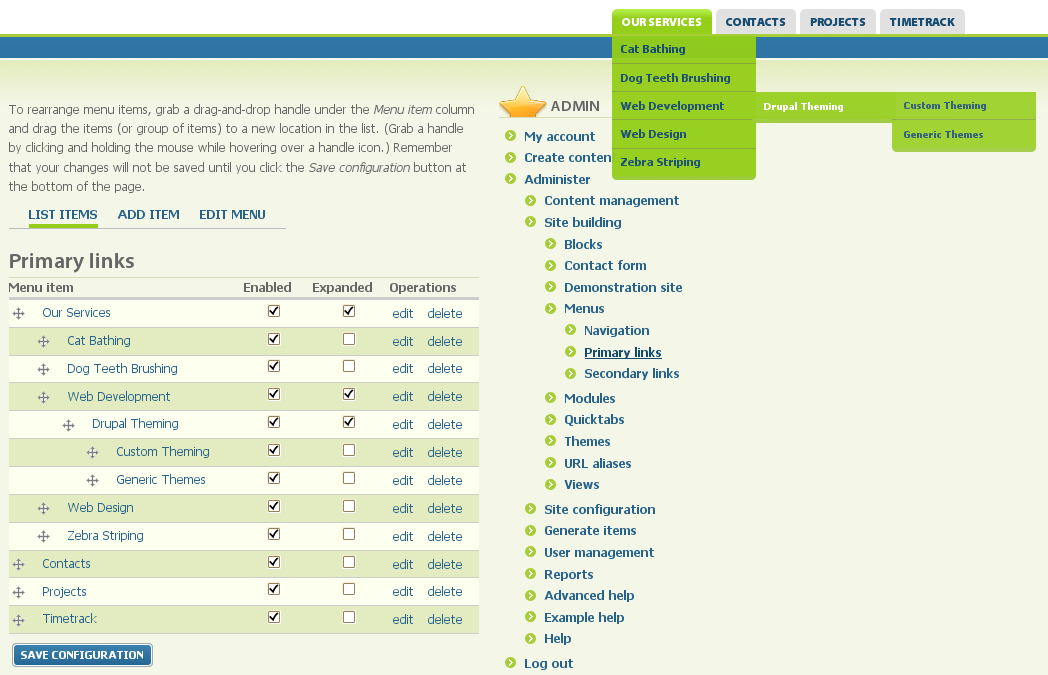
From primary links I have 2 levels of submenus with the top level menu and first submenu using the "expanded" option. First submenus appear expanded as expected when I hover on the top level menu. However, the second level submenu also appears expanded while hovering on the primary menu. It should ONLY display when hovering over the first submenu.
So when I have at least 2 submenus with second level submenus below them, they all show up even though I am hovering on the primary menu. This effectively makes using more than one level of expanded menu not useable.
| Comment | File | Size | Author |
|---|---|---|---|
| #15 | multilevel_expanded_menus_display_improperly.patch | 1.13 KB | sinasalek |
| #3 | Screenshot-01.png | 19.1 KB | jwolf |
| #3 | Screenshot-02.png | 103.37 KB | jwolf |


Comments
Comment #1
jwolf commentedA link to your site where this problem occurs and/or a screenshot would be helpful in coming up w/ a solution
Comment #2
mustardman commentedI have since removed the submenus so can't show you what happens. It only takes a couple minutes to create primary menus/submenus to reproduce this.
Comment #3
jwolf commentedOK. Here's the deal. I'm a visual person. I comprehend things much quicker if I can see what you're trying to describe. If you won't show me, I can't help you.
Attached are two screenshots where I have tried to duplicate what you describe. As you can see, I am having none of the issues in which I comprehend to be the problem in your description.
I'm changing this issue to a support request.
Comment #4
jwolf commentedComment #5
mangwills commentedI'm not sure if I should comment here or the newer issue, but you can check http://www.amici.com.ph to see the reported issue here. Am still trying to investigate the CSS, but am a beginner.
When you hover over the primary link Products > Water Heating, all the "grandchildren" menu items of Water Heating all appear.
Comment #6
mustardman commentedYup, that's the problem I was describing. Thanks for the link.
Comment #7
mustardman commentedComment #8
petarb commentedI'm getting this issue as well. Any updates?
Comment #9
Tiger_Kris commentedI'm having the same problem, I have been trying to modify the CSS to hide the grandchild items until their parent is highlighted without any success. Has there been any progress?
Comment #10
Tiger_Kris commentedOk, I have found the CSS needed for the 4th level of the menu. Add the following to your style.css:
#primary-menu ul.menu li ul li ul.menu li ul.menu {
left: -999em;
margin: 0 0 0 -14px;
padding: 6px 0 4px;
}
#primary-menu ul.menu li ul li:hover ul.menu li:hover ul.menu,
#primary-menu ul.menu li ul li.hover ul.menu li:hover ul.menu{
display: block;
left: 154px;
top: -6px;
}
#primary-menu ul.menu li ul li ul.menu li ul.menu li a {
padding: 4px;
width: 128px;
}
For the 5th level menu it would be the following 3 lines:
#primary-menu ul.menu li ul li ul.menu li ul.menu li ul.menu{
left: -999em;
margin: 0 0 0 -14px;
padding: 6px 0 4px;
}
#primary-menu ul.menu li ul li:hover ul.menu li:hover ul.menu li:hover ul.menu,
#primary-menu ul.menu li ul li.hover ul.menu li:hover ul.menu li:hover ul.menu{
display: block;
left: 154px;
top: -6px;
}
#primary-menu ul.menu li ul li ul.menu li ul.menu li ul.menu li a {
padding: 4px;
width: 128px;
}
And so on for each additional level you require. Hope this helps!
Comment #11
sid.b commentedI am seeing the same issue on version 6.x-1.9 with 4th level menus, and can confirm that the CSS changes proposed by Tiger_Kris fixes the issue. I am no expert, but this looks to me more like "bug" than "support request". Anyway, thanks to Tiger_Kris.
Comment #12
dyke it commentedi agree that it's a bug. i had the same problem and the solution in #10 fixed it. thanks a lot! :)
Comment #13
jwolf commentedFix will be added to the 1.10 release.
Comment #14
jwolf commentedfixed in 2.x. Thank you!
http://drupal.org/cvs?commit=305226
Comment #15
sinasalek commentedPatch against 1.9 using the CSS provided by #10
You can find version 1.x patched version here
PS : Although 4 levels is enough in most cases but i really think i should be dynamic.