

 Come together with the global Drupal community in Rotterdam, 28 Sept – 1 Oct 2026. Sessions, contribution, connection, and Early Bird savings until 8 June.
All of the examples have the tabs loading above the blocks, but I would like to load them below the blocks.
Thanks!
| Comment | File | Size | Author |
|---|---|---|---|
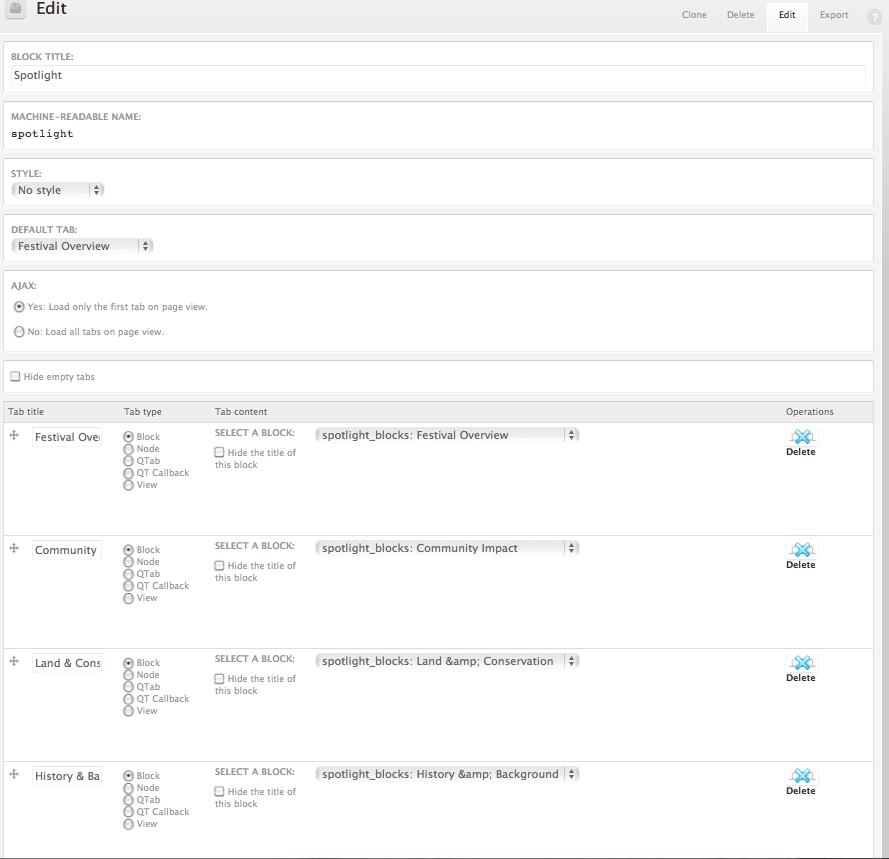
| #15 | spotlight_quicktabs_setup.gif | 48.51 KB | Courtney.B |
| #15 | spotlight_qt_theming.zip | 344.11 KB | Courtney.B |
| #13 | spotlight.jpg | 158.95 KB | Courtney.B |
| #13 | page-front.txt | 268 bytes | Courtney.B |
| #13 | theme_quicktabs_tabs.txt | 1.4 KB | Courtney.B |


Comments
Comment #1
pasqualleit can be done with css like:
(42 is the quicktab id)
Comment #2
mitchell commentedThank you very much Pasquale. I'll leave this open for now while I'm working on it, and I'll try to add more soon.
Comment #3
pasqualleA handbook page about this could be useful..
Comment #4
zanlus commentedWhich file are your required to put that in? I have put that in my last css file and I get nothing.
Comment #5
pasqualleit could be in your theme css file (mostly style.css)
Comment #6
zanlus commentedThanks. Now I see how it works!
Comment #7
ansari.wajid commentedI used the same styles discussed above, tabs are showing at the bottom of the block.. but the tabs are not working when clicked. I am using three blocks with in quicktabs..Seems all are overlapping on one another. Also can we use images for tabs title?
Thanks
Comment #8
ndwilliams3 commentedbottom tabs with a fixed height block are easily done with css. Variable height is not. The best solution would be a quicktabs.tpl, so that the html can be changed.
Comment #9
mikeaja commentedHi all
Just to clarify, this doesn't actually move the tabs below. It only moves the tabs to a fixed position and forces the tab content to fit in a fixed space, therefore displaying the tabs below/
The problem is that I think it is unlikely that many people will have a fixed height tab content.
I've tried to change this in quicktabs.module but I have not succeeded yet. When moving the tabs code, they disappeared, and I could not figure out how this was working.
If anyone can give me some pointers here, I'll try again and post what I try, and how successful (or not) it is.
Comment #10
ndwilliams3 commentedhere is a solution that works for variable height.
Comment #11
pasqualleI hope I will not visit any website with tabs below the content, where content height is not fixed.. Because if I have to click->scroll (or move up/down)->click to get to the next tab I will say something ugly.
Comment #12
Courtney.B commentedFor some reason, I couldn't get #1 to work. I don't know if it's how I've customized the CSS or what. I did find a solution that I haven't tested out in IE yet, but it uses a combination of negative margins and padding. It's another fixed height solution.
I hope I've contributed in a meaningful way! Please let me know if there any problems with the CSS. I'll edit this reply if I need to do some adjusting during my cross-browser compatibility testing. So far it's worked in Chrome 13 and FF 4.
Comment #13
Courtney.B commentedHere is the full implementation of Quicktabs for a spotlight section, with the menu links on the bottom and using css sprites. I'm using Basic as my starter theme.
I still need to test this out in IE but it works with the current version of FF and Chrome. I hope this helpful for individuals wishing to accomplish something similar! This took me awhile to put all together so I thought I could provide the full set-up so you could see what is needed.
content-top.txt = CSS for content-top area
spotlight_qtblock_export.txt = Exported quicktabs block
spotlight_views_export.txt = Exported view of content for the spotlight area
theme_quicktabs_tabs.txt = Override
theme_quicktabs_tabs; see http://drupal.org/node/625972#comment-4863710page-front.txt = Adding
<div id="content-inner"></div>to page-front.tpl.phppage-front.tpl.php is just a copy of page.tpl.php with the above added
spotlight.jpg = screenshot of content-top area and how it looks completed
I really hope this helps someone!!! Please let me know if you have any questions.
Comment #14
mikeaja commentedThis looks very interesting. Not sure what to do with 'spotlight_qtblock_export.txt'. I don't see any way of importing into quicktabs (or blocks). Sorry if I'm being stupid.......
Comment #15
Courtney.B commented@mikeaja: When I was moving from development to production, I couldn't figure out what to do with block export as well. The help says "Place this code in your module's implementation of hook_quicktabs_default_quicktabs() to provide it as a default quicktab" but I looked and could not find. Oh well, a different issue for a different day.
I've uploaded a screenshot to this post of the quicktab block I created that will probably be more useful than the file 'spotlight_qtblock_export.txt'.
I've also included a zip file with this new screenshot and the files I attached in #13.
Comment #16
Courtney.B commentedComment #17
Courtney.B commentedJust to give an update, I should have the D6 documentation up this weekend for review.
Comment #18
Courtney.B commentedComment #19
marqpdx commentedI just did this with a smidge of jQuery, which merely swaps the two div's (container and tabs).
double check the element identifiers but they should be ok
Comment #20
netw3rker commented