Closed (fixed)
Project:
Drupal core
Version:
6.4
Component:
base system
Priority:
Normal
Category:
Bug report
Assigned:
Unassigned
Reporter:
Created:
20 Jan 2009 at 17:48 UTC
Updated:
20 Jan 2009 at 18:08 UTC


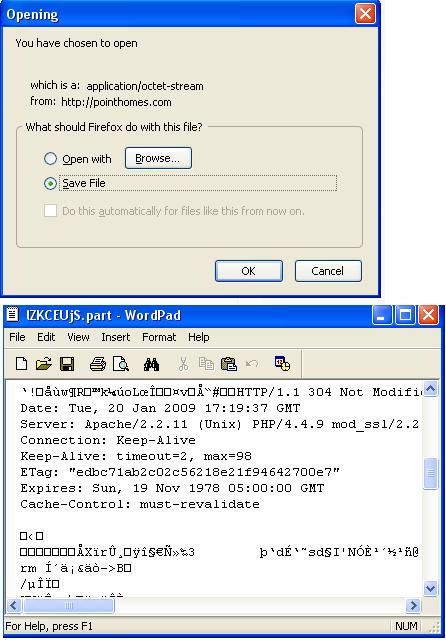
I have normal page caching enabled on a Drupal 6 and Drupal 5 site. On some pages, when I click on a page link, I get a notice in Firefox to download the page. If I click cancel and I click on the link again, the actual page loads.
- This doesn't happen all of the time (I may have to repeatedly go to node/2 and then from there click on the link to node/1).
- It will happen on the same page link (like it will happen on node/1 but it will never happen on node/2)
- I use Firefox 3... I tried replicating it on IE6, but I gave up after a few minutes.
- Clearing the cache tables in the database seems to fix the issue on the specific page, but it may start on another page.
I attached a screenshot.
Currently, this happens on this page (Drupal 5 site) when you click on "home" in the breadcrumb:
http://pointhomes.com/demo/?q=search/home
I tried searching drupal issues for this, but can't seem to find anything.
Thanks,
Michael

Comments
Comment #1
Michael M commentedI tried to replicate the issue on a few other computers but could not. It may just be an issue with my current machine, browser, session, etc.