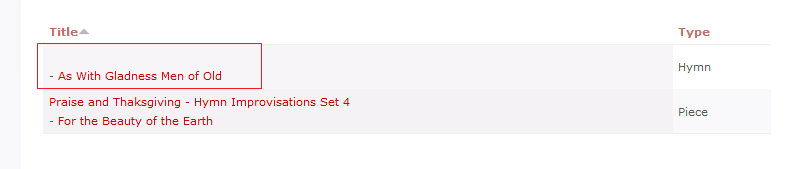
I have a view that shows two content types. One of the content types has a node referrer cck field pointing to a third content type. I have the view set to show the title from the referred content type followed by the original title. The problem is that when the other content type shows, the separator shows even though there is nothing in front of it.
I am assuming I am doing something wrong, but this may be a bug.
The view:
$view = new view;
$view->name = 'tune_refer';
$view->description = '';
$view->tag = 'Node Body';
$view->view_php = '';
$view->base_table = 'node';
$view->is_cacheable = FALSE;
$view->api_version = 2;
$view->disabled = FALSE; /* Edit this to true to make a default view disabled initially */
$handler = $view->new_display('default', 'Defaults', 'default');
$handler->override_option('relationships', array(
  'field_book_nid' => array(
    'label' => 'Book',
    'required' => 0,
    'delta' => -1,
    'id' => 'field_book_nid',
    'table' => 'node_data_field_book',
    'field' => 'field_book_nid',
    'relationship' => 'none',
  ),
));
$handler->override_option('fields', array(
  'title_1' => array(
    'label' => 'Title',
    'link_to_node' => 1,
    'exclude' => 0,
    'id' => 'title_1',
    'table' => 'node',
    'field' => 'title',
    'relationship' => 'field_book_nid',
    'override' => array(
      'button' => 'Override',
    ),
  ),
  'title' => array(
    'label' => 'Node Title',
    'link_to_node' => 1,
    'exclude' => 0,
    'id' => 'title',
    'table' => 'node',
    'field' => 'title',
    'relationship' => 'none',
    'override' => array(
      'button' => 'Override',
    ),
  ),
  'type' => array(
    'label' => 'Type',
    'link_to_node' => 0,
    'exclude' => 0,
    'id' => 'type',
    'table' => 'node',
    'field' => 'type',
    'relationship' => 'none',
  ),
));
$handler->override_option('arguments', array(
  'field_tune_nid' => array(
    'default_action' => 'default',
    'style_plugin' => 'default_summary',
    'style_options' => array(),
    'wildcard' => 'all',
    'wildcard_substitution' => 'All',
    'title' => '',
    'default_argument_type' => 'node',
    'default_argument' => '',
    'validate_type' => 'node',
    'validate_fail' => 'not found',
    'break_phrase' => 0,
    'not' => 0,
    'id' => 'field_tune_nid',
    'table' => 'node_data_field_tune',
    'field' => 'field_tune_nid',
    'relationship' => 'none',
    'default_options_div_prefix' => '',
    'default_argument_user' => 0,
    'default_argument_fixed' => '',
    'default_argument_php' => '',
    'validate_argument_node_type' => array(
      'tune' => 'tune',
      'poll' => 0,
      'forum' => 0,
      'book' => 0,
      'hymn' => 0,
      'page' => 0,
      'person' => 0,
      'piece' => 0,
      'publisher' => 0,
    ),
    'validate_argument_node_access' => 1,
    'validate_argument_nid_type' => 'nid',
    'validate_argument_vocabulary' => array(
      '6' => 0,
      '5' => 0,
      '4' => 0,
      '1' => 0,
      '10' => 0,
    ),
    'validate_argument_type' => 'tid',
    'validate_argument_php' => '',
  ),
));
$handler->override_option('filters', array(
  'status_extra' => array(
    'operator' => '=',
    'value' => '',
    'group' => '0',
    'exposed' => FALSE,
    'expose' => array(
      'operator' => FALSE,
      'label' => '',
    ),
    'id' => 'status_extra',
    'table' => 'node',
    'field' => 'status_extra',
    'relationship' => 'none',
  ),
  'type' => array(
    'operator' => 'in',
    'value' => array(
      'hymn' => 'hymn',
      'piece' => 'piece',
    ),
    'group' => '0',
    'exposed' => FALSE,
    'expose' => array(
      'operator' => FALSE,
      'label' => '',
    ),
    'id' => 'type',
    'table' => 'node',
    'field' => 'type',
    'relationship' => 'none',
  ),
));
$handler->override_option('access', array(
  'type' => 'none',
));
$handler->override_option('style_plugin', 'table');
$handler->override_option('style_options', array(
  'grouping' => '',
  'override' => 1,
  'sticky' => 0,
  'order' => 'asc',
  'columns' => array(
    'title_1' => 'title_1',
    'title' => 'title_1',
    'type' => 'type',
  ),
  'info' => array(
    'title_1' => array(
      'sortable' => 1,
      'separator' => '<br /> - ',
    ),
    'title' => array(
      'sortable' => 0,
      'separator' => '',
    ),
    'type' => array(
      'sortable' => 1,
      'separator' => '',
    ),
  ),
  'default' => 'title_1',
));
$handler = $view->new_display('block', 'Block', 'block_1');
$handler->override_option('block_description', '');
$handler->override_option('block_caching', -1);


Comments
Comment #1
merlinofchaos commentedIt's possible that the field may not be truly blank. Can you check the underlying HTML and see if maybe there's an empty
<a>tag there?Comment #2
will_in_wi commentedThere are no tags indicating the presence of data from the nonexistent entry. The problem is that there is no field. In the attached screenshot, the first list item has no node_reference field on it to get the title from.
Comment #3
thepanz commentedI found the issue: the result of isset($foobar) is TRUE even if $foobar is an empty string. Using instead empty($foobar) gives the (right) FALSE result.
Comment #4
will_in_wi commentedWhen I apply the patch, it doesn't change anything. The original problem was that if I had field1 + separator + field2 and field1 is blank then I want to only show field2. What currently happens is it displays the separator + field2.
Comment #5
will_in_wi commentedThis works for me. Thanks to thePanz for finding the location. Same fix, different line.
Comment #6
thepanz commentedMore fixes: for more than one field we should "merge" the two patches :)
I also commented out the else branch: we don't have to set the column to "" if no data in there.
Anyone can try this patch with all PHP warnings on? Maybe isset() and empty() manage variables existing checks in different ways.
Comment #7
merlinofchaos commentedYes, we do have to set the column to blank if it's empty or a notice will be generated.
Comment #8
merlinofchaos commentedAnd please combine the patches into one. =)
Comment #9
chilledoutbeardedman commentedNot sure if this should be a new request, so putting it here for now.
I have a similar issue whereby the separator shows when the second field is blank. This is an unexpected/undesired result.
Comment #10
thepanz commentedComment #11
thepanz commentedI didn't find any bugs in my dev-site. Please review if any ! :)
Comment #12
merlinofchaos commentedCommitted.