

Postponed (maintainer needs more info)
Project:
Links Package
Version:
5.x-1.12
Component:
Code: links.module
Priority:
Critical
Category:
Bug report
Assigned:
Reporter:
Created:
25 Jan 2009 at 14:36 UTC
Updated:
14 Mar 2009 at 14:32 UTC
Jump to comment: Most recent file

Comments
Comment #1
syscrusher commentedI am so far unable to replicate this. Could you please give me the results of the following SQL queries? Each query will be wrapped here but is actually one line in SQL:
The second query will intentionally return some rows that are not directly relevant; I want some context.
Also, let me know the node IDs of the nodes that were involved in the transaction you described.
@all: Anyone else see this problem?
Thanks.
Scott
Comment #2
syscrusher commented> @all: Anyone else see this problem?
Errr, I meant, "Has anyone else *seen* this problem?"
Sorry...fingers outpaced neurons.
Scott
Comment #3
syscrusher commentedComment #4
syscrusher commentedOne other question:
Do you have any modules that use the Links API installed other than links.module, links_admin.module, links_weblink.module, and links_related.module? That is, have you installed any third-party module (i.e., not mine) that uses the Links API and its database?
Scott
Comment #5
syscrusher commentedI have a theory on this problem. There was one beta version of links_weblink for Drupal 5 that was not properly incrementing the sequential numbering. You may have created a weblink in that version, in which case the bug has been fixed but we need to update your database to avoid errors. Please check your logs and see if you have errors indicating duplicate keys on the {links} table, or any similar SQL errors.
It also occurs to me that if you restored your database from a backup prior to the beta with the bug, you will have eliminated this problem already. In this case, again, we don't have a code bug, just a glitch in your database caused by a bug that has been fixed.
Scott
Comment #6
altparty commentedHi,
Here are the answers:
I haven't enabled the Links Administration and the Links Related modules. As far as I know, no other module uses the Links API.
I have CCK link installed.
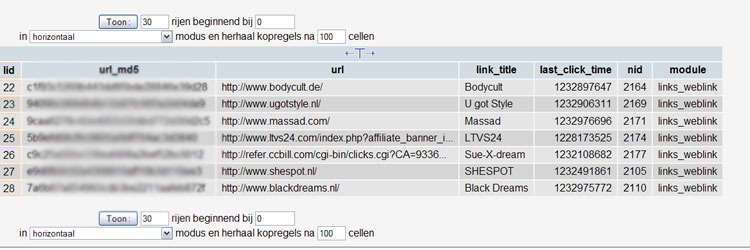
links_lid refers now to '26'
see screenshot.
Thanks for your help anyway!
Comment #7
syscrusher commentedTry this:
UPDATE sequences SET value=(SELECT MAX(lid) FROM links) WHERE name='links_lid';
I think that will get you back on track. Let me know if the problem recurs after doing this update in MySQL.
Sidenote: There is no real need to obscure the url_md5 field from the links table in a screenshot. It is just a hash of the URL for quick lookups, since a TEXT field can't be in an index. If your URL is "http://www.example.com/" then the url_md5 field is simply the result of the PHP function call
md5("http://www.example.com/"). There is no security-related information in the MD5 hash. :-)Kind regards,
Scott
Comment #8
altparty commentedI think you mean:
UPDATE sequences SET id=(SELECT MAX(lid) FROM links) WHERE name='links_lid';
I replaced 'value' by 'id'.
I also noticed I have a [table-prefix]links_lid variable in my sequences table. With the same value. Maybe this could be the cause of the problem?
Thanks again for the help.
Comment #9
rene_w commentedI just noticed the same problem.
Adding/Editing a link results in the first URL from the database being chosen for the link entry. Editing the link in the node repeatedly changed the link by incrementing the id. That is, when adding a second link, it would not assign it the first URL from the database again, but continue where it stopped before.
I was able to correct the link from the "Links database" form. I noticed that both title and URL were wrong in the "master table list" (only selecting "Edit references from nodes" would show the correct link name, but still with the wrong URL).
However, while I could correct the URL from the "links database" form, now the name of the link isn't correctly encoded: for "Mr: X's homepage" it creates (spaces added to prevent Drupal from changing it back) "Mr. X & # 039;s homepage" (this did not happen before for links created directly in the nodes).
Currently running "Links Package 5.x-1.12". Have been using Links for a bit over a year now, not sure exactly with which version this problem started.
Comment #10
summit commentedSubscribing, I definitelly have different id's for links than nodes, do not yet exactly know how to fix this.
Greetings,
Martijn
Comment #11
syscrusher commentedOkay, we have two different issues here.
The main issue is that there was a bug in a previous version of Links that caused the link ID ("lid") column in the database to get out of sync with the Drupal-maintained sequence number. This is fixed in the current release of Links, but the problem wasn't discovered until after the release came out, so there was no embedded correction for the database glitch. To fix that, execute this SQL command manually:
UPDATE sequences SET id=(SELECT MAX(lid) FROM links) WHERE name='links_lid';Of course, you'll need to prefix the table names ("sequences" and "links") as appropriate for your site.
The second issue is that annoying entity-escaping of the apostrophe. I'm working on a fix for that. But yes, I can confirm that it's a bug and not something you're doing wrong. :-)
Kind regards,
Scott
Comment #12
syscrusher commentedI'm not exactly sure what you mean by this. The lid column in the {links} table should *not* match the nid column in the {node} table and its related tables. The {links_node} table relates link IDs with node IDs. They might occasionally match up by coincidence (especially if you have a brand-new site where you just created node #1 and link #1 in the same article), but there is no actual correlation.
In other words, it's perfectly fine for node #1234 to connect to link #763, in which case the applicable row in {links_node} would have lid=763 and nid=1234.
Hope this helps.
Kind regards,
Scott (Syscrusher)
Comment #13
rene_w commentedRunning the SQL query fixed the sequencing problem on my site. Thanks!