

 Come together with the global Drupal community in Rotterdam, 28 Sept – 1 Oct 2026. Sessions, contribution, connection, and Early Bird savings until 8 June.
Hello,
First of all; nice template! but it has some bugs in it.
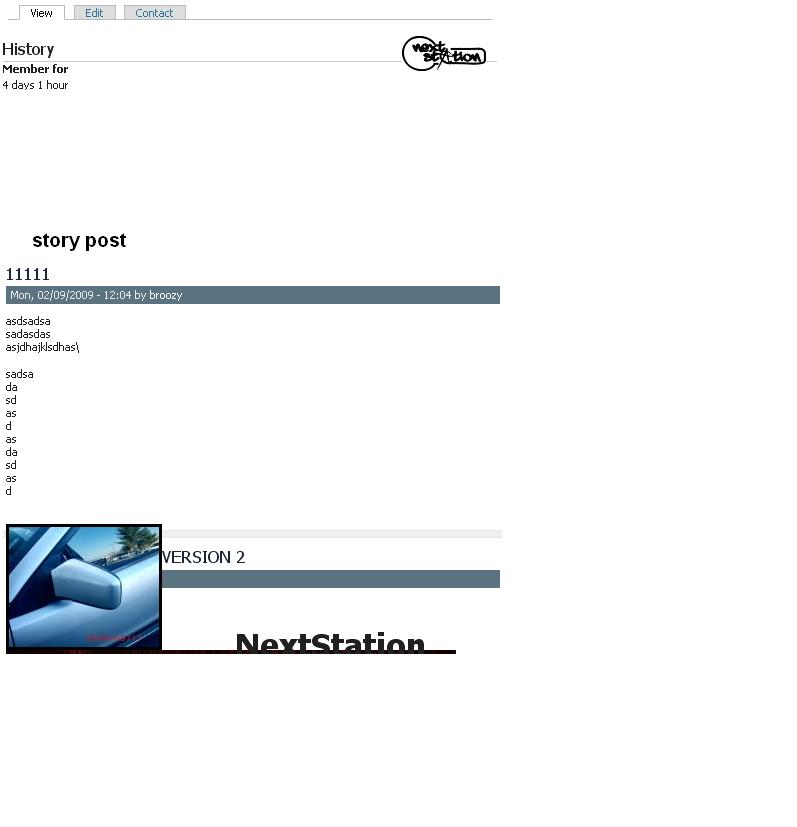
When you make a new node and add an image in it, the image overlap the node under the current node when you look at the frontpage. So it seems the images ignore the div tags or something like that. I've been looking to fix it, but I have no idea how.
I've attached a screenshot to give an idea how it looks like if you didn't understand quite well what I'm saying (my English isn't superior :D )
I hope someone can help though :)
Thanks in advance
| Comment | File | Size | Author |
|---|---|---|---|
| #3 | Addari Firefox.jpg | 148.3 KB | macrodesign |
| #3 | Addari Internet Explorer.jpg | 139.35 KB | macrodesign |
| #2 | problem.JPG | 32.39 KB | brzbg |
| divprob.JPG | 110.35 KB | apoc1 |



Comments
Comment #1
sakib000 commentedyou should use 1.3 version. This has been fixed
Thanks
Comment #2
brzbg commentedi still have this problem ... i use version 6.x-1.3
and its only on firefox ... on IE works fine
see the attachment
thanx in advance :)
Comment #3
macrodesign commentedI have the same problem, I am D6.9 and latest today's download of Addari. don't know what to do, attached picture of Internet & Firefox box, UGLY; i don't know I moved from Acquia to Garland and now to Addari; I can't keep changing themes and spending 20 hours of adjustments; please someone help. (Garland is perfect by the way, but way too dull and i don't know much to change everything on it) any help to fix this issue will be highly appreciated.
Comment #4
macrodesign commentedSorry, I must first appreciate the really clean interface & shinny look of this theme; excellent very professional. I am sure this is an small issue for you.
Comment #5
sakib000 commentedfixing in v 1.4
by now you can remove
float:left;from line 34 of style.css