I have just installed this module and I really like what it does in the normal displaying of nodes. I have an issue however when enabling tabs in node editing.
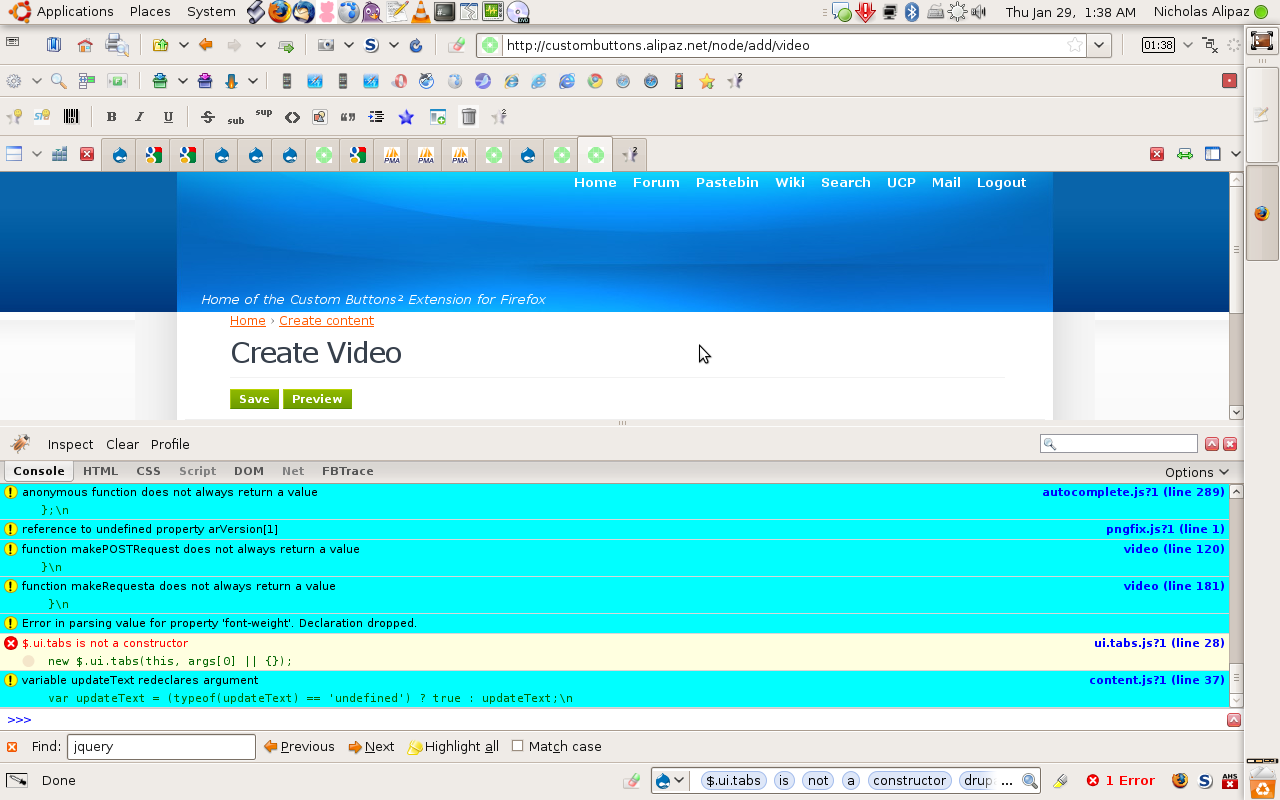
After enabling tabs for a group in the edit area it seems that when clicking edit I get the edit page, minus any content or tabs. I simply have the title of the page and the submit buttons, nothing between those.
I have attached a screenshot for you to see what is happening.
Here is the source code from between the <form> tags. Please some one help. Thanks for any assistance.
<form enctype="multipart/form-data" id="node-form" method="post" accept-charset="UTF-8" action="/node/add/video">
<div>
<div class="node-form">
  <div class="standard">
<div class="drupal-tabs tabs-processed" id="tabs-fieldgroup_tabs"><ul><li><a href="#tabs-fieldgroup_tabs-1">Video</a></li><li class="group-testy"><a href="#tabs-fieldgroup_tabs-2">test</a></li><li><a href="#tabs-fieldgroup_tabs-3">Admin</a></li></ul><div id="tabs-fieldgroup_tabs-1"><h2 class="drupal-tabs-title">Video</h2><div id="edit-title-wrapper" class="form-item">
 <label for="edit-title">Title: <span title="This field is required." class="form-required">*</span></label>
 <input type="text" class="form-text required" value="" size="60" id="edit-title" name="title" maxlength="255"/>
</div>
<div class="body-field-wrapper"><div class="smileys-box"><fieldset class="collapsible collapsed"><legend>Smileys</legend><div class="smileys"><span><img class="smiley-class" alt=":)" title="Smile  —  :) :-) :smile:" src="http://custombuttons.alipaz.net/sites/all/modules/smileys/packs/Roving/smile.png" ilo-full-src="http://custombuttons.alipaz.net/sites/all/modules/smileys/packs/Roving/smile.png"/></span><span><img class="smiley-class" alt=":D" title="Laughing out loud  —  :D :-D :lol:" src="http://custombuttons.alipaz.net/sites/all/modules/smileys/packs/Roving/lol.png" ilo-full-src="http://custombuttons.alipaz.net/sites/all/modules/smileys/packs/Roving/lol.png"/></span><span><img class="smiley-class" alt=":bigsmile:" title="Big smile  —  :bigsmile:" src="http://custombuttons.alipaz.net/sites/all/modules/smileys/packs/Roving/bigsmile.png" ilo-full-src="http://custombuttons.alipaz.net/sites/all/modules/smileys/packs/Roving/bigsmile.png"/></span><span><img class="smiley-class" alt=";)" title="Wink  —  ;) ;-) :wink:" src="http://custombuttons.alipaz.net/sites/all/modules/smileys/packs/Roving/wink.png" ilo-full-src="http://custombuttons.alipaz.net/sites/all/modules/smileys/packs/Roving/wink.png"/></span><span><img class="smiley-class" alt=":p" title="Tongue  —  :p :-p :tongue:" src="http://custombuttons.alipaz.net/sites/all/modules/smileys/packs/Roving/tongue.png" ilo-full-src="http://custombuttons.alipaz.net/sites/all/modules/smileys/packs/Roving/tongue.png"/></span><span><img class="smiley-class" alt=":O" title="Shock  —  :O :-O :shock:" src="http://custombuttons.alipaz.net/sites/all/modules/smileys/packs/Roving/shock.png" ilo-full-src="http://custombuttons.alipaz.net/sites/all/modules/smileys/packs/Roving/shock.png"/></span><span><img class="smiley-class" alt=":|" title="Stare  —  :| :-| :stare:" src="http://custombuttons.alipaz.net/sites/all/modules/smileys/packs/Roving/flat.png" ilo-full-src="http://custombuttons.alipaz.net/sites/all/modules/smileys/packs/Roving/flat.png"/></span><span><img class="smiley-class" alt=":(" title="Sad  —  :( :-( :sad:" src="http://custombuttons.alipaz.net/sites/all/modules/smileys/packs/Roving/aw.png" ilo-full-src="http://custombuttons.alipaz.net/sites/all/modules/smileys/packs/Roving/aw.png"/></span><span><img class="smiley-class" alt=":~" title="Puzzled  —  :~ :-~ :puzzled:" src="http://custombuttons.alipaz.net/sites/all/modules/smileys/packs/Roving/puzzled.png" ilo-full-src="http://custombuttons.alipaz.net/sites/all/modules/smileys/packs/Roving/puzzled.png"/></span><span><img class="smiley-class" alt=":((" title="Crying  —  :(( :-(( :cry:" src="http://custombuttons.alipaz.net/sites/all/modules/smileys/packs/Roving/sad.png" ilo-full-src="http://custombuttons.alipaz.net/sites/all/modules/smileys/packs/Roving/sad.png"/></span><span><img class="smiley-class" alt="8)" title="Cool  —  8) 8-) :cool:" src="http://custombuttons.alipaz.net/sites/all/modules/smileys/packs/Roving/cool.png" ilo-full-src="http://custombuttons.alipaz.net/sites/all/modules/smileys/packs/Roving/cool.png"/></span><span><img class="smiley-class" alt=":steve:" title="Steve  —  :steve:" src="http://custombuttons.alipaz.net/sites/all/modules/smileys/packs/Roving/steve.png" ilo-full-src="http://custombuttons.alipaz.net/sites/all/modules/smileys/packs/Roving/steve.png"/></span><span><img class="smiley-class" alt="J)" title="Crazy  —  J) J-) :crazy:" src="http://custombuttons.alipaz.net/sites/all/modules/smileys/packs/Roving/crazy.png" ilo-full-src="http://custombuttons.alipaz.net/sites/all/modules/smileys/packs/Roving/crazy.png"/></span><span><img class="smiley-class" alt=":glasses:" title="Glasses  —  :glasses:" src="http://custombuttons.alipaz.net/sites/all/modules/smileys/packs/Roving/glasses.png" ilo-full-src="http://custombuttons.alipaz.net/sites/all/modules/smileys/packs/Roving/glasses.png"/></span><span><img class="smiley-class" alt=":party:" title="Party  —  :party:" src="http://custombuttons.alipaz.net/sites/all/modules/smileys/packs/Roving/party.png" ilo-full-src="http://custombuttons.alipaz.net/sites/all/modules/smileys/packs/Roving/party.png"/></span><span><img class="smiley-class" alt=":love:" title="Love  —  :love:" src="http://custombuttons.alipaz.net/sites/all/modules/smileys/packs/Roving/love.png" ilo-full-src="http://custombuttons.alipaz.net/sites/all/modules/smileys/packs/Roving/love.png"/></span></div></fieldset>
</div><div id="edit-teaser-js-wrapper" class="form-item">
 <textarea class="form-textarea teaser resizable" disabled="disabled" id="edit-teaser-js" name="teaser_js" rows="10" cols="60"/>
</div>
<div class="teaser-checkbox"><div id="edit-teaser-include-wrapper" class="form-item">
 <label class="option"><input type="checkbox" class="form-checkbox" checked="checked" value="1" id="edit-teaser-include" name="teaser_include"/> Show summary in full view</label>
</div>
</div><div id="edit-body-wrapper" class="form-item">
 <label for="edit-body">Body: </label>
 <textarea class="form-textarea resizable" id="edit-body" name="body" rows="20" cols="60"/>
</div>
<fieldset class="collapsible collapsed"><legend>Input format</legend><div id="edit-format-1-wrapper" class="form-item">
 <label class="option"><input type="radio" class="form-radio" checked="checked" value="1" name="format" id="edit-format-1"/> Filtered HTML</label>
 <div class="description"><ul class="tips"><li>Web page addresses and e-mail addresses turn into links automatically.</li><li>Allowed HTML tags: <a> <em> <strong> <cite> <code> <ul> <ol> <li> <dl> <dt> <dd> <img></li><li>Lines and paragraphs break automatically.</li></ul></div>
</div>
<div id="edit-format-2-wrapper" class="form-item">
 <label class="option"><input type="radio" class="form-radio" value="2" name="format" id="edit-format-2"/> Full HTML</label>
 <div class="description"><ul class="tips"><li>Web page addresses and e-mail addresses turn into links automatically.</li><li>Lines and paragraphs break automatically.</li></ul></div>
</div>
<div id="edit-format-3-wrapper" class="form-item">
 <label class="option"><input type="radio" class="form-radio" value="3" name="format" id="edit-format-3"/> PHP code</label>
 <div class="description"><ul class="tips"><li>You may post PHP code. You should include <?php ?> tags.</li></ul></div>
</div>
<div id="edit-format-9-wrapper" class="form-item">
 <label class="option"><input type="radio" class="form-radio" value="9" name="format" id="edit-format-9"/> MediaWiki Syntax</label>
</div>
<div id="edit-format-8-wrapper" class="form-item">
 <label class="option"><input type="radio" class="form-radio" value="8" name="format" id="edit-format-8"/> DokuWiki Syntax</label>
</div>
<div id="edit-format-10-wrapper" class="form-item">
 <label class="option"><input type="radio" class="form-radio" value="10" name="format" id="edit-format-10"/> Creole Syntax</label>
</div>
<div id="edit-format-11-wrapper" class="form-item">
 <label class="option"><input type="radio" class="form-radio" value="11" name="format" id="edit-format-11"/> BBCode</label>
 <div class="description"><ul class="tips"><li>You may quote other posts using [quote] tags.</li><li>You can use <a href="/filter/tips/11#filter-bbcode-0">BBCode</a> tags in the text.</li><li><a href="/filter/tips/11#filter-smileys-0">Textual smileys</a> will be replaced with graphical ones.</li></ul></div>
</div>
<div id="edit-format-12-wrapper" class="form-item">
 <label class="option"><input type="radio" class="form-radio" value="12" name="format" id="edit-format-12"/> TikiWiki Syntax</label>
</div>
<div id="edit-format-13-wrapper" class="form-item">
 <label class="option"><input type="radio" class="form-radio" value="13" name="format" id="edit-format-13"/> CoWiki Syntax</label>
</div>
<div id="edit-format-14-wrapper" class="form-item">
 <label class="option"><input type="radio" class="form-radio" value="14" name="format" id="edit-format-14"/> Markdown Syntax</label>
 <div class="description"><ul class="tips"><li>You can use <a href="/filter/tips">Markdown syntax</a> to format and style the text. Also see <a href="http://michelf.com/projects/php-markdown/extra/">Markdown Extra</a> for tables, footnotes, and more.</li><li>Every instance heading tags will be modified to include an id attribute for anchor linking.</li><li>Every instance of "<!--tableofcontents-->" in the input text will be replaced with a collapsible mediawiki-style table of contents. Accepts options for title, list style, minimum heading level, and maximum heading level as follows: <!--tableofcontents list: ol; title: Table of Contents; minlevel: 1; maxlevel: 3;-->. All arguments are optional and defaults are shown.</li></ul></div>
</div>
<p><a href="/filter/tips">More information about formatting options</a></p></fieldset>
</div><input type="hidden" value="bedc2347ad511af1b6318d874fb40053" id="edit-video-node-form-form-token" name="form_token"/>
<fieldset class="collapsible collapsed"><legend>View/Edit Permissions</legend><div class="form-item">
 <table class="sticky-enabled">
 <thead><tr><th>Role</th><th>View</th><th>Edit</th><th>Delete</th> </tr></thead>
<tbody>
 <tr class="odd"><td>anonymous user</td><td><div id="edit-node-privacy-byrole-roles-1-view-wrapper" class="form-item">
 <input type="checkbox" class="form-checkbox" checked="checked" value="1" id="edit-node-privacy-byrole-roles-1-view" name="node_privacy_byrole[roles][1][view]"/>
</div>
</td><td><div id="edit-node-privacy-byrole-roles-1-edit-wrapper" class="form-item">
 <input type="checkbox" class="form-checkbox" value="1" id="edit-node-privacy-byrole-roles-1-edit" name="node_privacy_byrole[roles][1][edit]"/>
</div>
</td><td><div id="edit-node-privacy-byrole-roles-1-delete-wrapper" class="form-item">
 <input type="checkbox" class="form-checkbox" value="1" id="edit-node-privacy-byrole-roles-1-delete" name="node_privacy_byrole[roles][1][delete]"/>
</div>
</td> </tr>
 <tr class="even"><td>authenticated user</td><td><div id="edit-node-privacy-byrole-roles-2-view-wrapper" class="form-item">
 <input type="checkbox" class="form-checkbox" checked="checked" value="1" id="edit-node-privacy-byrole-roles-2-view" name="node_privacy_byrole[roles][2][view]"/>
</div>
</td><td><div id="edit-node-privacy-byrole-roles-2-edit-wrapper" class="form-item">
 <input type="checkbox" class="form-checkbox" value="1" id="edit-node-privacy-byrole-roles-2-edit" name="node_privacy_byrole[roles][2][edit]"/>
</div>
</td><td><div id="edit-node-privacy-byrole-roles-2-delete-wrapper" class="form-item">
 <input type="checkbox" class="form-checkbox" value="1" id="edit-node-privacy-byrole-roles-2-delete" name="node_privacy_byrole[roles][2][delete]"/>
</div>
</td> </tr>
 <tr class="odd"><td>administrator</td><td><div id="edit-node-privacy-byrole-roles-3-view-wrapper" class="form-item">
 <input type="checkbox" class="form-checkbox" checked="checked" value="1" id="edit-node-privacy-byrole-roles-3-view" name="node_privacy_byrole[roles][3][view]"/>
</div>
</td><td><div id="edit-node-privacy-byrole-roles-3-edit-wrapper" class="form-item">
 <input type="checkbox" class="form-checkbox" checked="checked" value="1" id="edit-node-privacy-byrole-roles-3-edit" name="node_privacy_byrole[roles][3][edit]"/>
</div>
</td><td><div id="edit-node-privacy-byrole-roles-3-delete-wrapper" class="form-item">
 <input type="checkbox" class="form-checkbox" checked="checked" value="1" id="edit-node-privacy-byrole-roles-3-delete" name="node_privacy_byrole[roles][3][delete]"/>
</div>
</td> </tr>
 <tr class="even"><td>administrator2</td><td><div id="edit-node-privacy-byrole-roles-5-view-wrapper" class="form-item">
 <input type="checkbox" class="form-checkbox" value="1" id="edit-node-privacy-byrole-roles-5-view" name="node_privacy_byrole[roles][5][view]"/>
</div>
</td><td><div id="edit-node-privacy-byrole-roles-5-edit-wrapper" class="form-item">
 <input type="checkbox" class="form-checkbox" value="1" id="edit-node-privacy-byrole-roles-5-edit" name="node_privacy_byrole[roles][5][edit]"/>
</div>
</td><td><div id="edit-node-privacy-byrole-roles-5-delete-wrapper" class="form-item">
 <input type="checkbox" class="form-checkbox" value="1" id="edit-node-privacy-byrole-roles-5-delete" name="node_privacy_byrole[roles][5][delete]"/>
</div>
</td> </tr>
 <tr class="odd"><td>regular</td><td><div id="edit-node-privacy-byrole-roles-4-view-wrapper" class="form-item">
 <input type="checkbox" class="form-checkbox" checked="checked" value="1" id="edit-node-privacy-byrole-roles-4-view" name="node_privacy_byrole[roles][4][view]"/>
</div>
</td><td><div id="edit-node-privacy-byrole-roles-4-edit-wrapper" class="form-item">
 <input type="checkbox" class="form-checkbox" value="1" id="edit-node-privacy-byrole-roles-4-edit" name="node_privacy_byrole[roles][4][edit]"/>
</div>
</td><td><div id="edit-node-privacy-byrole-roles-4-delete-wrapper" class="form-item">
 <input type="checkbox" class="form-checkbox" value="1" id="edit-node-privacy-byrole-roles-4-delete" name="node_privacy_byrole[roles][4][delete]"/>
</div>
</td> </tr>
</tbody>
</table>

 <div class="description">Select which users can view/edit your post based on their role.</div>
</div>
</fieldset>
<div class="attachments"><fieldset class="collapsible collapsed"><legend>File attachments</legend><div class="description">Changes made to the attachments are not permanent until you save this post. The first "listed" file will be included in RSS feeds.</div><div id="attach-wrapper"><div id="edit-upload-wrapper" class="form-item">
 <label for="edit-upload">Attach new file: </label>
 <input type="file" size="40" id="edit-upload" class="form-file" name="files[upload]"/>

 <div class="description">The maximum upload size is <em>2 MB</em>. Only files with the following extensions may be uploaded: <em>jpg jpeg gif png ico html txt doc xls pdf ppt pps odt ods odp xpi</em>. </div>
</div>
<input type="submit" class="form-submit" value="Attach" id="edit-attach" name="attach"/>
</div></fieldset>
</div></div><div id="tabs-fieldgroup_tabs-2"><h2 class="drupal-tabs-title">test</h2><div id="edit-field-testy-0-value-wrapper" class="form-item">
 <label for="edit-field-testy-0-value">tst: </label>
 <textarea class="form-textarea resizable" id="edit-field-testy-0-value" name="field_testy[0][value]" rows="5" cols="60"/>
</div>
</div><div id="tabs-fieldgroup_tabs-3"><h2 class="drupal-tabs-title">Admin</h2><fieldset class="menu-item-form collapsible collapsed"><legend>Menu settings</legend><div id="edit-menu-link-title-wrapper" class="form-item">
 <label for="edit-menu-link-title">Menu link title: </label>
 <input type="text" class="form-text" value="" size="60" id="edit-menu-link-title" name="menu[link_title]" maxlength="128"/>
 <div class="description">The link text corresponding to this item that should appear in the menu. Leave blank if you do not wish to add this post to the menu.</div>
</div>
<div id="edit-menu-parent-wrapper" class="form-item">
 <label for="edit-menu-parent">Parent item: </label>
 <select id="edit-menu-parent" class="form-select menu-title-select" name="menu[parent]"><option value="menu-new:0"><loggedout></option><option value="menu-new:192">-- Home</option><option value="menu-new:369">---- Custom Buttons² @ Addons</option><option value="menu-new:439">---- Extension Releases</option><option value="menu-new:440">---- Video Tutorials</option><option value="menu-new:164">-- Forum</option><option value="menu-new:411">---- Buttons (Recent Posts)</option><option value="menu-new:344">---- Buttons Database</option><option value="menu-new:353">---- Buttons Discussion & Support</option><option value="menu-new:351">---- Extension Support</option><option value="menu-new:352">---- Forum Support</option><option value="menu-new:414">---- Forum FAQ</option><option value="menu-new:340">-- Wiki</option><option value="menu-new:365">---- Custom Buttons² Documentation</option><option value="menu-new:416">---- Buttons that Compliment</option><option value="menu-new:417">---- Buttons that Replace</option><option value="menu-new:415">---- Extension FAQ</option><option value="menu-new:366">---- Wiki Syntax (MarkDown)</option><option value="menu-new:189">-- Search</option><option value="menu-new:167">---- Active Topics</option><option value="menu-new:165">---- New Posts</option><option value="menu-new:166">---- Unanswered Posts</option><option value="navigation:0"><Navigation></option><option value="navigation:9">-- Compose tips (disabled)</option><option value="navigation:575">-- Contact (disabled)</option><option value="navigation:576">-- Download counter</option><option value="navigation:498">-- Forums (disabled)</option><option value="navigation:578">-- Freelinks</option><option value="navigation:579">-- Mass Contact (disabled)</option><option value="navigation:522">-- Messages</option><option value="navigation:21">-- My account</option><option value="navigation:580">-- Recent changes</option><option value="navigation:581">-- Search (disabled)</option><option value="navigation:714">-- Tags (disabled)</option><option value="navigation:195">-- User list (disabled)</option><option value="navigation:11">-- Create content</option><option value="navigation:548">---- 1 Button</option><option value="navigation:431">---- Extension Announcement</option><option value="navigation:486">------ Cb² Change Log</option><option value="navigation:506">---- Forum topic</option><option value="navigation:568">---- Image</option><option value="navigation:420">---- Include Page</option><option value="navigation:107">---- Page</option><option value="navigation:659">---- Set of Buttons</option><option value="navigation:108">---- Story</option><option value="navigation:425">---- Video</option><option value="navigation:226">---- Wiki Entry</option><option value="navigation:2">-- Administer</option><option value="navigation:10">---- Content management</option><option value="navigation:27">------ Comments</option><option value="navigation:28">------ Content</option><option value="navigation:29">------ Content types</option><option value="navigation:507">------ Forums</option><option value="navigation:42">------ Post settings</option><option value="navigation:43">------ RSS publishing</option><option value="navigation:95">------ Taxonomy</option><option value="navigation:17">---- Site building</option><option value="navigation:25">------ Blocks</option><option value="navigation:595">------ Contact form</option><option value="navigation:596">------ Custom breadcrumbs</option><option value="navigation:600">------ Mass Contact form</option><option value="navigation:601">------ Menus</option><option value="navigation:652">-------- Navigation</option><option value="navigation:653">-------- Primary links</option><option value="navigation:654">-------- Secondary links</option><option value="navigation:655">-------- loggedout</option><option value="navigation:39">------ Modules</option><option value="navigation:50">------ Themes</option><option value="navigation:119">------ URL aliases</option><option value="navigation:688">------ Views</option><option value="navigation:18">---- Site configuration</option><option value="navigation:23">------ Actions</option><option value="navigation:24">------ Administration theme</option><option value="navigation:588">------ Advanced Forum</option><option value="navigation:590">------ BUEditor</option><option value="navigation:592">------ Browscap</option><option value="navigation:722">------ CCK Fieldgroup Tabs</option><option value="navigation:26">------ Clean URLs</option><option value="navigation:593">------ Comment mover</option><option value="navigation:717">------ Community tags</option><option value="navigation:30">------ Date and time</option><option value="navigation:597">------ Download counter</option><option value="navigation:33">------ Error reporting</option><option value="navigation:34">------ File system</option><option value="navigation:128">------ File uploads</option><option value="navigation:657">------ Forumtools</option><option value="navigation:598">------ Freelinking settings</option><option value="navigation:35">------ Image toolkit</option><option value="navigation:564">------ ImageAPI</option><option value="navigation:570">------ Images</option><option value="navigation:36">------ Input formats</option><option value="navigation:37">------ Logging and alerts</option><option value="navigation:40">------ Performance</option><option value="navigation:527">------ Private messages</option><option value="navigation:602">------ Quote</option><option value="navigation:603">------ Recent changes</option><option value="navigation:604">------ Search settings</option><option value="navigation:605">------ Shadowbox</option><option value="navigation:606">------ ShareThis</option><option value="navigation:607">------ Signatures for Forums</option><option value="navigation:47">------ Site information</option><option value="navigation:48">------ Site maintenance</option><option value="navigation:537">------ Smileys</option><option value="navigation:723">------ Tabs</option><option value="navigation:718">------ Tagadelic configuration</option><option value="navigation:609">------ Upload permissions per content</option><option value="navigation:610">------ Wikitools</option><option value="navigation:725">------ jQuery Update</option><option value="navigation:560">------ phpBB2Drupal Settings</option><option value="navigation:20">---- User management</option><option value="navigation:22">------ Access rules</option><option value="navigation:41">------ Permissions</option><option value="navigation:197">------ Profiles</option><option value="navigation:46">------ Roles</option><option value="navigation:51">------ User settings</option><option value="navigation:52">------ Users</option><option value="navigation:553">---- phpBB to Drupal</option><option value="navigation:558">------ Post Migration Configuration</option><option value="navigation:16">---- Reports</option><option value="navigation:608">------ Top search phrases</option><option value="navigation:591">------ Browscap</option><option value="navigation:589">------ Available updates</option><option value="navigation:49">------ Status report</option><option value="navigation:4">-- Log out</option><option selected="selected" value="primary-links:0"><Primary links></option><option value="primary-links:193">-- Home</option><option value="primary-links:468">---- Chat</option><option value="primary-links:438">---- Video Tutorials</option><option value="primary-links:437">---- Extension Releases</option><option value="primary-links:360">---- Custom Buttons² @ Addons</option><option value="primary-links:118">-- Forum</option><option value="primary-links:410">---- Buttons (Recent Posts)</option><option value="primary-links:343">---- Buttons Database</option><option value="primary-links:350">---- Buttons Discussion & Support</option><option value="primary-links:349">---- Extension Support</option><option value="primary-links:348">---- Forum Support</option><option value="primary-links:412">---- Forum FAQ</option><option value="primary-links:125">-- Pastebin</option><option value="primary-links:367">---- Paste New Code</option><option value="primary-links:405">---- All Posts</option><option value="primary-links:368">---- Help with Pastebin</option><option value="primary-links:341">-- Wiki</option><option value="primary-links:363">---- Custom Buttons² Documentation</option><option value="primary-links:393">---- Buttons that Compliment</option><option value="primary-links:394">---- Buttons that Replace</option><option value="primary-links:413">---- Extension FAQ</option><option value="primary-links:364">---- Wiki Syntax (MarkDown)</option><option value="primary-links:126">-- Search</option><option value="primary-links:203">---- My Posts</option><option value="primary-links:135">---- New Posts</option><option value="primary-links:134">---- Unanswered Posts</option><option value="primary-links:136">---- Active Topics</option><option value="primary-links:206">---- Members</option><option value="primary-links:342">---- Buttons By Me</option><option value="primary-links:143">-- UCP</option><option value="primary-links:145">---- Profile</option><option value="primary-links:146">---- Forum Preferences</option><option value="primary-links:147">---- Private Messages</option><option value="primary-links:148">---- Usergroups</option><option value="primary-links:149">---- Friends & Foes</option><option value="primary-links:150">---- My Custom Buttons</option><option value="primary-links:151">-- Mail</option><option value="primary-links:154">---- Inbox</option><option value="primary-links:155">---- Outbox</option><option value="primary-links:156">---- Sentbox</option><option value="primary-links:152">---- Compose Message</option><option value="primary-links:153">---- Manage PM Drafts</option><option value="primary-links:157">---- Rules, Folders & Settings</option><option value="secondary-links:0"><Secondary links></option></select>
 <div class="description">The maximum depth for an item and all its children is fixed at 9. Some menu items may not be available as parents if selecting them would exceed this limit.</div>
</div>
<div id="edit-menu-weight-wrapper" class="form-item">
 <label for="edit-menu-weight">Weight: </label>
 <select id="edit-menu-weight" class="form-select" name="menu[weight]"><option value="-50">-50</option><option value="-49">-49</option><option value="-48">-48</option><option value="-47">-47</option><option value="-46">-46</option><option value="-45">-45</option><option value="-44">-44</option><option value="-43">-43</option><option value="-42">-42</option><option value="-41">-41</option><option value="-40">-40</option><option value="-39">-39</option><option value="-38">-38</option><option value="-37">-37</option><option value="-36">-36</option><option value="-35">-35</option><option value="-34">-34</option><option value="-33">-33</option><option value="-32">-32</option><option value="-31">-31</option><option value="-30">-30</option><option value="-29">-29</option><option value="-28">-28</option><option value="-27">-27</option><option value="-26">-26</option><option value="-25">-25</option><option value="-24">-24</option><option value="-23">-23</option><option value="-22">-22</option><option value="-21">-21</option><option value="-20">-20</option><option value="-19">-19</option><option value="-18">-18</option><option value="-17">-17</option><option value="-16">-16</option><option value="-15">-15</option><option value="-14">-14</option><option value="-13">-13</option><option value="-12">-12</option><option value="-11">-11</option><option value="-10">-10</option><option value="-9">-9</option><option value="-8">-8</option><option value="-7">-7</option><option value="-6">-6</option><option value="-5">-5</option><option value="-4">-4</option><option value="-3">-3</option><option value="-2">-2</option><option value="-1">-1</option><option selected="selected" value="0">0</option><option value="1">1</option><option value="2">2</option><option value="3">3</option><option value="4">4</option><option value="5">5</option><option value="6">6</option><option value="7">7</option><option value="8">8</option><option value="9">9</option><option value="10">10</option><option value="11">11</option><option value="12">12</option><option value="13">13</option><option value="14">14</option><option value="15">15</option><option value="16">16</option><option value="17">17</option><option value="18">18</option><option value="19">19</option><option value="20">20</option><option value="21">21</option><option value="22">22</option><option value="23">23</option><option value="24">24</option><option value="25">25</option><option value="26">26</option><option value="27">27</option><option value="28">28</option><option value="29">29</option><option value="30">30</option><option value="31">31</option><option value="32">32</option><option value="33">33</option><option value="34">34</option><option value="35">35</option><option value="36">36</option><option value="37">37</option><option value="38">38</option><option value="39">39</option><option value="40">40</option><option value="41">41</option><option value="42">42</option><option value="43">43</option><option value="44">44</option><option value="45">45</option><option value="46">46</option><option value="47">47</option><option value="48">48</option><option value="49">49</option><option value="50">50</option></select>
 <div class="description">Optional. In the menu, the heavier items will sink and the lighter items will be positioned nearer the top.</div>
</div>
</fieldset>
<fieldset class="collapsible collapsed"><legend>Authoring information</legend><div id="edit-name-wrapper" class="form-item">
 <label for="edit-name">Authored by: </label>
 <input type="text" class="form-text form-autocomplete" value="nalipaz" size="60" id="edit-name" name="name" maxlength="60"/>
 <div class="description">Leave blank for <em>Anonymous</em>.</div>
</div>
<input type="hidden" disabled="disabled" value="http://custombuttons.alipaz.net/user/autocomplete" id="edit-name-autocomplete" class="autocomplete"/><div id="edit-date-wrapper" class="form-item">
 <label for="edit-date">Authored on: </label>
 <input type="text" class="form-text" value="" size="60" id="edit-date" name="date" maxlength="25"/>
 <div class="description">Format: <em>2009-01-29 01:44:55 -0800</em>. Leave blank to use the time of form submission.</div>
</div>
</fieldset>
<fieldset class="collapsible collapsed"><legend>Revision information</legend><div id="edit-revision-wrapper" class="form-item">
 <label class="option"><input type="checkbox" class="form-checkbox" value="1" id="edit-revision" name="revision"/> Create new revision</label>
</div>
<div id="edit-log-wrapper" class="form-item">
 <label for="edit-log">Log message: </label>
 <textarea class="form-textarea resizable" id="edit-log" name="log" rows="2" cols="60"/>
 <div class="description">An explanation of the additions or updates being made to help other authors understand your motivations.</div>
</div>
</fieldset>
<fieldset class="collapsible collapsed"><legend>Publishing options</legend><div id="edit-status-wrapper" class="form-item">
 <label class="option"><input type="checkbox" class="form-checkbox" checked="checked" value="1" id="edit-status" name="status"/> Published</label>
</div>
<div id="edit-promote-wrapper" class="form-item">
 <label class="option"><input type="checkbox" class="form-checkbox" checked="checked" value="1" id="edit-promote" name="promote"/> Promoted to front page</label>
</div>
<div id="edit-sticky-wrapper" class="form-item">
 <label class="option"><input type="checkbox" class="form-checkbox" value="1" id="edit-sticky" name="sticky"/> Sticky at top of lists</label>
</div>
</fieldset>
<fieldset class="collapsible collapsed"><legend>Comment settings</legend><div class="form-radios"><div id="edit-comment-0-wrapper" class="form-item">
 <label class="option"><input type="radio" class="form-radio" value="0" name="comment" id="edit-comment-0"/> Disabled</label>
</div>
<div id="edit-comment-1-wrapper" class="form-item">
 <label class="option"><input type="radio" class="form-radio" value="1" name="comment" id="edit-comment-1"/> Read only</label>
</div>
<div id="edit-comment-2-wrapper" class="form-item">
 <label class="option"><input type="radio" class="form-radio" checked="checked" value="2" name="comment" id="edit-comment-2"/> Read/Write</label>
</div>
</div></fieldset>
<fieldset class="collapsible"><legend>URL path settings</legend><div id="edit-pathauto-perform-alias-wrapper" class="form-item">
 <label class="option"><input type="checkbox" class="form-checkbox" checked="checked" value="1" id="edit-pathauto-perform-alias" name="pathauto_perform_alias"/> Automatic alias</label>
 <div class="description">An alias will be generated for you. If you wish to create your own alias below, untick this option. To control the format of the generated aliases, see the <a href="/admin/build/path/pathauto">Pathauto settings</a>.</div>
</div>
<div id="edit-path-wrapper" class="form-item">
 <input type="text" class="form-text" value="" size="60" id="edit-path" name="path" maxlength="128"/>
 <div class="description">Optionally specify an alternative URL by which this node can be accessed. For example, type "about" when writing an about page. Use a relative path and don't add a trailing slash or the URL alias won't work.</div>
</div>
</fieldset>
</div></div><input type="hidden" value="" id="edit-changed" name="changed"/>
<input type="hidden" value="form-03ffede545bbe5c5bd035604646a71c3" id="form-03ffede545bbe5c5bd035604646a71c3" name="form_build_id"/>
<input type="hidden" value="video_node_form" id="edit-video-node-form" name="form_id"/>
  </div>
<input type="submit" class="form-submit" value="Save" id="edit-submit" name="op"/>
<input type="submit" class="form-submit" value="Preview" id="edit-preview" name="op"/>
</div>

</div></form>


Comments
Comment #1
nicholas.alipaz commentedI have just installed this module and I really like what it does in the normal displaying of nodes. I have an issue however when enabling tabs in node editing.
After enabling tabs for a group in the edit area it seems that when clicking edit I get the edit page, minus any content or tabs. I simply have the title of the page and the submit buttons, nothing between those.
I have attached a screenshot for you to see what is happening.
Comment #2
nicholas.alipaz commentedHere is the source from between the
<form>tags.Comment #3
nicholas.alipaz commentedAnyone have any input on this? Anyone getting the same problem?
Comment #4
nicholas.alipaz commentedStill never resolved. Anyone else experiencing this issue?
Comment #5
Cybergarou commentedI have encountered this same error, though I also noticed it affected the add form. It took me a while to figure out what exactly was happening. In my case I get the title, submission instructions, and the submit buttons. The form itself is actually there but it's completely hidden. Only one of my content types was affected though.
I created a new content type and added fields one at a time until the form was broken. It turns out that adding a datetime field with a date pop-up calender produces this bug. A datetime field that doesn't have the pop-up calender won't prevent the form from displaying. It doesn't matter if the pop-up field is in the actual tab group or not.
I smell a Javascript conflict here, which is outside of my expertise.
Version Info:
Drupal 6.13
CCK 6.x-2.4
Date 6.x- 2.3
jQuery UI 6.x-1.3
jQuery UI Tabs 6.x-1.0
Javascript Tools 6.x-1.0
Comment #6
nedjoMoving tabs rendering to the pre_render stage seems to have solved this issue.
Comment #7
Cybergarou commentedI don't think this issue has really been solved. Now, instead of all of the form tabs being hidden, none of them are hidden. This results in all of the tabs to the right of the active tab showing up at the bottom of them form, and all of the tabs to the left of the active tab showing up on top of the form.
Slightly different behavior, but the overall issue seems to be that tabs aren't hidden correctly.
Comment #8
nedjok, thanks for the update.
This appears to be a JS conflict and so tricky to troubleshoot/resolve. Not clear if this is a problem in tabs or in some other module. What JS errors do you get if any?
Comment #9
Cybergarou commentedI don't see any errors. Just a warning about a function that doesn't always return a value in ui.tabs.js.
I can try to figure out if one of the other modules is causing the problem, but it's going to take a bit of time. I have a lot of them installed on this particular site.
One new thing I noticed, all content types with fieldgroup tabs are affected now, not just the ones with a date pop-up selector.
Comment #10
KoCo commentedReferring to a closed issue #314852: Date breaks CCK Fieldgroup Tabs , where this behaviour is also mentioned for a date field.
The solution lies with the tabs module #440098: Incompatible with jquery_update, but is also still ongoing.
It could be conflicting with a pop-up for the date field, or what I believe is more likely is a conflict with Jquery.ui module, which could load another tabs.js in its core.js. The latter is a recent dependency added to the date api.
In my case it's a date field in the edit form. Firebug shows a break error "sites/all/modules/tabs/ui.tabs.js" on line 28. Stating "$.ui.tabs is not a constructor".
UPDATE:
Just added the patch from #8 issue #440098, and it worked.
If others find the problem with the tabs.module, then this post belongs there.
Comment #11
Cybergarou commentedThat patch has already been applied to the version of the tabs module I'm using. I can try downgrading as described in #440098-13: Incompatible with jquery_update which might help pinpoint the problem.
I must be seeing a new conflict resulting from upgrading so I'll likely be opening a new issue. I'll mark this one fixed once I confirm that patch works after I downgrade.
Comment #12
Cybergarou commentedI downgraded and applied the patch and can confirm that it did work. I'm seeing something else so I'll mark this as fixed and open a support request. I'm just not sure which module to make the request for, I'm guessing Tabs since it does most of the work.