

 Come together with the global Drupal community in Rotterdam, 28 Sept – 1 Oct 2026. Sessions, contribution, connection, and Early Bird savings until 8 June.
when I go to map fields, he purpose me to match these field nodes:
Field name Maps to
Title
Body
Input format
Comment settings
Comment settings
Authoring information
Authored by
Authored on
Publishing options
Published
Promoted to front page
Sticky at top of lists
URL path settings
URL path settings
wit my csv fields and this is totally wrong and I can't use it in this way..
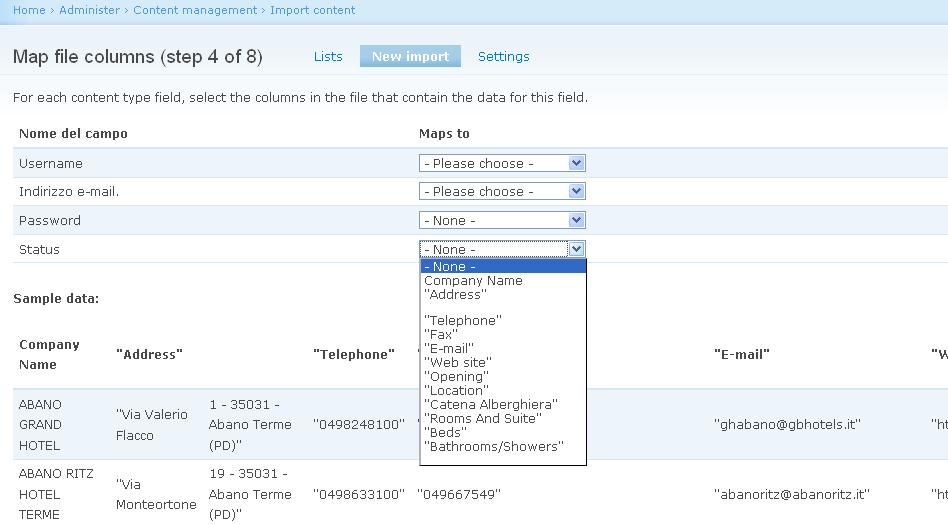
the same similar problem, i have importing users:
Field name Maps to
Username
E-mail address
Password
Status
He eask me to match them with fields of my csv file, but this is wrong to my eyes..
| Comment | File | Size | Author |
|---|---|---|---|
| #6 | import.JPG | 57.91 KB | matteoraggi |

Comments
Comment #1
Robrecht Jacques commentedWhat is wrong? I don't understand what you are asking.
Comment #2
Robrecht Jacques commentedComment #3
indiapoly commentedok so you are trying to import users from an CSV file and you want
Username
E-mail address
Password
Status
These fields to be available in mapping with CSV fields.I think this is already available in user.inc.
YOu can check file:-
node_import\supported\user.inc Line 72
Thanks :-)
-Inder Singh
Comment #4
matteoraggi commentedI mean that for example for the "Input format" field, but the same is for others, it ask me to match it with fields of my csv file, but this is illogical, how I can match a telephone number or fax or addres, with "Authored by" or "Authored on"? and the same problem with all fields listed over..
Comment #5
Robrecht Jacques commentedYou only need to map the fields that are present in your CSV file. If there is a column with the author, map it to "Authored by", if not, don't map it. For the fields you don't map, you will be able to set the default value to use.
Comment #6
matteoraggi commentedI can't map them , because have no sense to map authord on, with a telphone number or a fax , ora name of a company or adress etc..
and I don't see which is default value, I just see blank or strange things coming casually only from my csv fields, for example in past , I could coose if generate password or import this from csv file, now instead I can't
or if take username from csv file or generat it casually, now I can't
etc..
Comment #7
Michsk commentedif you cant match it that leave the select list on none. Then you will be asked in the next screen what for option to give this field.
Comment #8
Robrecht Jacques commentedI still don't understand the question.
If your CSV file has the data, map the field.
If it doesn't, do not map the field.
Can't make it clearer. If anyone can, reopen the issue.