

Closed (fixed)
Project:
Views (for Drupal 7)
Version:
6.x-2.2
Component:
page displays
Priority:
Normal
Category:
Bug report
Assigned:
Unassigned
Reporter:
Created:
3 Feb 2009 at 19:13 UTC
Updated:
7 May 2018 at 20:34 UTC
Jump to comment: Most recent, Most recent file

Comments
Comment #1
merlinofchaos commentedUnable to duplicate.
Steps I took:
Edit view 'tracker'.
Select 'clone'.
Change name to 'trackerclone'.
Select page tab.
Select path. Change path to 'trackerclone'. Click update.
Click save.
Select view "Page".
I am now visiting "trackerclone" and see the new View.
Comment #2
stg11 commentedOK, I tried it again with a different view on another website and it seems to be working. I'm not sure what went wrong in the other case.
Comment #3
merlinofchaos commentedMy guess is that maybe the view hadn't been saved; the way the Views UI caches it's very easy to have a modified view that isn't saved and unless you look at the 'changed view' line you may not realize it.
Comment #4
kellyllek commentedI just cloned a view, but the clone doesn't have an "Page settings" options, so I can't change the path for the cloned view. This is for a photo gallery. Will I have to create a new view entirely for each photogallery I make? My aim was simply to change the taxonomy filter and I could easily define each of my galleries. If I can't change the path I'm not even sure what "clone" is for?
Comment #5
joergenaj commentedI had the same problem. I am doing a video turorial about cloning. No Page settings. BUT when I remembered to select the name of the gallery I was cloning from, instead of "Defaults" it was working as it should.
Comment #6
mwright1 commentedI am having the same problem, after peforming a clone.
My guess is that this is due to drupal 5.3 and it will be because of an "&" in the code ie function(&$something,$somethingelse)
similair problems have been fixed that I was having by following posts on drupal.org that got me editing the code like this (sorry not much of a coder so I can't elaborate any more)
Would be great to fix this -- no view cloning for people on php 5.3 with latest drupal 6.14
***UPDATE***
tad embarassing -- you have to click Add display PAGE
This is not obvious from a human computer interaction perspective -- my mistake though
Comment #7
PeterChanYC commentedHi, I'm using Drupal 6.15 on PHP5.2.11.
At q=admin/build/views, I cloned a view.
On q=admin/build/views/clone/Story, I must change the view name (very good!).
On validation, I got to q=admin/build/views/edit/ and edit the view properties.
From here, I can save or cancel. But no where can I change path name!
Back to q=admin/build/views,
there is a path attribute to each view: my clone has the same path as the original !
and I can't change the path name via the edit link.
What have I done wrong ?
-----
OK, I'm being short-sighted. It's on the tab 'page'. Click on page settings. There you go !
Maybe the distinction between the view properties, 'page' view properties, etc. is not clear.
Comment #8
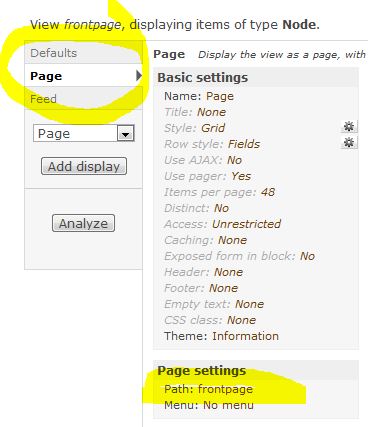
andysharp commentedMaybe this is obvious to other people, but when the other comments refer to the "page" tab, they mean the "page" link in the first column when you are editing a view. When you click it, the second column now has a "path" option that you can edit and change. (I uploaded a screenshot from my Drupal 6 version if it helps).
Comment #9
vayu commentedThis is the same problem I'm having with 8.3.7. I cloned the content listing. When I changed the path the new path shows up on the views edit form, but on the main listing of all views page it still shows the old path. When I manually go to the new path name, I get a not found error. I've tried saving it, clearing all caches, saving again, deleting the clone and starting over. Anyone have some things for me to try?
Comment #10
thorandre commented@vayu: Yes, I've seen the same. And I guess it happened when you cloned the /admin/content view?
The problem then is usually that the "Menu: Tab: Content" also is cloned from the original and seems to give a conflict. Removing that menu item fixes the issue usually.
Comment #11
Ralf Eisler commented@vayu: Thanks for the hint. Changing from “Default menu tab” to “Menu tab” under “Page Settings > Menu: Tab:” did it for me.