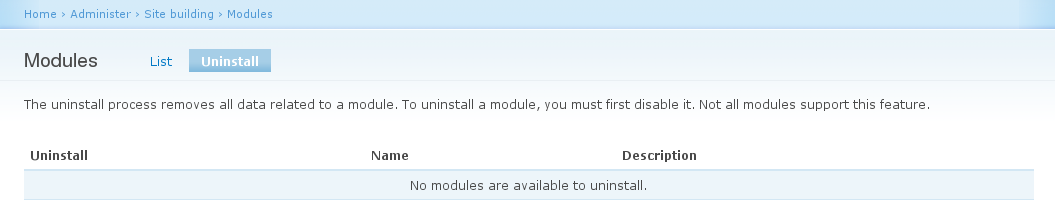
I don't know if anyone's planning to work on the uninstall tab in D7, but I see five significant usability problems that could use some attention:
1) You have to go to a separate page to uninstall ...
2) where you may or may not see any modules ...
3) and then you are told that you have to go back to the previous page to disable the module ...
4) because it doesn't give you any information about whether or not it currently is enabled ...
5) and then you have to *check* a checkbox to uninstall (the opposite action to the previous page where you *unchecked* to disable)
For a new person or someone who doesn't do much admin work, it's *very* easy to overlook the uninstall tab. Especially since the modules page gives you the option to enable and disable a module. To the average person "disabling" is going to mean exactly the same thing as "uninstalling" so why even bother looking at the uninstall page? If you do look at the tab, depending on where you are in setting up your site, you might not actually see anything anyway and you'd think the page is irrelevant.
Aside from the tab being easy to overlook, it seems to break the Drupal paradigm a bit. Most admin pages display information about the actual state of a particular area ... and if you don't like the state you can change it. One would expect that the modules page would tell you, at a glance, which modules are installed (by displaying a *checked* checkbox) ... and if you want to uninstall it you'd uncheck it. And of course, if the module is still enabled, the "Installed" checkbox would actually be greyed out, telling you right away that there's something you have to do before uninstalling.


Comments
Comment #1
Mesdag commentedI have been wondering about this one myself a while back.
The idea behind putting the modules that can be disabled on a separate pages forces you to think about your actions.
You can not accidentally click 'uninstall' and hit 'Next/Do it'. People tend to do it a lot without actually being aware of their action.
There is nothing in the way of deleting a module without disabling it first. However if you would put all the modules you can uninstall on a single page, the page gets cluttered. Also it adds a layer that makes sure you can't uninstall by accident.
However, if we want to simply and take for granted that people might click 'do it' too easily i would suggest the following:
-create a uninstall button per module.
-onclick show a warning message (jQuery box) or show a confirmation page with a clear message that data can/will be lost and the action cannot be undone.
-execute the action, when the action is confirmed
-show success/fail page and offer an undo option (see below).
Perhaps it might be an idea to offer a sort of undo option. Since the actual module files remain on the server you can actually quite easily reinstall the module, except you will need to find a way to restore the data.
You could write a sort of backup script that stores the data in a compressed file that can be used when reinstalling the module.
Comment #2
yoroy commentedtagging…
Comment #3
Bojhan commentedPlease attach screenshots of ideas, avoid adding anything to the module administration page.
Comment #4
mrfelton commentedThis certainly doesn't fully address all the above problems, but possibly provides a slight usability improvement, which doesn't affect the module administration page... I simply reworded the uninstall page help text, and included a link to the module administration page to make it clear where you actually need to go to disable a module prior to uninstalling (the 'list' tab is not an obvious place to click at all).
Attached are two attempts at making the uninstall page help text a little more helpful.
Comment #5
tstoeckler+1 for the second .png: Although this makes sense to some extent from a developer's perspective (but not really either), it is weird to call uninstalling a feature. I would omit "which you can" and go with: ...disabled on the module administration page.
Comment #6
wretched sinner - saved by grace commentedCould we use a confirmation page when disabling a module? The way I think of it working is:
User unchecks an installed module and clicks "Save Configuration"
User is then asked if they wish to keep the data for the modules which have an uninstall function. I see a series of checkboxes, which are selected by default.
Unchecking a checkbox means that data will be deleted (module uninstalled). Leaving the checkbox checked means the module is simply disabled.
(This still doesn't answer what to do with the uninstall page in case someone wants to come back later to uninstall a module they earlier disabled. Maybe the text on the confirmation page could reference the uninstall page and mention that if they don't uninstall now, they can do so later)
Comment #7
Bojhan commentedmrfelton : If you can, create a new issue with that patch, it should go in easily. Patch 1, that is.
Comment #8
stella commentedI couldn't find a new issue that was opened, so I created a new issue #473012: Improve help text on uninstall modules page for mrfelton's first patch. I also went with the 1st patch, because sometimes less help text that says the same thing is better for usability.
The original issue proposed here still isn't addressed, so setting back to active.
Comment #9
tr commentedThe original issue is basically a duplicate of #277513: Make uninstallation of modules more obvious and intuitive, so I'm marking it as such. I've added a reference to this thread on that other issue.