

 Come together with the global Drupal community in Rotterdam, 28 Sept – 1 Oct 2026. Sessions, contribution, connection, and Early Bird savings until 8 June.
I am brand new to using Drupal, so please forgive this very silly question. I downloaded the Acquia Marina theme and I see that others who use that theme have tabs for their menus. When I create a menu, it is what looks to be an unordered list. Any tips on how to make my menus appear in tab format? Thank you very much in advance.
| Comment | File | Size | Author |
|---|---|---|---|
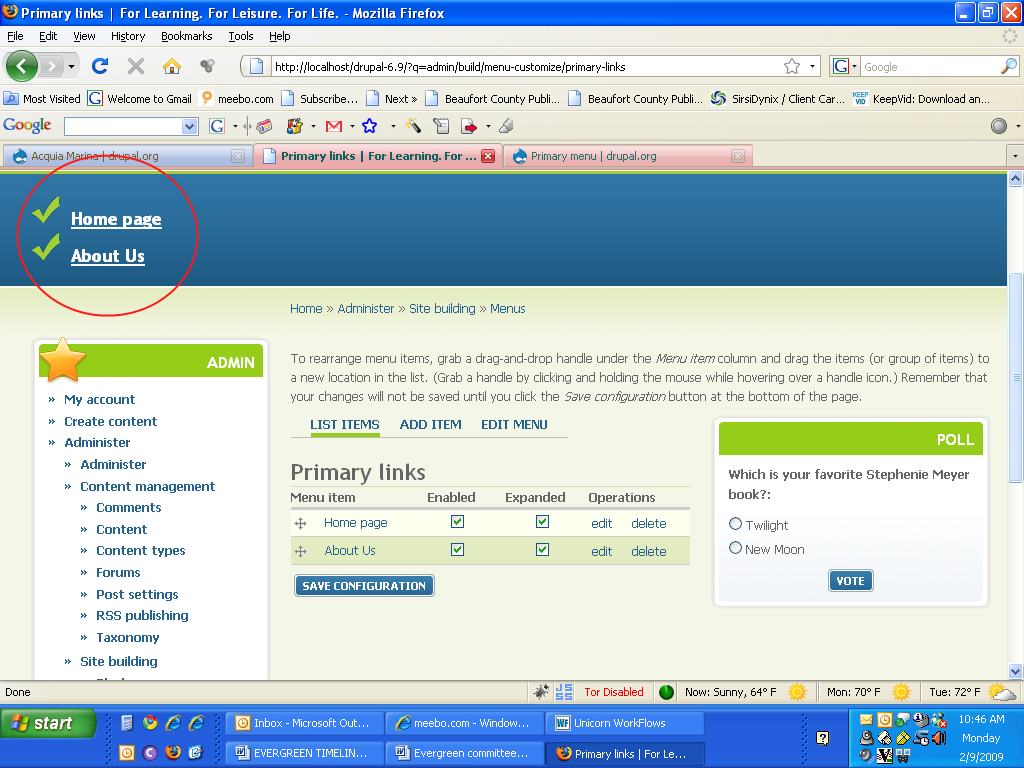
| #2 | drupal-menu-problem.png | 152.08 KB | ElizaD |

Comments
Comment #1
jwolf commentedPlease read the handbook for this theme at: http://drupal.org/node/357261
Comment #2
ElizaD commentedThank you for the quick response. I have read the handbook for the theme and still do not understand what I am doing wrong. I have set up my menu links as the primary links and they are still coming out as an unordered list, not as a tabbed menu (please see attached screen capture).
Comment #3
ElizaD commentedNever mind. I figured it out.
Comment #4
ElizaD commentedComment #6
nerissa commentedEliza D - how did you figure it out?
Comment #7
nerissa commentedComment #8
stephthegeek commentedI believe ElizaD was placing the Primary Links block in the preface region rather than checking the "Primary Links" checkboxon the theme settings. Please see the handbook linked above.
Comment #9
nerissa commentedI ended up figuring it out. I have Simplemenu module installed and I needed to make sure that the theme I was using was not excluded from the list. That was the main reason why I couldn't see it but I had to make sure that the tabbed menu was set as the Primary Menu.
Thanks for your help.
Comment #11
dianacastillo commentedHi I have the same problem, my primary links come out as a list, not tabs as I want them. I am using the Zen Theme. I cant find any documentation for how to change this. thank you
Comment #12
jeremycaldwell commented@dianacastillo, you may want to check out the Zen issue queue (http://drupal.org/project/issues/zen) since this issue queue is specific to the Acquia Marina theme. Best of luck!