

Closed (fixed)
Project:
Rules
Version:
6.x-1.x-dev
Component:
Rules Core
Priority:
Normal
Category:
Bug report
Assigned:
Unassigned
Reporter:
Created:
9 Feb 2009 at 16:35 UTC
Updated:
9 Jun 2012 at 18:41 UTC
Jump to comment: Most recent file

Comments
Comment #1
mitchell commentedThis works on 1.0
Comment #2
schultetwin commentedI can also confirm this bug when trying to 'populate cck field.' Your selected values aren't saved.
Comment #3
mitchell commentedComment #4
schultetwin commentedOh wait, sorry, this was for rules 6.x-1.0, not dev. I'll check upgrade to dev though to double check.
Comment #5
schultetwin commentedNope, I still get this problem in 6.x-1.x-dev.
Comment #6
fagoPlease make sure you are using a recent CCK version and try again. If it still doesn't work, report the CCK version you have used.
Comment #7
Jason Dean commentedI'm getting the same with CCK 6.x-2.3 and Rules 6.x-1.0
Comment #8
dinis commentedSame issue with CCK 6.x-2.5 and Rules 6.x-1.1.
Comment #9
gausarts commentedSame issue reported here => http://drupal.org/node/573956
Comment #10
Royce-1 commentedI'm getting this same issue when a save with AHAH
Comment #11
fagoOk, looks like being confirmed. But I don't have to time to look at it right now.
Comment #12
azol commentedSubscribing.
Comment #13
Bilmar commentedsubscribing
Comment #14
westbywest commentedsubscribing
Comment #15
robby.smith commentedsubscribing
Comment #16
eiland commentedare you sure its a rules issue? I've never used rules, and with me its the same thing.
Comment #17
rconstantine commentedI'm using Rules 1.2, CCK 3.x and have this problem. I'm going to delve into the code and hopefully come up with a patch next week. This is critical for me, so I have to fix it.
Comment #18
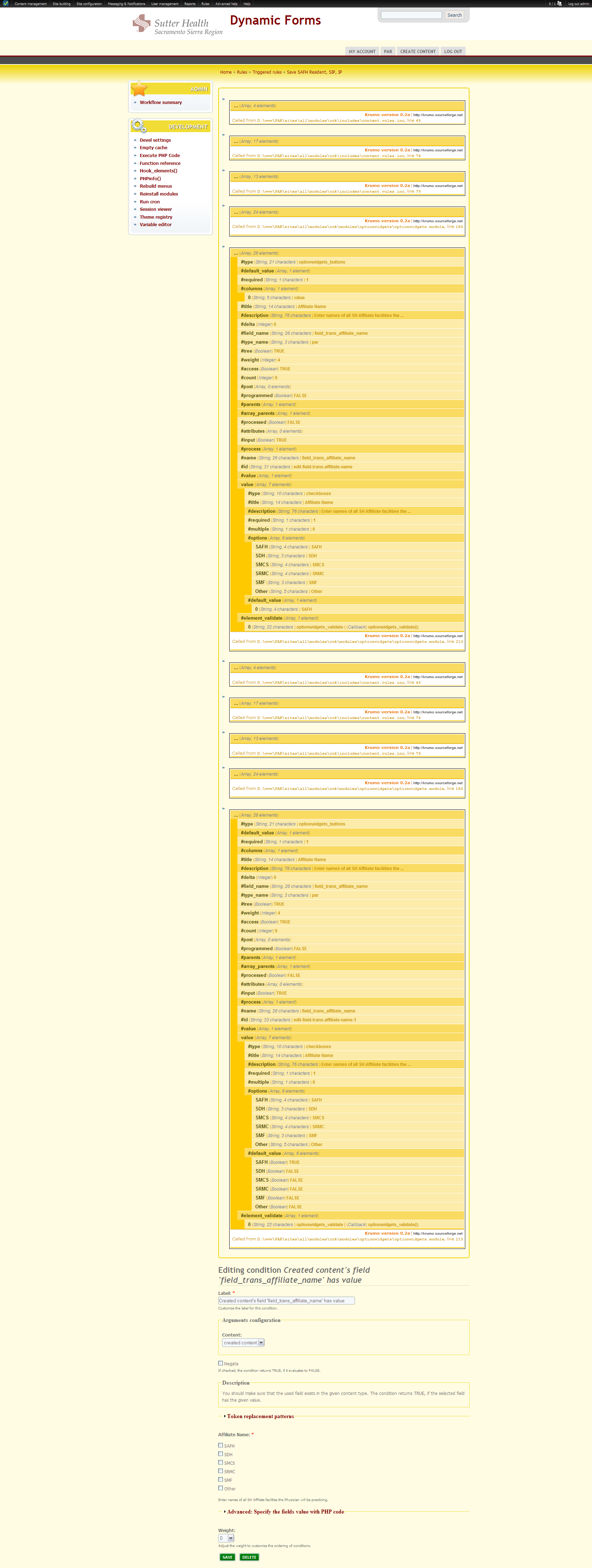
rconstantine commentedAs you can see in the screen shot, the functions which create the CCK portion of the form are called twice for some reason. I'm outputting the contents of the function "optionwidgets_buttons_process". You can see that the values are correct (match a node I created with similar values using this field) the first time it is built, but the second time it is wrong. I'm trying to find where the calls are coming from and what is modifying the default values.
I suppose I should setup a proper debugger so I can figure out the function calls as they happen.
Without that, I've managed to figure out that "rules_admin_form_edit" is being called twice itself, which is a function that is called by Drupal itself I think when the menu path is evaluated.
The menu item in rules_admin.module is:
Is there any reason any of you know of that would cause the menu callback to be called twice?
Comment #19
rconstantine commentedI haven't had tons of time, but I'm closing in on the cause I think. I am currently looking at the content_rules_action_populate_field_form function in content.rules.inc and the first time this is called, everything is fine. The second time it's called, it isn't. I believe that the call to content_field_form is doing it. I'll look at that next. I'm going to check the passed-in variables' values to see whether they change between call 1 and 2. If they do, then I need to figure out why they change. If they don't, I need to figure out why content_field_form is behaving differently each time.
Comment #20
rconstantine commentedWell, crap.
I tried something else. I made use of the devel module's dsm function to see the state of the $form_state array at various stages of the page building for both an instance of the field as seen on a node edit page as well as the rule condition edit page. The new problem is that they match, so what that means is that for some reason the display of the form is what is wrong, not the data structure behind it. I think. Maybe.
FYI, the data one selects (checks off) on the rule condition edit page is actually saved, it just doesn't end up as #default_value where it should. Also, they don't seem to work for actual rule evaluation, which is something else I need to look at. Why are the values savable but not usable? Weird. I wish complicated modules like rules had visual diagrams of execution like flow charts or something. It would make this a lot easier.
Comment #21
rconstantine commentedPer my investigations, the values are saved to the DB, but just don't show up when you revisit the admin setup page for that condition. My current work-around is to name the condition with the value(s) that should be set and then if I really need to make a change, make sure I set them each time and adjust the name accordingly. What a hassle.
At first, I thought the values were not saved, but that was because I didn't understand that content_taxonomy values and optionwidget checkboxes weren't being evaluated as I expected. The default way is that you will only get a TRUE if ALL checkboxes match, whereas I wanted a TRUE if AT LEAST ONE checkbox matched. I suppose I could have negated on having all others selected. Maybe that would have worked, but it seems counter-intuitive to me if that is the case.
For example, if my checkboxes are colors in response to "What colors do you like?" and if I want to fire a rule off when 'Red' is chosen, I would expect to select 'Red' in my condition for 'has value'. However, if the user has selected multiple colors, the evaluation is never TRUE. Like I said, you could do the opposite (maybe) and select all other colors and negate it, such as IS NOT (black, blue, green, etc.), but that might produce the same issue.
So my solution was to modify the _content_rules_field_has_value function as seen here:
http://drupal.org/node/343403#comment-3020586
I hope that helps some of you. I have, unfortunately, burned too many days on this issue and now have rules that are behaving as expected. I'm not sure (due to other demands) that I'll get another chance to look at this issue and actually get the checkboxes' #default_value(s) to properly populate. But at least we know now what the issue really is. Perhaps fago or another with more experience with this module will know exactly where to look.
Comment #22
mitchell commentedClosing old issues. Please reopen if this problem still requires maintenance.