

Active
Project:
GMap Module
Version:
7.x-2.x-dev
Component:
User interface
Priority:
Normal
Category:
Feature request
Assigned:
Unassigned
Reporter:
Created:
9 Feb 2009 at 16:58 UTC
Updated:
25 Jun 2013 at 05:16 UTC
Jump to comment: Most recent, Most recent file

Comments
Comment #1
matthew_ellis24 commentedUnfortunately that page is showing a table view not a GMap view so I can't say for sure, but..... it sounds like the marker files aren't in the right place so it's using the alt text for the image as it can't find the image file itself. Check they're there and accessible
Comment #2
keyone commentedThanks for the reply. The markers do show up properly in the Gmap view, which is here:
http://interstateeateries.com/map/node
I guess I explained it wrong. I want markers in the table view. The reason I want the markers to show up in table view is that they are color coded according to taxonomoy.
Comment #3
matthew_ellis24 commentedOh, don't know I'm afraid. Might have to use http://drupal.org/project/taxonomy_image and duplicate the images
Comment #4
zhte commentedUnder style: GMap in your view try clicking on the setting icon next to where it says GMap. An option box should appear below the view with some options:
Marker handling:
By content type (for node views)
By term (for node views)
Use single marker type
Check the one you want (i.e. the same market for content types, or the same marker for nodes in a certain taxonomy).
Personally I wish this were more fine grained - a market via taxonomy term for a certain content type, and a market by content type for all other content types.
Comment #5
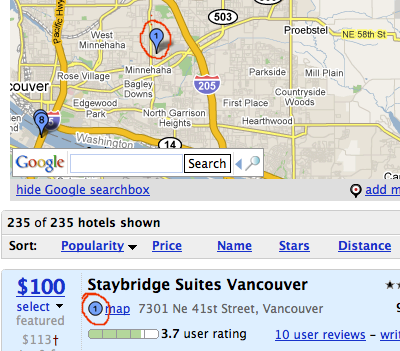
aclight commentedWhat I would like (and I think what keyone was asking for) is for the GMap module to provide a field that would contain the marker used for that particular result on the map itself. For an example of this, please see the attached screenshot (not created with on a Drupal site, but demonstrates the basic idea). I'm using numbered markers, and though I can print the number with the view result it would look even nicer if instead of printing the number I could just display the marker next to the result.
Comment #6
nemchenk commentedDid anyone get anywhere with this? I'd love to be able to use the Gmap marker I have set for taxonomies in Views other than Gmaps...
Comment #7
markdavidzahn commentedI would also like to know how to do something like what is mentioned in #5.
Comment #8
khosman commentedgreat idea
Maybe via customfield > php code?
Comment #9
ejohnson commentedInteresting suggestion khosman. I'll have to check this out and see if the custom code blows my mind.
I'm assuming no one has a solution that they would like to share for this issue still?
Comment #10
Anonymous (not verified) commented#5 is what I want, too. Anyone?
Comment #11
Josh Benner commentedThis worked (at least for now) on a recent map:
Use Global: View result counter
Rewrite output to:
(adjust path to gmap as needed)
Note: numbers only go up to 26, so pagination (or more markers) may be needed.
Comment #12
mthak commented#11 no longer works in latest dev. Any alternative suggestions/solutions?
Comment #13
kniekel commentedMatthew_Ellis, it seems that you succeeded in having different markers in one map. At least I see green markers and RIP markers on http://interstateeateries.com/map/node
This is what I want to have, too (No RIP, but different markers on one Gmap ;-) ). But somehow it doesn't work for me on https://www.schweinfurt-evangelisch.de/karte
What did you do to achieve that?