

Closed (works as designed)
Project:
Quotes
Version:
5.x-1.81
Component:
Code
Priority:
Normal
Category:
Bug report
Assigned:
Unassigned
Reporter:
Created:
13 Feb 2009 at 12:52 UTC
Updated:
20 Jul 2009 at 18:16 UTC
Jump to comment: Most recent file

Comments
Comment #1
dinis commentedFurther testing shows that the "access quotes" setting allows visibility of individual quotes, but not the block which displays them.
Comment #2
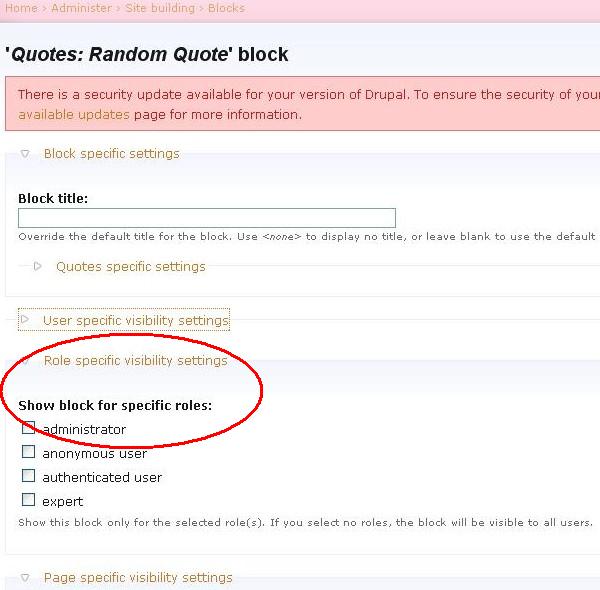
nancydruBlock visibility is set on the block configuration page - see the attached image.
Comment #3
dinis commentedHi Nancy,
I've tried that (it was the first thing I did) no matter which roles I allow, or if I allow every role the block simply won't display. However if I then grant "Administer Nodes" to a given role, the block shows up and the configuration page settings work as intended.
Every other block I have, custom, my own, or ones generated by other modules work correctly, it is only this one which requires the "Administer Nodes" permission to view.
Comment #4
nancydruAre you using any kind of access control module, such as node_access or taxonomy_access_control? I can see my blocks as anonymous or a simple authenticated user without any special permissions.
Comment #5
dinis commentedHola,
I am indeed using taxonomy_access_control, though even with roles which have tac disabled the block refuses to show. I've also created a permission and addedd all quotes to a category with explicit permissions set in tac and that does not work either.
Cheers,
Danielle
Comment #6
nancydruI cannot reproduce this. It works fine for me and you are the only one reporting it. I have to believe that there's some other module on your site that is preventing it from working right.
Have you got any theme overrides? Have you tried it with an unmodified core theme?
Comment #7
dinis commentedHola,
I've done some more digging today and discovered that disabling the TAC module entirely seems to resolve the issue of the Quotes Block from appearing.
What is curious is that the Quotes block is the only block which has this symptom, all the views blocks and custom blocks / blocks from other modules display correctly.
As I posted previously, I've tried giving quotes entries a content type and allowing the view and list permission with TAC, but this does not appear to make any difference. However TAC generally prevents uncategorised content from being visible to users who do not have the administer nodes permission, so this might be related.
Any ideas?
Cheers,
Danielle
Comment #8
nancydru"giving quotes entries a content type" -- I don't understand this; they have always had a content type of "quotes".
Comment #9
dinis commentedSorry, I mean assigning the quotes content type a category.
Comment #10
nancydruI have seen TAC only on one site that I've worked on, and that site no longer exists. I have no way to even try to test this.
Comment #11
nancydruHave you asked the TAC maintainer about this?
Comment #12
dinis commentedI haven't I'm afraid, I did find a workaround though.
To get around the problem I made a custom block in Views using the random output feature and a page value of 1.
Cheers,
Danielle
Comment #13
nancydruOkay, without any input from the TAC people, I'm going to have to say it's a TAC or setup problem.
Comment #14
ctmattice1 commentedI use TAC and do not have a problem with the quotes block display. I am not using views though.
What I have is quotes module view setting in taxonomy Access:permissions to allow and ignore on all other settings. Of course I have uncategorized nodes set the same. Found this has to be done with all user roles you have, I missed a couple and both quotes and the quotes block wouldn't show without administrator permission.
Not sure if this helps or not.
Comment #15
nancydruThanks, Chuck, it sound like it should help.
Comment #16
dinis commentedHi Chuck,
That's very interesting, it sounds like you've nailed it.
Where are you configuring uncategorised nodes? My understanding was that feature was not accesible with the existing UI.
Comment #17
ctmattice1 commentedI'm using TAC 5.x-1.1 and quotes 5.x-1.81
you can find the Taxonomy Access:Permissions at
yoursite.com/admin/user/taxonomy_access
This is where you find the user roles, go into each role listed and the uncategorized nodes is the top setting. Click it to open the form if it is closed and check the view permission. Do the same for quotes which you'll find futher down the page. also in quotes on the far right be sure to have the list set to allow.
Save the permissions
These are the setting I use for all roles to view. If you allow your users to create quotes you will have to change permissions accordingly in those roles making sure the create permission is set to allow. If they can edit then that permission will need to be set as well. Test this first though, it is highly possible this setting from what I've seen in the past will allow ANY user to edit ANY quote (based on 4.7x, hopefully TAC maintainers have fixed this in 5x to work with module permissions, haven't tried it)
I never give permission to delete, period. It is always set to ignore.
These are my prefs but after getting burnt a few times by malicious users I decided it was better to allow the view and list permission but I don't allow anything else, it's set to ignore. If I trust them I have one role which I call authors with create permission and have subscriptions setup to notify me on any post.
It's easier this way to control what posts to the site and just as easy to delete content and users as necessary. Sorry so longwinded but TAC use to be a real plus but can also be a real pain. Again these comments are base on 4.7x and hopefully maintainers have fix in 5.x
Comment #18
jweedman commentedI'm having a similar problem.
It should be noted, the main difference with my issue, is that Taxonomy has nothing to do with it. It seems that one of my Custom Content types can only be seen by users if they have the "Administer Nodes" permission. You would see how this could be a problem when I want everyone to see the block, but would never dream of giving them "Administer Nodes" rights.
I'm creating a view that outputs a block. One of the filters on the view is "Node: Type" set to only allow my Custom Content Type. Well... my root user (user ID=1) can see the block, but a user that does not have the "administer nodes" permission cannot see it. I've NEVER had this problem with any other custom view or block I've made. I'm currently looking into the Drupal API for node_access('administer nodes', $account) to see if there's anything screwy happening there.
I even disabled Taxonomy on my site to see if it affected the visibility of the block, but still wasn't able to see it. I've checked all the permissions for the view, for imagecache (one of the fields in the view), and on the content type.
Apart from this issue happening with Taxonomy, does anyone have any ideas? Any help would be greatly appreciated...
-jweedman