

 The 2026 Drupal Business Survey is open. Your response will help shape the future of the Drupal business ecosystem.
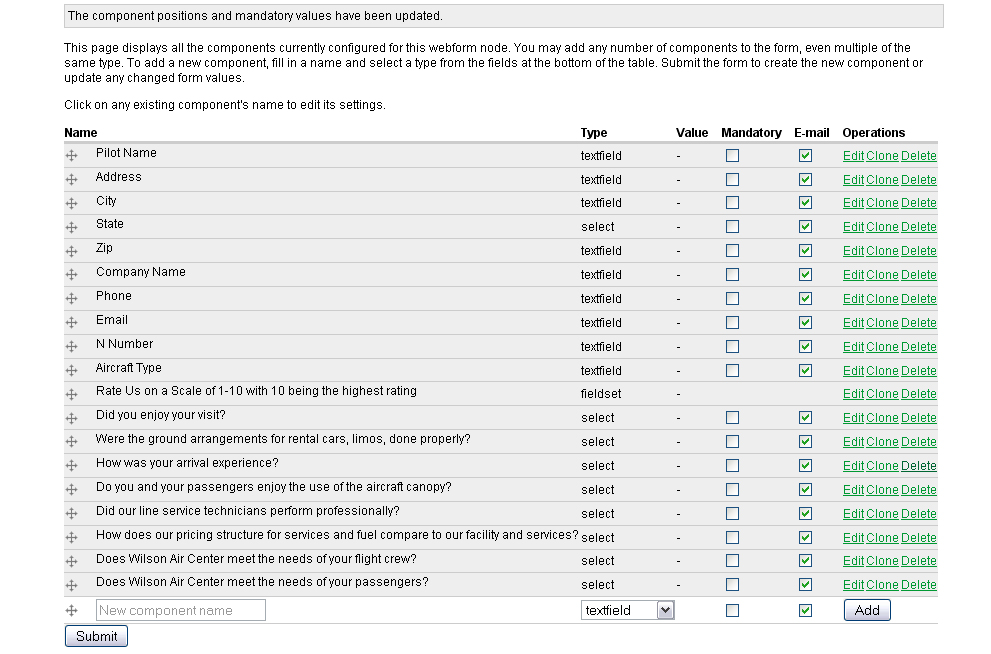
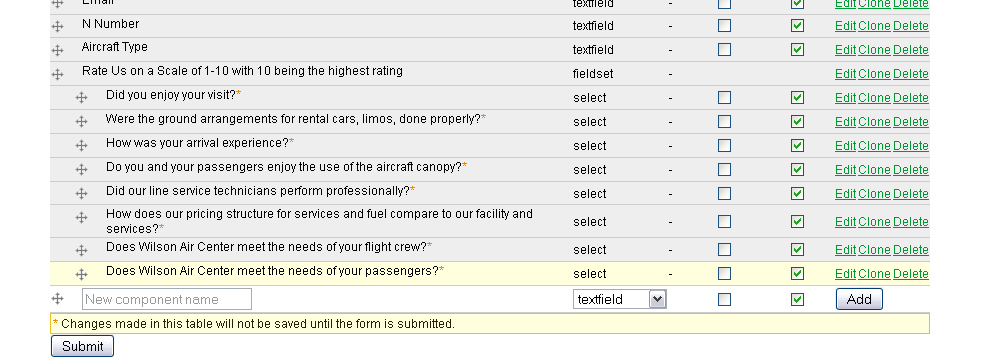
I can't seem to figure out how to place components into fieldsets. When I go to Edit > Form Components to re-arrange the components underneath and to the right of the fieldset, the changes don't get saved. Attached are screenshots showing what the form looks like, what I try to do in edit components mode, and what the edit components form looks like after submitting changes.
| Comment | File | Size | Author |
|---|---|---|---|
| #17 | Screen shot 2012-01-03 at 1.52.59 PM.png | 148.13 KB | Dantien |
| #12 | Screen shot 2011-12-27 at 3.46.43 PM.png | 147.45 KB | Dantien |
| #1 | webform-fieldset-solution.jpg | 175.11 KB | kitsunechan |
| webform-fieldset-edit2.jpg | 345.83 KB | kitsunechan | |
| webform-fieldset-edit.jpg | 222.3 KB | kitsunechan |



Comments
Comment #1
kitsunechan commentedNevermind. I found a drop-down called Parent Fieldset for this in the advanced settings for each component.
Comment #2
kitsunechan commentedComment #3
rcharles commentedUnfortunately, I do not see this "advanced" option under component edit or the specific fieldset component?
Comment #4
bobmct commentedI too cannot find the "advanced" option either and it is required
Comment #5
quicksketchThe positioning options are hidden on the individual component forms. Just use the drag and drop handles on the listing of components to indent any component underneath a fieldset.
Comment #6
pluginguin commentedWell... I'm using Drupal 7 and I also don't see the advanced settings inside the individual components, but I also don't see the drag and drop handles 'Quicksketch' is writing about.
So how do I do it?
Comment #7
quicksketchThe handles are probably being hidden. Click the "Hide table weights" link in the upper right hand corner of the table. This is supposed to be a usability feature of Drupal 7, but generally causes confusion. :\
Comment #8
quicksketchComment #10
Dantien commentedWhere is the "Hide Table weights" link? I dont see it anywhere on the webform components. I can't move the components via drag-and-drop either so I'm unable to put any fields in the fieldset.
Comment #11
vernond commentedThe "Show row weights" and "Hide row weights" links (actual text depends on which mode you're currently in) show at the top right hand side of the Webform Form components table where all your current forms components are listed. When you click on "Show row weights" your Form components page table will reveal an extra column to the left of the Actions column, clicking on "Hide row weights" hides this column again.
If you do not find these then your current theme is the most likely culprit.
Try changing your admin theme to Garland (in Drupal 6) or Seven (in Drupal 7) and make sure that your browser has JavaScript enabled to fix the drag 'n drop issue.
You may need to upgrade your version of Webform if you're genuinely still on version 6.x-2.4.
Comment #12
Dantien commentedsadly, I've checked all those and still can't get it to work. I have Webform 7.x-3.15 installed, JavaScript enabled on Chrome and Firefox (Mac), and am using the Seven Admin theme already. Screenshot attached. Cannot figure out how to get items in fieldsets!
Comment #13
vernond commentedCool, thanks for the screenshot. These are the steps you need to follow:
Add a new fieldset component (it's an option in the component type dropdown list);
Using the drag handle next to your new component, drag the fieldset to be above the first field you want to include in the fieldset;
With the drag handle of the first component you want included, drag it slightly to the right until it is indented;
Repeat this for all components you want in the fieldset;
IMPORTANT - click on the
SubmitSave button to save your work;Now click on View to check out what you've done.
Comment #14
Dantien commentedYeah, that's how I figured it could be done, but without the ability to drag components, I can't follow your instructions. Sadly, the dragging doesn't work at all for my Mac browsers...
Comment #15
vernond commentedMost weird - which Mac browsers do you use?
Comment #16
vernond commentedActually, it's probably not that weird. I am certain that Mac browsers work: a) because quicksketch works on a Mac; b) you are definitely not the only Webform user that is on Mac.
Getting back to your screenshot in #12: Add a fieldset component. Without a fieldset component you will not have fieldset functionality.
Comment #17
Dantien commentedI understand I may not have communicated clearly enough, but I had added a fieldset and couldn't get things to move "into" it, then removed the fieldset before taking that screenshot. Nonetheless, I've re-added one (see screenshot) and still there seems to be no way to move any fields into the fieldset.
I'm using Google Chrome for the Mac, but this also fails to work on Firefox. I'm not sure why it doesn't work (the click-drag sorting OR the fieldset functionality), but it seems that fieldsets have no way of being set up without click-drag?
Comment #18
vernond commentedDoes your mouse pointer change to indicate a link when you hover over the drag handles? I'm wondering if some obscure theming issue is possibly positioning a div over the drag handles somehow so that they never receive focus (or something in that line anyways).
Comment #19
Dantien commentedSadly the mouse pointer doesn't change into a pointer, only a four-way arrow identical to the one indicating the drag ability. And while I am using a customized form, when changing to a more common form like Bartik, this still occurs.
Comment #20
Dantien commentedInteresting, I installed a new theme (Jackson) on a different site/server and the drag functionality works fine (to move blocks around). But on the problematic installation/theme, I can't move the blocks on the same admin page. So it must be the theme causing the problem. I'll add the webform module to the other (test) installation and try to replicate the problem.
If it's a theme issue, what can I do to fix this?
Comment #21
vernond commentedFirefox has a webdeveloper plugin (firebug and other such tools also exist) which may help you identify the theme issue.
Comment #22
pelsdyret commentedI also use MAC and Chrome. I had it working by doing the following:
This works for me in Drupal 7, on MAC with both Chrome and Safari.
Comment #23
michaeldaly352 commentedWith D7, create a new component, of type Fieldset. Name then save it. Then go back to the existing component that you want to put in the newly created Fieldset. Scroll down to the bottom and selection 'Position'. Open it and you'll see an option 'Parent Fieldset'. In addition to the default position of 'Root', you should now see the name you chose for the new Fieldset. Choose that new Fieldset, save it, then View the Form. You'll understand the changes.
MD352