

Closed (fixed)
Project:
XML sitemap
Version:
6.x-1.x-dev
Component:
xmlsitemap.module
Priority:
Normal
Category:
Support request
Assigned:
Unassigned
Reporter:
Created:
18 Feb 2009 at 01:18 UTC
Updated:
13 Apr 2009 at 16:10 UTC
Jump to comment: Most recent, Most recent file

Comments
Comment #1
avpadernoFor the nodes, the last commits should update the content of the xmlsitemap_node table.
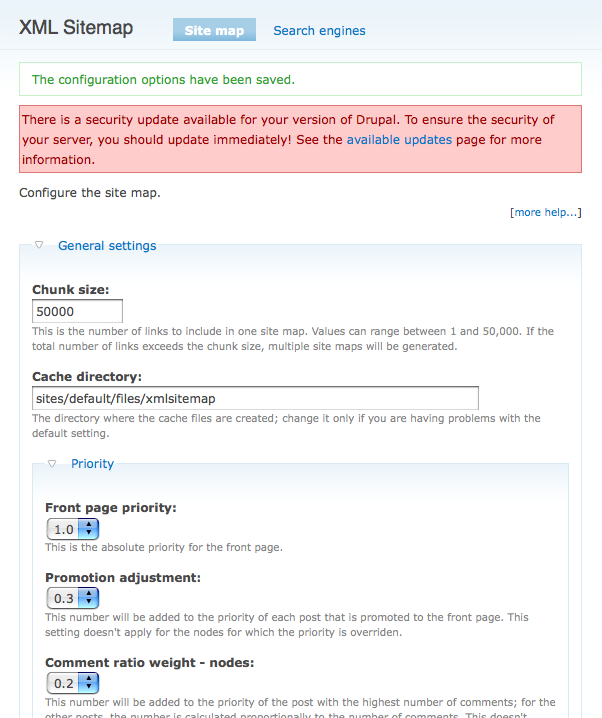
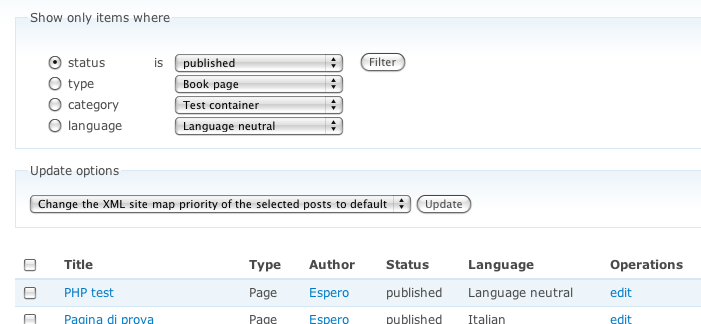
If you want to update the content of that table with the new nodes, go to http://example.com//admin/content/node, and select the operation showed in the attached screenshot; then, click on Updated.
The same is true for taxonomy terms.
Comment #2
dirksonii commentedPerhaps I'm misunderstanding how to use the admin/content/node tool, but it appears that I can only do operations on one page at a time. You expect me to do these operations for all 5000+ nodes of my website? That would take weeks of dedicated clicking time, and more alcohol than I possess to get through the tedium of it. We need a better way of adding old nodes to the sitemap.
Comment #3
avpadernoThat is not true; if you notice, for every row representing a node there is a checkbox that select to which nodes the operaration will be applied. If you want to apply the operation to all the nodes shown in the page just click on the checkbox close to Title.
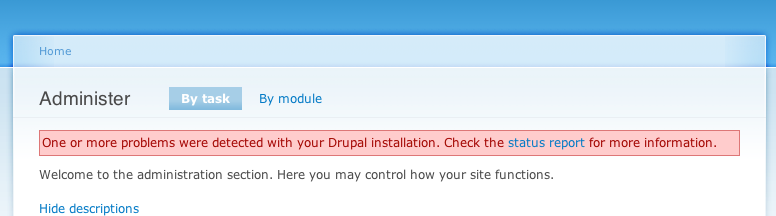
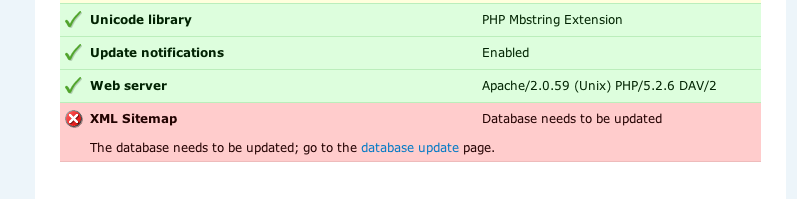
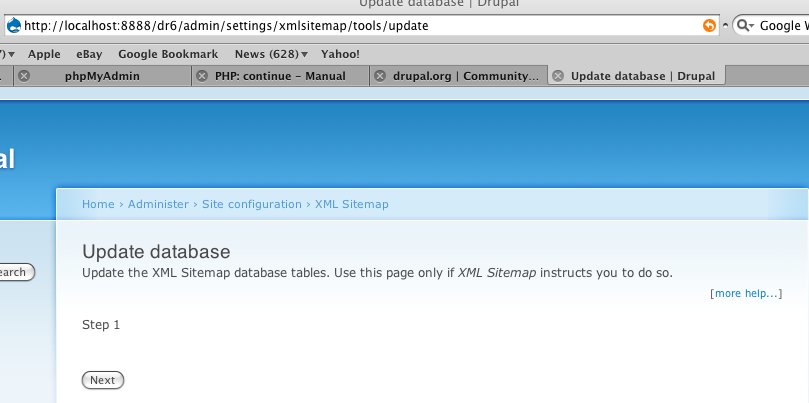
In the latest commits, xmlsitemap_node.module add the reference to nodes that is not still present in its own database table; if you correctly updated the module (by visiting the page http://example.com/update.php), you should have noticed, in http://example.com/admin a warning message (see Voila_Capture_10.png). If then you click on the link reported in the message, you would notice that the page you are redirected to contains an error message (Voila_Capture_11.png); click on the link present there, and you will see the XML Sitemap tools page (Voila_Capture_12.png).
Comment #4
dirksonii commentedWell, yes, I know you can do pages of nodes at once. That's part of my point- I have hundreds and hundreds of these pages of nodes that I'd need to do this update to. 5000+ nodes makes for lots of pages of nodes, and I'm not sure I see anywhere to click to stop the pagination.
I'm not sure what you mean by the second bit. I'm using the latest V6 xmlsitemap module, installed from scratch, and there are no updates available or error messages anywhere.
Comment #5
avpadernoIf you didn't see the message I am talking of, then or you didn't installed the last version available, or you didn't visit the page update.php of the web site where you installed XML Sitemap.
Comment #6
dirksonii commentedEr... To restate myself: I'm using the latest V6 xmlsitemap module, installed from scratch, and there are no updates available or error messages anywhere.
Comment #7
artscoop commentedIf you want to submit old nodes to the XML Sitemap Easily, you can use the module called Views Bulk Operations.
It will help you create a view, where you will be able to select the nodes you want to appear in the Sitemap.
Then you will be able to add these nodes to the sitemap.
That's an easy way to work, I think.
Comment #8
avpaderno@#6: Maybe I don't understand correctly what you are saying, but if you are saying there are not updates of the tarball archive, why are there one update on February 19, 2009 - 12:24 PM UTC, and on February 20, 2009 - 12:21 AM UTC?
If you are reporting what Drupal says in the Available updates page at /admin/reports/updates of the Drupal-powered site you are using, then that pages wrongly reports that the last update has been on February 18.
To see the last time the tarball archive has been generated for the Drupal 6 branch, you can look at http://drupal.org/node/190839/release.
Comment #9
avpadernoNow Drupal is able again to correctly report the latest version available of a project (see #378890: package-release-nodes.php creating new entries in {files} and {project_release_file} when rebuilding -dev snapshots).
To correct what I reported before, after you install the latest version, and you ran update.php, go directly to /admin/reports/updates, see the warning message XML Sitemap will give you, and follow what it suggests you to do.
Take in mind that the site map content will be updated the first time its content is requested. I passed to 6.x-1.x-dev on my web site (before I had the 6.x-0.x-dev version installed), and it worked for me.
Comment #10
AlexisWilke commentedHi guys,
I had that problem too. A totally empty map.
I posted on this thread: #379854: The site map is not being populated
The solution worked. You need to (1) go to the node content and then (2) make sure the CRON system runs at least once. Then a wget of your sitemap.xml will work.
Thank you.
Alexis
Comment #11
avpadernoSee also the reports I opened (#380636: The update of the database should start in automatic, #380646: Implement a batch operation to update the database tables). After I am done with both the tasks, the project modules will automatically update their database tables, without the need for the administrator to check a page, or click any links; the procedure will start automatically when update.php gets executed.
Comment #12
Anonymous (not verified) commentedsubscribe
Comment #13
tamhas commentedAlways nice, when one has a problem, to find an existing thread about the problem ... except when it turns out not to help...
I have just downloaded the latest release on a 6.10 Drupal base, enabled the module, added user permissions, set a few things in Configure ... mostly enabling everything except user profiles ... and ending up with 463 bytes of sitemap. Not empty, but just a pointer to the site. So, finding this thread, I went to the admin/content/node page and tried Add to sitemap and change sitemap priority to default (as suggested above) for all nodes ... and ran cron ... and I have exactly the same file I started with except the timestamp has changed. One this first site, I have a mere two pages of nodes ... manageable, but I sympathize with the person with 5000 nodes. But, so far I can't get anything beyond the site itself to show up.
It does seem like there should be a documented procedure and utility for adding this to an existing site.
Comment #14
kmillecam commented@artscoop, how would you go about using Views Bulk Operations to add nodes to the XML Sitemap. I've been working with it for an hour or so and can't see how it can be done.
Kevin
Comment #15
Anonymous (not verified) commentedGo to admin/settings/xmlsitemap/tools and click Continue.
Comment #16
kmillecam commentedEarnie,
The url you provided takes me to a settings page.
It doesn't appear to have a way to add old content into the sitemap (see attached).
Kevin
Comment #17
AlexisWilke commentedTry the admin/content instead. There is an option in one of the drop down in there.
Comment #18
kmillecam commented[quote]Try the admin/content instead.[/quote]
Thanks for the direction AlexisWilke but that's not really an option. I have 200,000 nodes on my site so that would mean submitting this page 4,000 times -- if I could filter on content that's not already in the sitemap; which, unfortunately, I can't.
I sure wish there was a script or tool of some sort.
Comment #19
tamhas commentedClearly with 200000 nodes, one needs a different approach, but I have a relatively new site with only two pages of nodes and I could manage with the content approach ... if it worked. But, I select a page of nodes, chose Add to site map, and click update and it says Processing and the timestamp on the file updates, but there are no nodes in it. The log tells me:
Details
Type access denied
Date Tuesday, March 10, 2009 - 16:21
User boss
Location http://www.cintegrity.com/batch?id=11&op=do
Referrer http://www.cintegrity.com/batch?op=start&id=11
Message batch
Severity warning
Hostname 66.120.4.105
Operations
So this seems to be part of the same irony that anonymous can access the site map but the administrator can't.
Comment #20
AlexisWilke commentedkmillecam,
I agree that the admin/content is limited in that way.
I would be nice to have a button to just say "re-assign everything".
Kiem is working on 2 versions, I think. It is annoying because we could otherwise offer him patches, but he does not want to release version 2.x... Hopefully the new version will work like a charm. 8-)
Thank you.
Alexis Wilke
Comment #21
tamhas commentedFor someone with 200,000 existing nodes, I think it goes a little beyond "nice" :) If I were facing that I think I would say "xmlsitemap would be nice, but ...".
For the record, I just tried creating a new node. The good news is that the log shows the site map being submitted to all three search engines. The bad news is that the only change to sitemap.xml is the time stamp. Total contents are and always have been:
<?xml version="1.0" encoding="UTF-8" ?>
1.0-
-
http://www.cintegrity.com/
2009-03-11T00:35:48+00:00
always
Be nice too to have some clue what significance the settings have. E.g., priority.
Comment #22
pwieck commentedI have also tried everything here and in other issue post without success. I have 6.10 and 3-9-2009 sitemap dev.
Comment #23
avpadernoThe priority is simply the priority of a link in the site map.
Comment #24
Anonymous (not verified) commentedRe: #16
Things have changed a bit; i.e.: Kiam has been busy. One issue I see is that the .install files calling functions such as xmlsitemap_helper_update_sitemap needs to ensure that the xmlsitemap_helper module is loaded by adding a module_load_include('module', 'xmlsitemap_helper') as the first thing. There is no assurance that the module will be loaded that contains the function otherwise. You might try something like the following untested script.
File: load_xmlsitemap.php
Put the script in the document root directory for your Drupal installation and give it a run. If this doesn't update the xmlsitemap_node table then something is wrong with the xmlsitemap_helper_update_sitemap function. You can add a line for each of the tables that need loaded if you wish.
Comment #25
kmillecam commentedI think I've figured out how to use Views Bulk Operations to re-populate my xmlsitemap tables.
Views Bulk Operations basically lets you build a page like the one you find at /admin/comment/node with one exception -- you can tweak the view to display more than 50 nodes at a time.
Edit -- I just found that you don't have to fiddle with the "items per page" setting. When you tick the "select all rows" checkbox, a button shows up that allows you to select all XXX,XXX rows in this view -- amazing.
Now I just need a way to filter the view to show just nodes that haven't already been added to the xmlsitemap table.
Comment #26
dman commentedkmillecam -#25
Freaking awesome! Thanks for that post.
Don't worry about adding existing nodes, it's not cumulative, it will just refresh them.
Comment #27
tamhas commentedWas adding nodes working for you from the content pages before you did this? I.e., is there any reason to think that, if I can't add them there, that I can add them with this approach?
I am trying to avoid hacking php since it is not yet one of my languages.
Comment #28
tamhas commentedOK, so it has now soaked in that this is not a patch, but a new file, but I'm not sure what you mean by "document root directory" or whether "give it a run" means executing it (via going to it with a browser???) or it just means giving it a try, e.g., ??? going to try the content update again.
Could you be a little more explicit for those of us who are still new to Drupal?
Comment #29
AlexisWilke commentedtamhas,
You probably missed this (#25)
http://drupal.org/project/views_bulk_operations
Comment #30
Anonymous (not verified) commentedRe: #28
Document Root Directory is defined by your http daemon but more precisely for Drupal it would be the top level Drupal directory.
Give it a run - yes, in your browser, e.g. http://sample.com/load_xmlsitemap.php.
Comment #31
kmillecam commentedSorry earnie, your script did me no good.
I counted the records in the xmlsitemap_node table before and after I accessed the script and got the same results.
Kevin
Comment #32
Anonymous (not verified) commentedLooks like maybe you need to execute cron.php afterward.
Comment #33
tamhas commentedNo, I got that this was a separate module which might be useful for people with thousands of nodes. But, I was skeptical that it would work when the simple content version didn't. I have only two pages of nodes myself, so I don't really need the bulk operation.
Comment #34
tamhas commentedApplying the script to what I had installed did nothing, but I noticed there was a new update available (albeit under the same name) and so I downloaded and installed that ... still didn't work ... but then I ran the script and tried the content approach and it updated. It also seems to be updating with changes to individual nodes so promising!
Comment #35
avpadernoDevelopment snapshots always keep the same name, on updates; it's not like a stable version that changes name from 5.x-1.5 to 5.x-1.6, in example.
Comment #36
netentropy commentedI am also unable to get older nodes to populate the site map
I have tried everything above (another day at my "real job" lost)
Comment #37
Anonymous (not verified) commented@bjraines: Are you adding xmlsitemap for the first time or doing an upgrade? If an upgrade you did execute the update.php process, correct?
Comment #38
tamhas commentedI understand about them keeping them the same name, but somehow it knows that what is installed is a certain date and what is available is a certain date. That's what I was wondering ... i.e., how to check independently. But, since the problem has gone away, perhaps it was just a fluke.
Comment #39
tamhas commentedFor me, the secret to getting the old nodes was the combination of a sufficiently recent dev release and the load_xmlsitemap.php mentioned above, executed *after* the new release. Then the content page approach worked. That was good enough for me, but I'd guess you needed to have that working before trying the bulk approaches for larger sites.
Comment #40
avpaderno@#38: That is the way it is handled by Drupal.org; it's not something the single projects can control.
Comment #41
Anonymous (not verified) commented@#38: The place to complain is d.o project/issues/webmasters; but, frankly I don't see an issue and many others will not either. One issue I see with what you suggest could be the amount of disk space to store files. If you're concerned about the date of the -dev then pull directly from CVS using the date tag parameters for the check out and store it in a directory of your choosing. The -dev file is a convenience for the maintainer and is reproduced on a periodic schedule if there were changes. It would be cumbersome to get a different filename on a daily basis.
Comment #42
tamhas commentedI'm not actually complaining about the way it works ... at least when it work the way it usually does. I.e., I download a fresh copy and install it and it says that all is now current. What I had a question about is when I downloaded the version it told me was newer, installed it, but it continued to say that I was not current by one day. At this point it is too late to go back and look at anything to diagnose what was wrong since I am now on a later release and it shows as current. What I was curious about is whether there was something I could check to make sure that I had done what I thought I had done or if there was some way that a particular update could appear to have one date, but internally have a different date, thus explaining what I saw.
Comment #43
avpadernoThat is a question you should ask to Drupal.org webmasters. After they updated the site to Drupal 6, there have been some issues with the project releases. I reported them a problem with Drupal.org not being able to report the latest release XML Sitemap, and it seems somebody else had a problem similar to the one you reported.
The way the new tarball archive is generated, and how Drupal.org reports a new release is not under control of the maintainers of a Drupal project.
Comment #44
tamhas commentedOK ... I guess I will just write it off as a D6 burp and forget about it then. Thanks and keep up the good work!
Comment #45
SideshowB commentedI installed XML Sitemap into an existing Drupal site today. As per other posters here, it didn't create any sitemap entries for any nodes. After a bit of digging through source code, I found that if I modified xmlsitemap_node/xmlsitemap_node.module and commented out lines 336 and 338, updated a page, then the entire sitemap was populated as expected.
This may give a bit of a hint to where the bug might lie?
Drupal 6.10, php 5.2.6, PostgreSQL 8.3.6, running on Fedora 10.
I'll post any further details about my environment if required.
Diff-style:
Comment #46
avpadernoThe reported lines are required to avoid duplicate rows are added to the site map. Considerating that the module has the priority over other modules, maybe they can be removed from this module.
Comment #47
avpadernoI am settings this support request to fixed, as the question about how to populate the site map with the data of old nodes got an answer.
The other comments are related to the site map being empty, which are more appropriate for the #379854: The site map is not being populated report.
Comment #48
avpadernoI am settings this support request to fixed, as the question about how to populate the site map with the data of old nodes got an answer.
The other comments are related to the site map being empty, which are more appropriate for the #379854: The site map is not being populated report.
Comment #49
avpadernoI am settings this support request to fixed, as the question about how to populate the site map with the data of old nodes got an answer.
The other comments are related to the site map being empty, which are more appropriate for the #379854: The site map is not being populated report.
Comment #50
916Designs commentedComment #51
mdlueck commentedSideshowB #45, your diff appears to have been incorporated.
I just downloaded / installed xmlsitemap-6.x-1.x-dev this evening, it shows 2009-Mar-23 as the last update.
Empty sitemap still persists.
I have...
1) Made sure the node support is enabled
2) Tried updating all of the content, selecting from admin/content/node all of the nodes, and "Change the XML site map priority to default"
3) I have tried #24 earnie's suggestion
4) I have run cron.php countless times
5) Tried shift-reload page while logged out of Drupal of the /sitemap.xml to see if FF3 was showing a cached copy
6) I have edited nodes
Still none show up in the sitemap.xml, only tags for the site itself.
Problem does not seem to be completely solved. Suggestions?
Comment #52
tamhas commentedIn your list of things tried, I don't see admin/content/node and "Add Selected Nodes to the XML Sitemap". This worked for me a while back ... fortunately I only have two or three pages of nodes per site so far.
Comment #53
mdlueck commented#52 tamhas, Thanks for the suggestion. However... nadda. I logged in, select all, add selected nodes..., submit, logout, view the /sitemap.xml, just the site tags, no nodes.
Logged back in, ran cron, logged back out, still nadda.
Comment #54
mdlueck commentedI went into PhpMyAdmin to see what was in the tables...
xmlsitemap has one record:
lid loc module type id sid language changed changefreq priority
6 xmlsitemap frontpage 0 0 1238113685 3600 1
xmlsitemap_node has four records:
nid changed previously_changed comment_ratio priority_override
1 1238117185 1238110432 0 -2
4 1238117260 1238110449 0 -2
2 1238117243 1238110388 0 -2
3 1238117216 1238110360 0 -2
Does anything look glaringly wrong?
I had just set all nodes from a priority of -5 to default, so the -2 looks odd.
Comment #55
AlexisWilke commentedHow many nodes do you have?
The date could be the culprit, I think there is a test with that. At least your previously_changed is small than changed which I think is the right way... let's see mine... Yep! That looks correct to me.
-2 represents "default" which is what you want in most cases. You should never had -5, but 0.5 instead.
Comment #56
avpadernoThat is correctly correct; -1.0 means the entry has been disabled, while -2.0 means to use the default value for that entry. -5 is not a used value.
Comment #57
mdlueck commentedAahh, so .5 via the UI is -2 in the DB. OK.
Yes, currently only four nodes on this site.
So, ideas of what I should check next? Thanks!
Comment #58
Anonymous (not verified) commented@mdlueck: I didn't see you mention that you ran update.php.
Comment #59
Anonymous (not verified) commentedAlso, if you installed the 2009-Mar-23 tarball over top of an existing directory you will need to remove the files in the top level directory of the module. The top level directory of the module should only contain directories and perhaps a README-1ST file.
Comment #60
mdlueck commented#58, I can not remember did I run cron or not, so logged in as uid=1, ran update, ran cron, logged out, nadda on the sitemap. Then I logged back in as me, admin/content/node, select all, add to sitemap, 100%, logout, nadda on the sitemap.
#59, The 2009-Mar-23 version is the first version of xmlsitemap that has been installed on this copy of Drupal. Was nervous as it is not an official release still... but I saw bugs like this one in closed status, so plucked up courage and installed it. Deja Vu...
Comment #61
Anonymous (not verified) commentedAnd you visited the sitemap.xml as an Anonymous user?
Comment #62
mdlueck commented#61 Yes, that is what I mean that I say "logout".
The site "header" tags show up, just no nodes.
Comment #63
Anonymous (not verified) commentedActive duplicate #379854: The site map is not being populated
Comment #64
avpadernoI agree; the last comments on this report are more related to that report, not to this one.
As this report already got an answer, I am setting this report like fixed.