

 The 2026 Drupal Business Survey is open. Your response will help shape the future of the Drupal business ecosystem.
When changing a user's password in the OD, the old password still works (new one works too).
I think this is because authentication looks for ldap_authenticated in the Drupal database (data field), and if it's found, login is granted.
Anyone else having issues with old passwords working when changed in your user database (open directory, active directory, etc.)?
I tried doing this:
function ldapauth_exit() {
  // We delete the login info here, instead of just not storing it at
  // _ldapauth_auth(), so at least ldapgroups can use it at login time.
  if (LDAPAUTH_FORGET_PASSWORDS && isset($_SESSION['ldap_login'])) {

   //ADDED THIS LINE:
   unset($data['ldap_authentified']);

    unset($_SESSION['ldap_login']);
  }
}
but checked the Drupal database and still saw ldap_authenticated in the data field.
Thanks for this indispensable module!!
| Comment | File | Size | Author |
|---|---|---|---|
| #8 | ldapdata.png | 46.99 KB | ebeyrent |

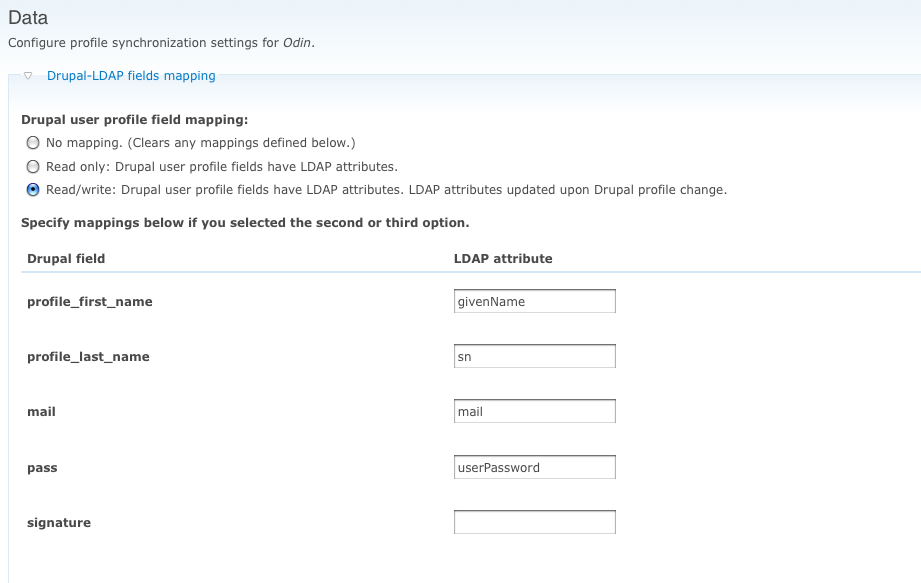
Comments
Comment #1
miglius commentedI believe that in the ldap authentication settings your setup is configured to act in a Mixed mode:
Choose authentication mode: *
Mixed mode. The LDAP authentication is performed only if Drupal authentication fails
I guess that old password is stored in the drupal db and a new one is ing the LDAP. In a mixed mode you can authenticate with the old password against the drupal db. The new password also works as when authentication with the drupal db fails it falls back to the LDAP authentication.
Comment #2
miglius commentedComment #3
ariflukito commentedhi i'm having the same problem, I've just tried changing my password from active directory but now I can login with both my old and new passwords. The authentication mode is set to LDAP directory only.
edit: after a few hours the old password stop working, maybe it was cached somewhere
Comment #4
mrthumpz commentedThis is a simple case to replicate, and I do believe it is a bug.
Bug Replication:
LDAP directory only IS selected
User does not exist in Drupal, does exist in AD.
Login to Drupal as the user successfully
Logout of Drupal
Change the user's password in AD
Login to Drupal with OLD password successfully
* You will be able to login to Drupal successfully using the old password until the new password is used to login once.
Logout of Drupal
Login to Drupal with new password successfully
* Now you will not be able to login with the OLD password
Comment #5
ebeyrent commentedI'm also seeing password changes in Drupal not taking affect in LDAP.
Steps:
1. Created new user account in Drupal, and verified that account was created in LDAP as well
2. Logged into Drupal as new user with generated password
3. Changed password in Drupal
4. Logged out of Drupal
5. Could not log back into Drupal with new password. However, I could log in with the old password.
I am running in LDAP-only mode.
Comment #6
ebeyrent commentedTurns out that I failed to configure the ldapdata configurations to map the Drupal pass field to an LDAP attribute. When you haven't configured this, and you attempt to update your account information, you get no warnings, errors, or messages that something has gone awry. It would be nice to add a watchdog entry and and drupal_set_message() so that the user and admin get some kind of notice that the data wasn't updated.
Comment #7
mississippiman commentedWhat attribute though?
Comment #8
ebeyrent commentedIn my case, I mapped the Drupal "mail" field to "userPassword" in LDAP (see attached screenshot).
Comment #9
mississippiman commentedSo does that allow passwords to be saved in AD?
Comment #10
skandyla commentedI have the some problem.
Changing user's password in drupal doesn't affect the ldap directory.
I.e. drupal writes that password was changed successfully but really only old password works.
I'm using drupal 6, linux, openldap,
ldap_integration, ldap_provisioning modules.
Comment #11
Alexzander commentedSame thing. Module saves correct password in windows, but doesn't update database.
Found it out when user changed his password and tried to login via services module from a side application.
Comment #12
kapayne commentedI've got the same configuration (drupal 6, windows, openldap, ldap_integration, ldap_provisioning modules) and problem, and I'll do you one better. Every time I change the password, they work, as well as all previous passwords. So I've changed the password 4 times and all four passwords will log the user in (I could understand 2, but 4?). I may be off the mark but we recently migrated from linux to windows and it may be that there is a difference in the user table configuration across the servers. The User table on linux has 39 columns and the user table on windows has 41 columns; the user table on windows has a password width of 41 characters and the user table password width on linux is 16 characters. Since we migrated I haven't been able to use the drupal user/register process to create any new users and I'm looking into this userTable issue to see if that is the issue and if it is related to the multiple password issue.
Comment #13
kapayne commentedsilly rabbit - i was confused - i was looking at the difference in the windows and linux db users, not the drupal user table so that isn't the issue.
Comment #14
MFox commentedTry this http://support.microsoft.com/kb/906305/en-us
Comment #15
cgmonroe commentedBased on #14, this looks like a Microsoft bug... marking as fixed works as designed.
Please open a NEW issue with details (and tested using the new dev version) if your still having problems.