First things first: Thank you very much for updating node_import to rc4 and including CCK support!!
I am trying to import into a multiple row textfield that is indexed like this:
1|Value one
2|Value two
3|Value three
4|Value four
5|Value five
6|Value six
7|Value seven
In the CSV I have the multiple values like this:
2||3||6
meaning that Value two, Value three and Value six should be imported.
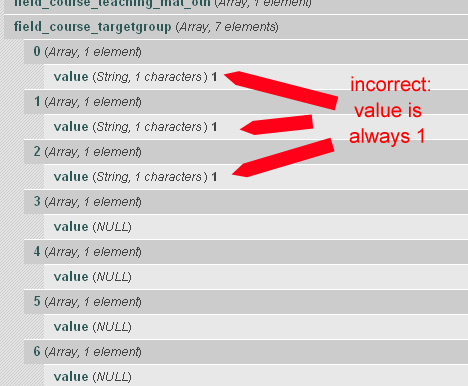
However, instead of the correct numbers (2, 3 and 6) , the number 1 is saved three times.
I did try to use other value separators, but that did not help.
Please also see the screenshot.
Thank you!!


Comments
Comment #1
Robrecht Jacques commentedCould you use "Content copy" to export the definition of the content type you are trying to import and attach it here?
Could you attach a sample CSV file (5 rows or so)?
This will make it easier for me to test it and make sure it works.
I'll fix this asap.
BTW you'll be able to use "Value two||Value three||Value six" as well (once this is fixed).
Comment #2
rezboom commentedThank you for your swift response!
The export of the content type I am trying to import data into is attached as text file, because it is probably too long to post here.
I have attached a sample csv as well.
Thanks again for your efforts!
Comment #3
Robrecht Jacques commentedCould you copy optionswidgets.inc from CVS into
sites/all/modules/node_import/supported/cckand test it?Option widgets (checkboxes and radio boxes) apparently need some extra work.
BTW: quite a content type... I have the feeling that the wizard is not that easy (wrong sorting and grouping) if there are many fields... need to look into that later.
Comment #4
Robrecht Jacques commentedComment #5
rezboom commentedOK, I copied optionwidgets.inc into the sites/all/modules/node_import/supported/cck - the result is promising, but the import does not yet work:
To test, I used the attached sample CSV file - note this is a different one from the above posted, with only 1 row.
At step 7 of the import wizard I now get the error "An illegal choice has been detected. Please contact the site administrator."
Completing the wizard is possible, but the import fails.
The output of the record at step 7 shows however, that the correct values are read into the corresponding arrays. Please see the attached record_output_optionwidgets.txt
So, (at least how I see it) it's almost working, but not quite.
BTW: Otherwise the import works very well, despite the size of the content type. :-)
UPDATE:
Looking into the "Recent log entries" revealed this: "Illegal choice Degree name Dr MSC etc in Name of degree/certificate element."
"Degree name Dr MSC etc" is the value to be imported.
I now tried not mapping the the "name of degree" field - and the import WORKS.
Comment #6
Robrecht Jacques commentedCould you look in your log (admin/reports/dblog or similar) what the exact error is? It will tell you on which form element the illegal choice was detected.
Comment #7
Robrecht Jacques commentedCould it be:
?
Comment #8
rezboom commentedLooking into the "Recent log entries" revealed this: "Illegal choice Degree name Dr MSC etc in Name of degree/certificate element."
"Degree name Dr MSC etc" is the value to be imported.
I now tried not mapping field_course_degree - and the import WORKS.
Sorry for confusing you with the "field_course_teach_facility_oth" - it is a normal text field and the CSV should not contain 5||6||7 there, but "normal" text - but this DID work.
Thank you very much for replying so fast !!
Comment #9
Robrecht Jacques commentedWhen I look at your "Name of degree/certificate" content field definition, it does not include "Allowed values" (it is empty) - I even get the warning "You need to specify the 'allowed values' for this field." if I go to edit the field.
What is happening is that the FormAPI expects a value (because it is a checkboxes element), but there are no possible options specified. If you create a single node with node/add/course the "Name of degreee/certificate" only contains "N/A", so this is more a wrong configuration of the field then a problem with node_import. Although a nicer error message would probably be advisable (eg seeing that the allowed value list of the checkboxes is empty).
So the optionwidgets.inc needs some more cleaning up.
The import of field_course_teach_facility_oth obviously did work because "5||6||7" *is* text :-) If the field is not configured to contain multiple values, then node_import will not interpret the || as a separator for multiple values.
Comment #10
rezboom commentedThank you for explaining - I already suspected that the problem was due to a faulty content type and not due to node_import.
I will fix this now and then lets import some data :-))
Really GREAT WORK by you!
Comment #11
rezboom commentedFor the sake of providing a happy ending to this issue:
The import now worked flawlessly!
Thanks again Jacques!!
Comment #12
Robrecht Jacques commentedThanks :-)
For sake of completeness: my firs name is Robrecht, not Jacques. A common mistake :-)
Comment #13
rbishop commentedhello, im having the same problem but still cant get this checkbox cck to import. its seems like you guys have it working so i must be close.
ive been most of a full day trying different combinations and decided to start over with a new simple content type just to get this to work
D6.10 - CCK 6.x-2.2 - Node Import 6.x-1.0-rc4
and ive also added "optionswidgets.inc from CVS"
my CSV file is
title;body;format
Title text;Body text;123||456
Some other title;Body text;789
my CCK values for the checkbox are
1|123
2|456
3|789
attached is the content type. i just added one integer field Checkbox with Number of values: unlimited. Im just trying to keep as simple as possible.
When i get to step 7 of 8 i dont get error message, i see the correct amount of values but not the correct values. it only displays the value "123" which is key value 1.
any ideas greatly appreciated.
Comment #14
servantleader commentedI am having the exact same problem as #13.
Comment #15
ultimikeUsing the latest -dev version did the trick for me...
I needed to import a bunch of data that involved multi-select checkboxes and select lists and using the latest version of -dev made everything play nice.
-mike
Comment #16
tahiticlic commentedIt doesn't work for me neither, I've a checkbox with
No
Yes|Label
And I have a CCK warning and an error :
"warning: array_key_exists() [function.array-key-exists]: The first argument should be either a string or an integer in www/drupal/sites/all/modules/cck/modules/text/text.module on line 156.
Label : illegal value"
No problem inserting "No" or "" value, which result on "No" value in base. But impossible to enter a "Yes" value. I've tried with rc4 and dev versions, and with optionwidget.inc or not.
Did someone succeed on such a case or must I investigate by myself?
Regards,
cfab
[EDIT] It works now, but I had to modify optionwidgets.inc to replace:
if ($fieldinfo['cck:fieldinfo']['widget']['type'] == 'optionwidgets_buttons') {by
Now, it works and "Yes" values are those where I don't put anything.
Comment #17
mvccfab's fix above worked perfectly for me.
Here's that change, as a patch file.
Comment #18
monotaga commentedcfab's fix in #16 didn't work for me. While I'm not getting the
* warning: array_key_exists() [function.array-key-exists]: The first argument should be either a string or an integer in [path]/sites/all/modules/cck/modules/text/text.module on line 156.
* [field name]: illegal value.
error, all the imported nodes have my cck text/checkbox checked, regardless of what the actual value in my .csv was set to.
Any thoughts?
Comment #19
twmiller commentedYeah, I'm having the same problem as #18. I've copied optionswidgets.inc (per #3) to the ./supported/cck directory and made the modifications that cfab outlined in his post (#16), and now I can get all of my records to import without error, but all of the values for single checkboxes are imported with the 'default' value, regardless of what is in the csv file. Anyone make it past this issue? Thanks!
Comment #20
tahiticlic commentedHave you try to NOT give any value?
For me it worked well and empty values correspond to a Yes whereas any non empty value will be considered as a No (my default value).
Comment #21
twmiller commentedcfab: that does the trick! Thanks a lot!
Comment #22
30equals commentedfyi
the patch works as well when using the option label as a value in the .cvs
Comment #23
twooten commented#16 also worked for me. Using 6.x-1.x-dev
Awesome module by the way.
Comment #24
vpapadim commentedI am still having trouble with this. My multi-select cck fields simply do not want to get in there
from playing around with the code, it looks like the correct value of the field never gets to
www/drupal/sites/all/modules/cck/modules/text/text.module on line 156.where the error prints
form_set_error($error_element, t('%name: illegal value)...even though the previews of my CSC's are what I expect (e.g. VL||PR||RS... ect) the value that ends up there is '1'
so the $item['value'] is not the Key I set on the CSV
any thoughts appreciated
Comment #25
grouchyladybug commentedThe fixes in #3 and #16 worked for me on 6.x-1.0-rc4.
Comment #26
monotaga commentedIs there any update on this? Does this patch (from #17 above) still need to be used? Any chance of getting this patch in HEAD?
Comment #27
kazah commentedsubscribing
Comment #28
qasimzee commentedsubscribe. Having exact same issue
Comment #29
hovel commentedSee here for a solution: Import of on/off widgets and select widgets does nor work propperly.
This support all option widgets.