Closed (works as designed)
Project:
ImageField
Version:
6.x-3.0-alpha4
Component:
User interface
Priority:
Normal
Category:
Bug report
Assigned:
Unassigned
Reporter:
Created:
27 Feb 2009 at 13:29 UTC
Updated:
10 Mar 2009 at 22:42 UTC


Hi,
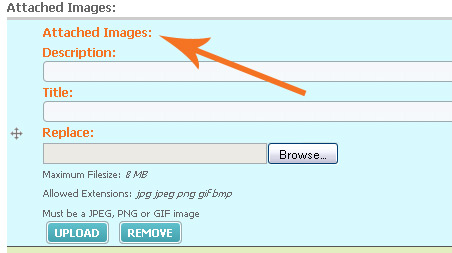
With all other cck fields I am using, when I browse for a file to upload, then click 'upload', the filename that has been uploaded appears above the 'browse' field, along with a small icon.
With imagefield, this is'nt happening (it does change 'New Upload:' to 'Replace:' though, so i know that its working.
I have the same problem on two sites, on different servers. Is anyone else having this problem?
Thank you
Rich
| Comment | File | Size | Author |
|---|---|---|---|
| imagefield_problem.jpg | 28.51 KB | rich_lang |

Comments
Comment #1
tancYes, I noticed this issue too. In my case the server I was using didn't have GD installed and the temporary directory as specified in admin/settings/file-system was incorrect which was stopping thumbnails being generated properly. I don't think imagefield displays a filename, instead it shows a thumbnail. Once I fixed GD this problem was resolved.
Comment #2
quicksketchI think I understand the issue, but the image provided doesn't seem to match what you've described. Could you provide more description of your image?
Comment #3
quicksketchThe problem referenced by your screenshot (as far as I can tell) looks like it's pointing at the duplicate labels within an ImageField. I believe this is a FileField problem, which is fixed in #387194: FileField UI Refactoring.
Comment #4
jcruz commentedI believe I am having the same problem rich_lang was having, ie. after uploading an image the thumbnail does not display on the node edit page.
This seems to only occur when I set the File System to Private.
Example:
After uploading an image I can view it at:
http://example.com/system/files/test.jpg
However the URL that the node edit page uses for the thumbnail does not work:
http://example.com/system/files/test.jpg.thumb.jpg
Comment #5
quicksketchThanks jcruz, that's helpful information. Looks like ImageField might not be generating the preview paths correctly. If you directly visit http://example.com/system/files/test.thumb.jpg does it work?
Comment #6
jcruz commentedNo, I get a Page not Found message. Thanks for looking into this, and for maintaining the module!
Comment #7
quicksketchI'm fixing the thumbnail problem as part of #397578: Uncouple ImageField from FileField Custom Hooks, since it requires an update.php run. I don't think it's directly related to this problem, so let's continue there instead.
I now realize what rich_lang was trying to say, he's describe the behavior of FileField, which shows an icon and file information instead of a thumbnail. rich_lang, this is by design and it is how ImageField differs from FileField. ImageField shows a thumbnail of the image, while FileField shows file information.