

Closed (duplicate)
Project:
Calendar
Version:
6.x-2.0
Component:
Code
Priority:
Critical
Category:
Bug report
Assigned:
Unassigned
Reporter:
Created:
27 Feb 2009 at 22:59 UTC
Updated:
2 Jan 2011 at 00:29 UTC
Jump to comment: Most recent, Most recent file


Comments
Comment #1
joewang commentedI looked through the live previews and even copied the SQL queries into phpMyadmin (which worked), but the view still does not display any calendar nodes.
Any thoughts?
Comment #2
jptarantoI'm experiencing the same issue. It seems my date field has been somehow corrupted...
Comment #3
tabyka commentedI have the same problem too. The events seems to be disconnected from the calendar.
Comment #4
karens commentedDid you update the Date module? Did you run the updates?
Comment #5
tabyka commentedYes, I've done it, in the same time.
Comment #6
joewang commentedI upgraded both Date and Calendar at the same time.
Comment #7
keeno commentedI have the same problem except events don't show in the block either.
I have an image of the modules I've added or upgrade since Date and Calendar at http://limrock.org/blogs/admin/25.
I don't know for sure if events stopped working as soon as I upgraded Date and Calendar or not.
The best I can remember I've run update after each upgrade.
Comment #8
elektro commentedI think the source of this problem is with the date module.
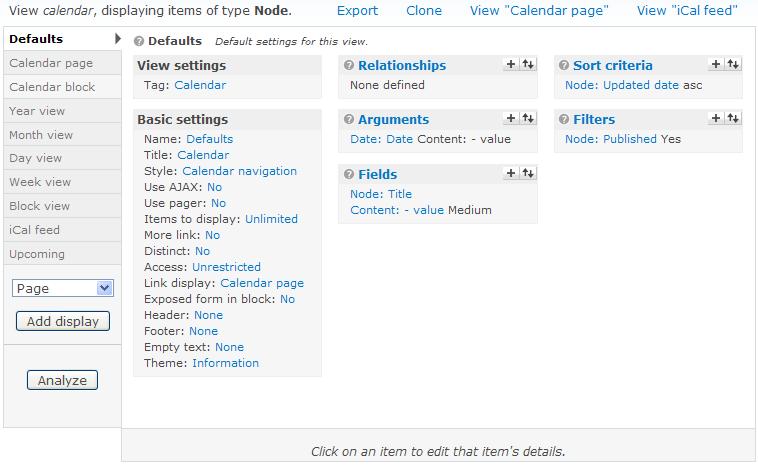
I just checked my views settings and found out, that the Arguments section doesn't display the correct field names for the date module.
When I click to the default argument I changed the default Date field (Content: Updated date) to my Date field (Content :Startofevent). In the last rc6 version it showed the real name: Content: Startofevent now it shows: Content: - value
I hope this helps.
Comment #9
Paul M commentedBy adding the date field into my month view suddenly my events reappeared, (although having the date repeated isn't great) so it seems it's a problem between the View's field settings and the calendar view. My year fields that were formatted as a table were never affected
Comment #10
joewang commentedThe workaround above worked for me--but it would be nice to have a clean fix :)
Comment #11
tschewe commentedI appear to be in even worse shape. When I try to go to Site Building and Views I get served a blank page!
Suggestions anyone? (PHP is already set to allow 64 MB of memory...)
EDIT: Restarting the server seemed to make the blank page problem go away.
Comment #12
keeno commentedWorked for me too. I checked 'Exclude from Display' to keep the date from showing on the calendar.
Comment #13
karens commentedThings to check:
1) Empty out both the Date and Calendar folders and re-upload the files to be sure you don't have old files still in there. This has been the cause of a number of issues.
2) Make sure you update both Date and Calendar together and always run update.php afterward (I realize that some people said they already did that, just re-iterating how important it is).
3) Edit the date field that is being used in the view or node that looks wrong. Make sure all the settings still look OK. Re-save it *even if you don't change anything* to be sure it has the right values and to flush out the caches.
4) Edit the view that looks wrong. Double-check all the settings. Make sure you don't see anything that says 'broken handler'. If you do, delete that item and re-add it. Re-save the view *even if you don't change anything* to be sure it has the right values and to flush out the caches.
Then see where you stand.
Comment #14
tknieper commentedHi KarenS,
i'm experiencing the same issue. I tried your 4 steps, but trying to edit the date field results in just an empty page. The field has the name "field_date" in my installation. The relative url is admin/content/node-type/event/fields/field_date - what can I do to edit the field?
To 4): I found http://drupal.org/node/376224 which is about a Bug in the Date module. Might this be related, or is it just a visual glitch?
Thanks,
Tobias
Comment #15
karens commentedI can see no reason why the date field wouldn't be editable. The issue you refer to is not related to whether or not you can edit the field, unless you are talking about editing it in the View. But from the URL you provided it looks like you are talking about editing the content type.
Clear all your caches (there's a button at admin/settings/performance you can use to clear the caches). And just for good measure, re-build your menus (which happens automatically when you go to admin/build/modules). Then see if the field shows up on your Manage fields tab for the content type (admin/content/node-type/event/fields). If so click on the edit button and edit it.
There is absolutely nothing in the update process that would wipe values out, so it is almost certainly a bad value in a cache somewhere.
Comment #16
tknieper commentedSome additional information: Running the generated query of the calendar view "Defaults" in phpMyAdmin gives me the correct rows.
The query is:
SELECT node.nid AS nid,
node.title AS node_title,
node.changed AS node_changed,
node.type AS node_type
FROM drupal_node node
LEFT JOIN drupal_content_field_date node_data_field_date ON node.vid = node_data_field_date.vid
WHERE ((node.status <> 0) AND (node.type in ('event')))
AND ((DATE_FORMAT(ADDTIME(node_data_field_date.field_date_value, SEC_TO_TIME(3600)), '%Y-%m') <= '2009-03' AND DATE_FORMAT(ADDTIME(node_data_field_date.field_date_value2, SEC_TO_TIME(3600)), '%Y-%m') >= '2009-03'))
ORDER BY node_changed ASC
The result in phpMyAdmin is:
nid node_title node_changed node_type
909 title1 1233598498 event
913 title2 1233598882 event
But the calendar does not display them.
Comment #17
tknieper commentedOK thx. I followed your instructions. I also disabled all Date and CCK modules, and re-enabled them, then I was again able to edit the field.
Comment #18
tschewe commentedI deleted calendar and date modules, uploaded new copies, ran update.php, cleared the cache, rebuilt my menus and there is still nothing in my calendar.
I am using an event_cck to put events into my calendar and have not changed those settings at all, expecting that if they were correct before, they should still be correct now.
Leaving all as is at this point, I tried making a new entry and that would not show up either.
Good lesson here for me about backing up first.... ;-)
Comment #19
sean69 commentedok - the calendar is now showing EVERYTHING BUT calendar dates.... all node types - users, articles etc... now that's broken!!!!
I did notice that even though the calendar was working the "path" type for the month view said "has no path" ....
UPDATE:
also the "to" and "from" dates are missing from the add event page ....
yea - thank god for backups ....
Comment #20
karens commentedIt sounds like the remaining issue is that the calendar is not working sometimes but comments like 'I have not changed those settings expecting that if they were correct before they should still be correct now' are the exact opposite of what I said to do in #13. You have to edit the view and you may have to change settings and you have to re-save it even if you don't make any changes. And the comment in #19 also indicates that you did not check that the view has the right settings and fix them if not.
I have no idea what the last line in #19 is, but it's clearly a different issue without enough information to have any idea what it could be. If people just dump any and every problem into every issue this issue queue will become totally unmanageable and I will have to quit trying to manage it.
If you don't want to follow exactly what I suggest, don't report back that things are still broken.
Comment #21
tschewe commentedOK, point well taken. The trouble is, I don't know what looks "wrong" and what should be there....
I followed the second half of this link:
http://www.packtpub.com/article/adding-calendar-to-website-using-drupal6
to use CCK to create my events for the calendar rather than using the default calendar. After a couple of hours of wandering through this, it looks well and truly broken.
Unfortunately, with my state of knowledge it looks easier to start all over again rather than trying to fix what's been nuked by the upgrade.
Comment #22
MatthewVance commentedFresh install of drupal 6 (6.10),
calendar (6.x-2.0),
date (6.x-2.0),
CCK (2.1),
views (2.3).
Enabled all modules, created a content type, added a datetime field to it, created one node of this content type, went to edit the view and... I am having this issue as well.
Date field is showing Content: - value instead of the name of the content. have screenshot!
Note-- does not seem to affect the results... might just be a graphical error.
Comment #23
karens commentedIt is not 'spectacularly broken!!!' Nothing is "nuked". Your data is still there. Views stores data in a kinds of different caches and the values stored there may be different than what should be in there now. There are new settings and values to support lots of new features in these modules that may not be set where they should be since they weren't there in older versions. You may have to reset things in the view to get the new stuff working right.
#21 is an article about creating events with the Event module and getting them to show up on the Calendar, but the Calendar project page clearly says it does not support adding Event module dates to a Calendar. The Event module has its own calendar, it doesn't need this one. I did not write that article. I guess the author found some way to get things working but I don't know how reliable it is or where it could break down. If you have trouble getting that method to work you'll have to contact the author for help.
#22 is not the same issue, 'this issue' says people don't see anything in the calendar, but then you say your problem "does not seem to affect the results". How can that be the same issue?
OK, I give up. I'm going to bed.
Comment #24
keeno commented#22 I think you need to have Content: - value for "Fields" instead of Node: Updated date
You probably want to filter for your created content type too.
Comment #25
tknieper commented#23 Sorry for not being clear enough. I did follow your 4 instructions.
#24 Thanks for the hint. Not only adding the field to the arguments, but also adding the field to the calendar fields (with enabled Exclude from Display) resolved the issue for me. I'm wondering how that could been working before?
Sorry for the noise.
Comment #26
sean69 commentedYour instructions were followed to the letter,
steps 1 & 2 - standard update procedure.
step 3, there were no "date" fields that looked wrong. I have a local development copy, which I rolled back and compared, all fields were identical with the exception of the 2 new ones in the calendar view, the add new date link said "broken field"
step 4: I added a field to the add new date link, updated and saved, cleared caches... and THEN, that's when the calendar started showing everything BUT calendar items.
UPDATE:
I'm going to totally waffle on this, my apologies KarenS.
I did a staged rollback [in dev] of all the modules involved, got everything working as before then began applying updates one at a time, first Drupal 6.10, then mimemail, then calendar - everything is still fine [even the start and finish dates in the calendar event page is back]....
...then updated date.. everything went to hell.
I'm sorry, I don't have a solution - other than "roll back date", I do know that in my situation the combination of date + calendar is causing problems, it seems to be interfering with CCK fields as my user profiles - heavily using CCK fields ALL disappeared.
so once again KarenS - I apologize.
-sean
Comment #27
sioux commentedI updated both date and calendar modules. I went to update an event that has multiple dates and I was unable to clear out old dates- 'Clear' option is missing since the latest date module update. I use the Date 'Text Field with date Pop-up Calendar' widget in my content type.
I checked my content type, then I checked my view set-up. I got this error " 'Content: Date - (field_date)' used by the display 'Defaults' cannot be set to 'Group multiple values'." Since the update I could not edit nor recreate my view date settings without getting this error.
So I stripped out all my old argument & field settings and recreated them. My new calendar now displays correctly from both content types, and will show the first day of an event, but does not show repeating dates for my events.
I use a CCK field (called calendar entry) to send a title & time to my Calendar from two different content types.
Here is what I did for my new calendar view.
Under Filters I used Node Type, and selected my two content types.
I set up both of my calendar entry fields under Fields. (to display)
I used a Date argument for both of my content type date fields, set to current date.
Everything works at this point except multiple dates.
I set up my two content dates types under fields, and checked Hide the display, and my multiple dates now appear.
On my home page view, which is a list of local events, I had multiple entries- I went to it's view, and changed Sort Criteria: I am using my Date fields and changed my delta from all to 1. Calendar now shows multiple listings and the the home page does not.
Comment #28
larskhansen commentedIt's working @ my site
But I'm missing the name of the content field....
I've attached a picture of my view and you can see that it's working here: http://drupal.rshansen.dk/calendar
If you need more screenshots I'll be glad to give 'em :o)
Regards,
Lars Hansen
Comment #29
Anonymous (not verified) commentedI had what looks like the same problem, but I only lost items which had a Repeated Date widget set. Another node type using simple Start Date worked OK.
The fix in #24 & #25 worked for me. Add the Repeated Date field to the output, with Exclude from Display ticked and it works. Remove this field and it stops working again.
(Still looks like a bug to me, but at least there is a workaround.)
Regards, Tony
Comment #30
karens commentedI'm going to mark this as a duplicate in favor of another report, #389294: Time Slot Calendar does not work, which has good details on how to reproduce the problem and is not polluted with a bunch of unrelated issues.
#27 is yet another unrelated issue. The title of this issue says it is about fields that do not show up in the calendar, so it is the wrong place to post an bug report about seeing duplicate copies of the field. And that particular problem is because you marked both the 'From date' and the 'To date' in the argument. You only need one and the description for that setting says not to mark both.
Comment #31
anawillem commentedthe issue seems to be that the 'start_date' and 'end_date' of the event aren't being recognized as proper date fields. i'm not sure how to fix this. in my case, i upgraded the views, date, event, calendar modules to the latest in drupal 5.x.
does this make sense to anyone? is there a way to fix it?
Comment #32
anawillem commentedchanging status to active.
Comment #33
albert volkman commentedSubscribing
Comment #34
karens commentedanawillem, this is a D6 bug report, and one that has already been marked as a duplicate. Don't re-open it to report some problem with a different version (the D5 version).