

 The 2026 Drupal Business Survey is open. Your response will help shape the future of the Drupal business ecosystem.
I always get this message at the top when my draggable table renders. How do I avoid this please?
| Comment | File | Size | Author |
|---|---|---|---|
| #45 | Picture 2.png | 39.63 KB | rengomez |
| #44 | Bildschirmfoto 2010-02-23 um 23.19.24.png | 51.47 KB | sevi |
| #42 | Picture 8.png | 7.73 KB | c4rl |
| #22 | draggable-weights-view-export.txt | 20.55 KB | aaron |
| #20 | draggableviews-393530.patch | 1.25 KB | sevi |



Comments
Comment #1
Woggers commentedargh. retarded. This always occurs if a sort method is not defined in the view itself. My own fault.
closed.
Comment #2
Macronomicus commentedIm not sure your right about that. I had a sort method and was still getting errors.
The only thing that got rid of that displaying on top of my view was to uncheck....
"Override normal sorting if click sorting is used" In the draggable views configuration.
I found this by accident, just unchecked it because I was not using click sorting any longer.
-------
That said I could be wrong too .. but im changing this to active and a bug just in case.
If I am wrong please forgive me... and re-close this! lol
Comment #3
mitchell commentedI have trouble with this too.
Comment #4
nessumsara commentedI have "Draggableviews: Value #1" set as my sort order and have unchecked "Override normal sorting if click sorting is used" but still get the "The structure was broken. It has been repaired." message. It appears for anonymous users as well. The only way I found to remove the message is to make this message blank in the main Draggable views configuration under "Site Configuration." THis solved the symptom, but the underlying bug still needs to be addressed so please leave this issue open.
Comment #5
nessumsara commentedI have "Draggableviews: Value #1" set as my sort order and have unchecked "Override normal sorting if click sorting is used" but still get the "The structure was broken. It has been repaired." message. It appears for anonymous users as well. The only way I found to remove the message is to make this message blank in the main Draggable views configuration under "Site Configuration." THis solved the symptom, but the underlying bug still needs to be addressed so please leave this issue open.
Comment #6
OneTwoTait commentedMe too. I'm using it with Flag Weights.
"The structure was broken. It has been repaired." shows up once whtn the page is loaded and shows up twice when you click "save". It doesn't save the order when "save" is clicked either.
Comment #7
sevi commentedFirst disable paging (set items per page=0) to make sure this doesn't cause the problems.
If this doesn't help check if you have permissions to write the CCK/weight fields.
Comment #8
sevi commentedComment #9
meba commentedI am having the same problem. Plus lacking any documentation makes this module useless for now :(
- "Override normal sorting if click sorting is used" is off
- Order field is set to "Weight" CCK field, handler CCK
- Sorting by CCK field Weight, ascending
- Pager is off, display unlimited number of nodes
Here is the view export: http://www.pastebin.cz/c076e0f8d4f4c6
Comment #10
sevi commentedNow I managed to reproduce this bug. It occurs when you add CCK fields to node-types afterwards.
Because of this there aren't any records for these nodes in the CCK database tables.
Until now the CCK handler didn't save a value if the order field is missing. The attached patch makes the CCK handler write into the order field anyway, even if there isn't such a field specified for the node.
Hope this helps!
Greetings,
sevi
Comment #11
sevi commentedComment #12
sevi commentedAnyone out there who tried the patch?
Comment #13
alxbkh commentedafter patch:
Fatal error: Cannot access empty property in modules/draggableviews/modules/draggableviews_cck/draggableviews_handler_cck.inc
$field = &$node->{$this->real_field_name};
So I rolled it back, droped cck weight and reconfigured Style: Draggable Table to support Native handler. Error gone and I 've got my sorting.
Comment #14
alxbkh commentedfor CCK handler: http://drupal.org/node/283498#comment-1608794
Comment #15
sevi commentedNow it's working with or without the patch?
Comment #16
cglusky commentedone way i found to fix this was to install Views Bulk Operations and modify the cck order field that you are using to sort on. I just changed them all to "0" and refreshed the draggable table view a couple times to get the error to go away. not sure yet if this will hold and it will reset whatever order you may have had prior. luckily i only need to resort 20 or so in the list. this was caused by me adding the cck order field after the nodes had been created. i prefer the cck field because i may want to filter on it. not sure if it makes sense for Draggable Views to expose the native sort and parent fields as filters.
i did not try the patch in #10
r,
coby
Comment #17
TC44 commentedI was having the same issue with flag weights.
What seemed to finally work for me was to click on the settings for draggable table, and check "sortable" for weight, and set it as default. Not sure if that will work in other cases, but I thought I'd post in case that's anyone else's issue as well.
Comment #18
jstollerI too was having this problem when trying to use DraggableViews to manage the list of Frequently Asked Questions on my site. I was able to fix it by manually editing the FAQ nodes I had already created and inserting values in my Order field.
To minimize the appearance of the broken structure warning in the future, and to ensure new FAQs go to the bottom of the list, I entered the following into the php box for calculating the default value of my Order field.
Now all new FAQ nodes are guarantied to have the highest value in field_order when first submitted. If anyone has a better solution I'd be happy to hear it.
Comment #19
sevi commentedThe "Behaviour of new nodes" can be changed in the style plugin settings. Click "On Bottom" to let them appear at the bottom by default. To use this feature the function is_integer($value) must return FALSE. So try to use "bla" or any other non-integer as the default value.
This is the preferred way and it should work.
Are you working with the latest dev-version? With this version the message "The structure was broken. It has been repaired." should only appear once at all. Otherwise I would have to fix this a little more :)
Greetings,
sevi
Comment #20
sevi commentedThis patch should do it.
Comment #21
aaron commentedI get this message also when using with flag_weights. I'm not using draggable_views_cck, so the patch doesn't help.
Comment #22
aaron commentedadditionally, the flag weights are not saved when pressing the 'save' button. attached is an export of the view:
Comment #23
aaron commentedthe flag had existed prior to enabling the flag weights module, if that helps.
Comment #24
aaron commentedand yes, creating a new test flag and setting that to the view seems to solve that problem. doesn't help w/ the issue of current flags, of course.
Comment #25
aaron commentedi take it back -- once you have flagged content with the new flag, you still get the warnings.
Comment #26
sevi commentedThe exported views code tells me that you use "Native" Handler instead of "Flag Weights" handler for the order field.
Currently all changes are written to the wrong database table :)
Comment #27
mikeytown2 commentedSo how do I fix this error?
Comment #28
sevi commentedYou're using flag_weights, right?
I guess the only thing you have to do is changing the handler from "Native" to "Flag Weights".
Doesn't this work?
Comment #29
mikeytown2 commentedHad to re-create the fields in the view.
Old: Draggableviews: Order Value #1
New: DraggableViews: Order Order
Then set it in the Style: settings
Comment #30
sevi commentedNow it is fixed?
Comment #31
mikeytown2 commentedyeah after manually changing things around, its fix. The upgrade process wasn't smooth, thats the bug in short.
Comment #32
sevi commentedThere's a prompt at the project page.
Updating views data and views settings is a little bit complicated.
I'll call this issue "closed".
Comment #33
EvanDonovan commentedI still get this error on the dev version, even when I have followed the instructions in this issue.
I did upgrade from beta, but I have created new views since then, which still have the bug.
Comment #34
sevi commentedIs it possible to post the views export codes here? (at least the $view->override_option("style") part)
Comment #35
agogo commentedIm using Flag Weights and still have the same problem with one of my views. For some reason its working with one of my views but not another.
As for the other error reports:
When viewing the view - I get ONE "The structure was broken. It has been repaired." error.
When saving the order - I get TWO "The structure was broken. It has been repaired." errors.
No matter which different setting I try in any combination on the Style settings page - I still get the error.
It seems the error has to do with the way I want to use the view - I want to show both flaged and UNflaged nodes. When I choose to show only one or the other I get no error (no matter if I set it up in relationships or filters).
Is there a fix to this?
PS.
Another strange bug is that the settings page for Style: Draggable Table wont load the currently saved options. All the settings reset when I enter them to make changes.
edit:
The error message DOES NOT show if ALL the listed posts ARE flaged.
If ONE of the posts IS NOT flaged - the error message shown (no matter how many posts are shown).
Comment #36
sevi commentedcheck out #677886: Loosing DraggableViews style plugin settings after upgrade from Views 6.x-2.7 to Views 6.x-2.8
Comment #37
agogo commentedAh great, thanks!
Comment #38
sevi commentedTypically you get these errors when you configured the wrong handler or the wrong order field in the "Draggable Table" settings.
I just tried Flag Weights (the dev-version) and everything seems to work fine.
Comment #39
sreynen commentedI've tried to apply all of the suggested fixes here and none of them seem to work on my view (CCK handler). Could someone please clarify what exactly the current recommended solution is?
Comment #40
sreynen commentedApparently I just needed to reload one more time. I'm still not sure what I changed to fix it, though. If there are settings known to cause this problem, it seems like at least a UI bug that the module doesn't prevent those settings from being selected. But again, I don't understand what exactly caused the problem.
Comment #41
higherform commentedThis error appears to be related to arguments for us. Our use case involves a view with two arguments that resolve to two different taxonomies. Whenever we set the different order for each combination of arguments, the warning silences. However, we need the order to not change with respect to one term/argument, and ignore the second completely, so I need to leave that option off. Every time I change the argument in the preview or the actual page display, I get the structure broken, rebuilding. View the page or preview with the same two arguments set, no broken message.
This issue was present in both 6.x-3.2 and now in 6.x-3.4
Ultimately, I think this should be a feature request / change in functionality w.r.t arguments... the UI should allow the order to be dependent on or ignore each unique argument... Until then, we will probably need to switch to a different node ordering system for our use case.
Comment #42
c4rl commentedFWIW, in the style options for Draggable there's an option "Repair broken structures" which you can uncheck. Doing this made the error go away, although I don't completely understand what the implication is. :)
Though I realize this doesn't *fix* the problem, per se, perhaps it is some use for debugging.
Comment #43
sevi commented@sreynen of #40:
Check out #723462: "The structure was broken. It has been repaired" caused by "Default Sort" radio button and "Override normal sorting" checkbox. Did the "Default sort" radio button triggered your issue?
Comment #44
sevi commented@higherform:
Do you use Native Handler? If Yes: Did you try "Use arguments as well as view ID to order nodes" setting (see attached screenshot).
What do you mean with "we need the order to not change with respect to one term/argument"; and what do you mean with "that option"?
I didn't really grasp your problem yet..
Comment #45
rengomez commentedHi,
I tried sort order and have unchecked "Override normal sorting if click sorting is used" but still get the "The structure was broken. It has been repaired." message. It appears for anonymous users as well. The only way I found to remove the message is to make this message blank in the main Draggable views configuration under "Site Configuration." THis solved the symptom, but the underlying bug still needs to be addressed.
Also, the sort order does not save when I click Save Order.
I cannot change Native to Flag Weights as there is no option for that - the relevant modules are all enabled.
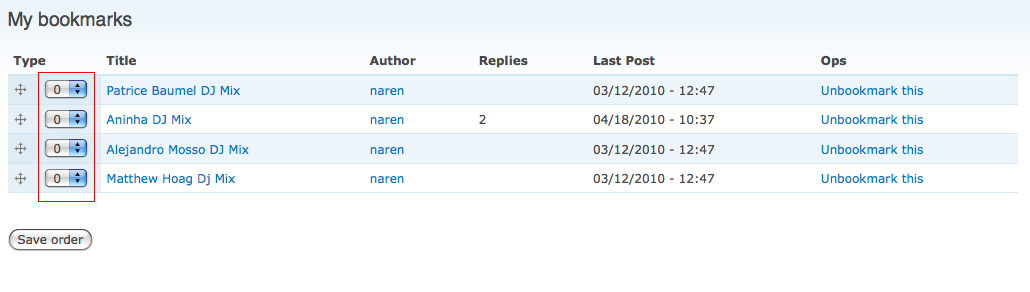
Here is a screen shot; Finally, how can I get rid of the column marked in red.
Thanks for all your support. Much appreciated and look forward to your response.
Cheers
rengomez
Comment #46
rengomez commentedI tried this tutorial, using the latest versions of flags and draggableviews, but the dev version of flag_weights, and it worked.
However I still continuously get message ->The structure was broken. It has been repaired.
The only way to stop this is by removing the message from Site Configuration --> draggable views, but as above this does not fix that particular issue.
Thanks again. Excellent module.
Cheers
rengomez
Comment #47
usonian commentedI was experiencing this same problem and tried all of the above recommendations unsuccessfully - then I realized I hadn't enabled the 'DraggableViews CCK Handler' module and set that as the sort handler for my CCK field. Once I did that, the error went away and the order gets saved correctly.
Thanks for a fantastic module, really impressive.
Comment #48
mikeytown2 commentedJust installed this module on another site. Problem was fixed by reading the readme. Recommend putting the installation directions on the project page.
Comment #49
EvanDonovan commented@mikeytown2: This module has changed significantly since the time of the initial issue posting. I think that perhaps some issues were fixed, but, as you said, not documented.
Comment #50
aleksey.tk commentedHello! My "structure" is repairing everytime i access my position view, i can live with that when there are 10 nodes but right now i have ~80000 nodes (overall in the view output total, but limited to 10 on the page without pagination) and repairing structure procedure takes more than a minute because it fills draggableviews_structure table with ~50000 entries. So the question is, it is "by design" or it is the problem with configuration?
Update: using Native handler.
Comment #51
mr.andrey commentedsubscribing...
Comment #52
willhowlett commentedsubscribing
Comment #53
nyl_auster commentedsuscribing, same problem here
Comment #54
sevi commentedI hope you misconfigured something :) I guess: The structure is being repaired but the values will not be saved because they are written to the wrong field.
Otherwise I wouldn't have any idea :)
Please post your views-export-code, just to be sure..
Comment #55
mikeytown2 commentedfixed it by reading the readme... try it.
Comment #56
siliconvalet commentedThis didn't work for me... I followed the instructions in the readme...
Comment #57
mattiasj commentedI am experiencing this aswell after trying several of hints in this post..
Comment #58
gregaltuna commentedFor me, I unchecked the "Repair broken structures" checkbox... but I, too, don't understand the implications of that... so. Well, it worked for me.
Comment #59
guignonvI don't know if that might solve your problem but I had the same error because in the "Style: Draggable Table" setting page, I used the same field for both "Order Field" and "Parent" (let's say "accidentally" ;-) )... so I added a "DraggableViews : Parent" field to my view field list and set it as the "Parent" field in "Style: Draggable Table". Then, all worked fine.
If that solves your problem, then, maybe a check should be made in the module to insure the same field is not used for both "Order Field" and "Parent" settings (and a warning should be displayed then).
Comment #60
sammys commentedThis issue appears to have become lost in the mess of different handlers. To focus things a little I've done some experimenting with flag_weights module causing this message. Turns out there are three causes for a broken structure:
I was doing all of the above (yes I'm that silly) and fixing those finally got it to work. I have draggableviews 6.x-3.5, flag_weights 6.x-1.1 and flag 6.x-1.3. Even the dev version of flag_weights won't work with global flags.
Comment #61
knalstaaf commentedI guess this module requires some skills to configure it.
Comment #62
luco commentedafter almost ripping my hair out, I found that Views 6.x-3.0-alpha causes Draggable Views to stop working.
I didn't get into details, but at least the checkboxes
"Override normal sorting if click sorting is used"and"Repair broken structures"don't retain whatever settings you apply to them.so watch out, it seems that Views 3 causes hair loss. :]
Comment #63
nicholaspapazoglou commentedI had many problems with the message "The structure was broken. It has been repaired" in a big e-shop (too many draggable views pages). The problem stopped when I changed the setting Distinct to "NO" in every "problematic" view.
Comment #64
jdln commentedSubscribing. I also need draggable views to work with arguments and relationships.
Comment #65
karljohann commentedWhat worked for me (finally) was to show all nodes (User pager: All Items) and then save the order. After that I could put the pager back and it still worked.
Comment #66
bxCreative commentedWow - a quick read of the tiny README solved it for me. Duh.
Comment #67
damd commentedCould you elaborate on that please? What had you done wrong?
Comment #68
mattcasey commentedIf you're using Ubercart, make sure the Ubercart Handler module is enabled and you've set the Handler to 'Ubercart'
Comment #69
hosais commentedI am using Ubercart. But I cannot see any Ubercat Handler. Can you explain more? Thanks.
hosais.
Comment #70
nicholaspapazoglou commentedComment #71
sreynen commentedIf this is fixed, what is the resolution? I don't see any relevant commit. If it is fixed, it should be changed to "fixed", not "closed (fixed)". See:
http://drupal.org/node/156119
Comment #72
mattcasey commentedSorry hosais, my response is late:
In my case I'm using Ubercart, so I had to enable the module "DraggableViews Ubercart handler." Then, in your view, set the style to DraggableTable. Configure it by clicking the gear icon, and under the label Defaults: Style options: Draggable Table Settings, set the Handler for Order Field from Native to Ubercart by using the dropdown
Comment #73
merch commentedI too am having issues with broken structures. I am using the native handler along with the setting "Use arguments as well as view ID to order nodes."
I have mutliple nodes assigned to multiple terms and for each term page I require a differnt order. Problems arise when I add new nodes to 1 or many terms. This "breaks" the structure and gives the new node an order of 0 (i can see this when I disable the auto repair option). Im very confused why the new nodes are given an order of 0 when I have selected the option Behaviour of new nodes: to be at the bottom.
Extra complications I have in my setup is that the dragable view is in multiple displays the dragable one is only visable when logged in. The Aim is for this list to control a slideshow display where only the top 5 from the dragged list is displayed as slides.
If I could get new nodes to be set at the bottom rather than the top I would be happy with the structure being broken
Comment #74
markwittens commentedI got this error because I had the wrong handler set (native instead of CCK). Maybe this can be detected automatically? Otherwise a more descriptive error message would be helpfull.
Comment #75
klokie commentedI was able to fix the error by disabling the option "Override normal sorting if click sorting is used" for the Draggable Table Style. Now it works like a charm (views-6.x-2.16, draggableviews-6.x-3.5).
Comment #76
tmsimont commentedI keep getting this message, too -- It seems to be harmless, except for one huge harmful flaw... That message is displayed to anonymous users!?
If that message is so common, it should at least be hidden from users that can do nothing about it.. It is confusing and strange to "end users" and should definitely not be displayed to them...
Comment #77
nicholaspapazoglou commentedHi!
this message appears only to you while you try to save. Don't worry for the users. For solutions read the messages/replies above.
Comment #78
tmsimont commentedthat's not true tho! I see it as an end user seemingly at random when navigating around the views that have rows set up to be draggable. The end user doesn't see the form because they are anonymous and don't have the permisison, but the message still pops up. I just removed the message in the settings by setting the message to say ""
thanks for the module!
Comment #79
tmsimont commentedit seems that exposed filters that work with ajax, as well as pagers will break this module. I am using the native handler on the the native order field. When i submit a draggableviews form with either a pager or filter applied via ajax, it blows up the order on other pages and unfiltered views.
Comment #80
vbard commentedconfirm 79. When using pager the message appears and everything breakes.
Im using drupal 6.28, views 3.0 and draggable views 3.5. I have end-user's display and sorting display, as it was said in the manual. End user's dispay has pager, that's ok. I wanted to use pager with the same number of items for sorting, but it behaves unexpectevely, every reload of sorting page gives different positions of items and th subject message appears.When I reorder items, the above message appears two times. When I disabled paging on sorting page, everything works fine. Maybe there is another solution, thats not very good to have tens of items on one page to sort??
BTW, some time ago (at least when I created this site about 2 years ago) everything worked as designed, and sorting views had pagers.
Comment #81
istryker commented@sumerian, 2 years ago you had to be using views 2.x. Thats probably why it worked.
Draggableviews 6 and 7 codebase are quiet different. I do not have time to work on 6.x right now
Patches are welcome!
Comment #82
istryker commentedThanks to everyone that contribute to this issue
Drupal 6.x is no longer supported. Closing issue.