

Description
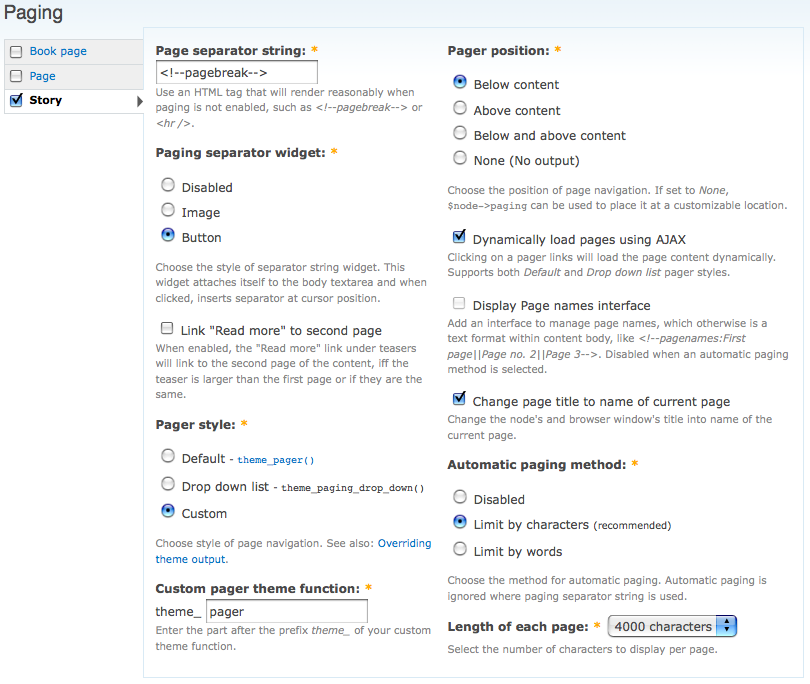
Break long pages into smaller ones automatically by words(or characters) limit, or by means of a customizable pagination tag:
First page here.
<!--pagebreak-->
Second page here.
<!--pagebreak-->
More pages here.
Features
- Automatic pagination with either character count or word count.
- Change page title to name of current page.
- Customizable page separator string.
- WSYIWYG plugin to insert page separator string into content.
- Link "Read more" to second page when the teaser is larger than or equal to the first page.
- Configurable pager position: Below content, Above content or both!
- Define different names for each page using
<!--pagenames:First page title||Second page title-->format. - Page navigation block using page names.
Documentation
- Installation and support instructions can be found in README.txt.
- Find further documentation, answers to FAQs, and other enhancement guides on the handbooks page at: http://drupal.org/handbook/modules/paging.
Drupal 8
* There is no official plan to create or support a Drupal 8 version of the Paging module.
* If someone creates one, and wants to support it, we would be happy to add them as a co-maintainer.
* Please follow this issue for progress on a Drupal 8 port.
Drupal 7 / Backdrop CMS
* There is a version of this module available for Backdrop CMS.
* Development will happen in tandem for Drupal 7 and Backdrop CMS indefinitely.
Drupal 6 & below
* Older versions of this module are no longer supported.
Supporting organizations:
Sponsored port to Drupal 7 and Backdrop CMS
Ported to Drupal 7 and Backdrop CMS
Project information
 Minimally maintained
Maintainers monitor issues, but fast responses are not guaranteed.- Maintenance fixes only
Considered feature-complete by its maintainers. - Project categories: Content display, Content editing experience
 227 sites report using this module
- Created by merlinofchaos on , updated
 Stable releases for this project are covered by the security advisory policy.
There are currently no supported stable releases.


