

 Come together with the global Drupal community in Rotterdam, 28 Sept – 1 Oct 2026. Sessions, contribution, connection, and Early Bird savings until 8 June.
I have Panels, Advanced Profile Kit, and Content Profile set up. I've got picture support enabled and I've even tried setting up an image field but for whatever reason, there's just no option to upload user pictures after you register your user account on my drupal installation. I've read up on the documentation and none of it seems to point to a specific solution to this problem, so I'm wondering if there's a step I'm missing or if this is just a bug. My intent is to be able to have my users be able to change their user pictures whenever they want through editing their profiles. Currently, all the proper permissions are given to the end-user so that's not an issue.
Any help would be appreciated. Thanks!
| Comment | File | Size | Author |
|---|---|---|---|
| #4 | not_cool.JPG | 72.27 KB | littlealy |

Comments
Comment #1
michelleThis has nothing to do with APK. User pictures are uploaded on the account edit page. That's part of core.
Michelle
Comment #2
vm commentedgo to administer -> user settings
enable user pictures
go to administer -> themes -> configuration
enable the user pictures to be shown in either, nodes, comments or both.
Comment #4
littlealy commentedHi. I re-opened this because I am having the same issue.
Let me be a little more specific. The user images are showing up fine in posts. They are showing up fine in comments. They are enabled for the site.
Yet, they do not show up in the user profile.
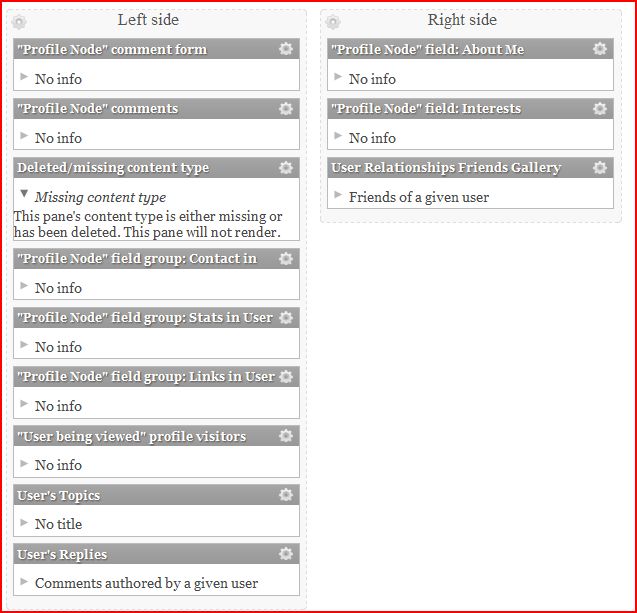
To confuse things even further -- there is no little mini-panel for them in the layout configuration. There is, however, a "this is missing" box that could be my missing photo. =( Snip attached.
Any ideas?
Comment #5
vm commentedIt's telling you a content type was deletd.
On a test site, and a fresh install of drupal. Install APK and dependency modules. Does the content type get created? If so, which one is it? What happened to yours?
May have to inspect on the test site and recreate the content type required by panels.
Comment #6
vm commentedor if just getting started with APK, maybe removing it and reinstalling it will recreate the deleted/missing content type.
Comment #7
littlealy commentedOK. I'll try removing it and reinstalling it, and then playing with it on a test site.
I did just recently install it on a second site and it installed just fine. Pretty weird.
Comment #8
littlealy commentedLOL! I'm SO sorry. My issue was that I hadn't ENABLED "Author Pane" module.... Thus missing/deleted content type.
Wow. I guess I shouldn't code half-asleep?
To original poster: Make sure you installed and enabled Author Pane.