

 Come together with the global Drupal community in Rotterdam, 28 Sept – 1 Oct 2026. Sessions, contribution, connection, and Early Bird savings until 8 June.
I upgraded to the dev version from 2009-Mar-07 this morning and noticed a problem: even though hours are saved in the content_field_hours table, when I edit the node in question the hours all show as 'none.'
Not sure how best to troubleshoot here; suggestions on where to start?
| Comment | File | Size | Author |
|---|---|---|---|
| #23 | hours.png | 92.8 KB | troybthompson |
| #16 | Picture 1.png | 31.08 KB | troybthompson |
| #16 | Picture 3.png | 6.61 KB | troybthompson |



Comments
Comment #1
Ozeuss commenteddid you get any error messages during the install? i made a small fix in the install file that should update in a few hours in the dev version.
the hours don't show up just on the node edit form, or also on the node itself?
in the latest dev version the hours are stored as 'military' type- 1500 and not 15:00, and the type in the database should be an integer and not varchar (this should have been updated in the install file)
what are the content of the table in the database?
Comment #2
troybthompson commentedI'm having the same problem on a clean module and Drupal 6.10 install. The data appears to be fine in the database itself in military time, but it's showing up as "none" on the edit page. If I submit, the information is cleared.
Comment #3
Ozeuss commentedsome more info please, a screenshot, perhaps?
Comment #4
miklHmm, yes, I appear to be having the same issue here on a newly created field.
The current output looks like this:
http://www.quicksnapper.com/mikl/image/hovedbiblioteket-k-benhavns-bibli...
But when you edit the node it looks like this:
http://www.quicksnapper.com/mikl/image/hovedbiblioteket-k-benhavns-bibli...
My database contents look like this (the node shown in this case has nid=1):
http://www.quicksnapper.com/mikl/image/untitled-0001
Comment #5
troybthompson commentedMine are the same. It looks like the values are saved to database fine when you set the values, but aren't being read back into the edit form correctly when you try to edit them again. Unfortunately I don't know PHP well enough to figure out what's wrong.
Comment #6
miklHmm, it seems that the patch from #413872: Missing labels on days fixes this issue as well. Can anyone confirm?
Comment #7
troybthompson commentedUnfortunately, I don't see any change after applying the patch. (the first part failed so I had to apply it manually)
Comment #8
troybthompson commentedOK, I found some more quirks that may help track it down:
When I put in values, they get saved to the database and show up in view.
If I don't submit hours for Sunday nothing gets put back into the form when I edit again.
If I put in hours for Sunday, the closing hours get populated into the edit form. The beginning hours aren't populated into the edit form.
Comment #9
domesticat commentedPatch failed against 6.x-1.x-dev for me; I'll try splicing in the code manually.
Comment #10
Ozeuss commentedUpdated the dev version, looks ok on my end.
Comment #11
troybthompson commentedIt's still not working for me. I just updated the module, ran update.php, tried entering hours for just Monday, and the hours show up on the page, but are gone when I go back to the edit page.
Comment #12
troybthompson commentedIf I enter in times for all days it works. But I have venues that aren't open on Sunday which causes it to break.
Also, if you select times between midnight and 1am, it shows up as "none" when you go back to edit and the time is shown incorrectly on the view page (:15 AM rather than 12:15 AM).
Comment #13
miklI've been looking into this problem a bit, and I've found that fixing it one place makes it break in another. The main problem is that the module is that days are being mapped to numbers which are in turn being mapped to CCK multi-value fields delta, and as long as the days are in the originally designed order (Sunday first) and all days are filled out, it works, but otherwise it becomes messy.
Since I have a client with more advanced needs than what is currently possible with the current data structure, I'm going to try and come up with a different storage model.
Comment #14
Ozeuss commentedI've commited a fix for an error in the while loop for the new feature in #413858: Office hours does not respect "First day of week" setting (grouped values formatter).
So, before it you had to supply the first day of the week, but now you don't.
@troybthompson: try it this time. you don't need to run update.php. if the problem persists, it would be great if you could a screenshot, because i don't experience the same problem.
@mikl: ordering has nothing to do with delta- actually the delta is being ignored.
Comment #15
miklSorry for the confusion about the delta part – I was looking at the code a bit too late in the evening.
Nevertheless, I've worked a bit with my client's requirements, and the storage backend experiment has branched out into a new UI and rewrite of most of the code.
In case you're interested, the new UI looks like this: http://www.quicksnapper.com/mikl/image/new-office-hours-interface and the code is available at Github: http://github.com/mikl/drupal-office_hours/tree/DRUPAL-6--2
Currently, it works with a single week and one set of hours per day, but I'm going to expand it to support multiple sets of hours per week (like Monday: 7-12, 13-19) and overrides for a specific week (open Sunday in week 22, etc.)
I know that this is tantamount to a fork, so please apologise me for budging in, but I figured that it would be better to share the code, even if it is a bit of a rewrite :)
Comment #16
troybthompson commentedTo start fresh, I removed the field, disabled the module, uninstalled the module, installed the new 2009-Apr-10 version, enabled, and created the field again using 12 hour mode and 15min increments.
While creating the field, I received the error:
Fatal error: Call to undefined function dpm() in /usr/www/users/earlycc/sites/all/modules/office_hours/office_hours.module on line 381
So I installed Devel and got to the field configuration screen.
Then I tried adding hours for Monday and Tuesday.
They showed up fine when I viewed the node.
When I edited the node, all hour fields were set to "none" and not the values I had set.
Thoughts?
I'm attaching screen shots but I don't see how they're helpful. Let me know if there's something else you want a screenshot of.
Comment #17
domesticat commented@troybthompson - I'm pretty sure your error is unrelated to the issue; that error looks like it's a one-line debugging statement left in by accident. Take out
dpm($element);on line 381 in office_hours.module and the whitescreen stops. I've reported it separately at #432416: Call to undefined function dpm()Comment #18
troybthompson commentedThat's what I figure as well. But the edit page still doesn't seem to be reading in hours if you don't set hours for Sunday. Thoughts? I'm going to have to find another solution soon since I need to finish a site for a client with office hours. If there's any other testing I can do, please let me know.
Comment #19
Ozeuss commentedi'll be commiting a fix for this soon
Comment #20
troybthompson commentedI tried the 2009-Apr-14 version and we seem to be making progress. Now when I only enter Monday hours, when I return to the edit page, those hours show up as Sunday's hours and Monday is empty.
Comment #21
milos.kroulik commentedI confirm this behavior.
Comment #22
Ozeuss commented@troybthompson, milos.kroulik- could you check the Apr 25 dev version? if that does not work for you, could you please tell me what config you're using (first day of the week, clock type, field no. etc)
Comment #23
troybthompson commentedSorry, still not working.
Drupal 6.10, mySQL 5.0.67, PHP 5.2.9, Apache/2.2.10
Required: unchecked
Number of values: 7
Hours Format: 12hrs
Granularity of Time: Quarter Hours
Start Hours: 5:00
End Hours: 24:00
Validate Hours: unchecked
In Date and Time, the first day of the week is set to Sunday and America/New_York time zone. User-configurable time zones is enabled.
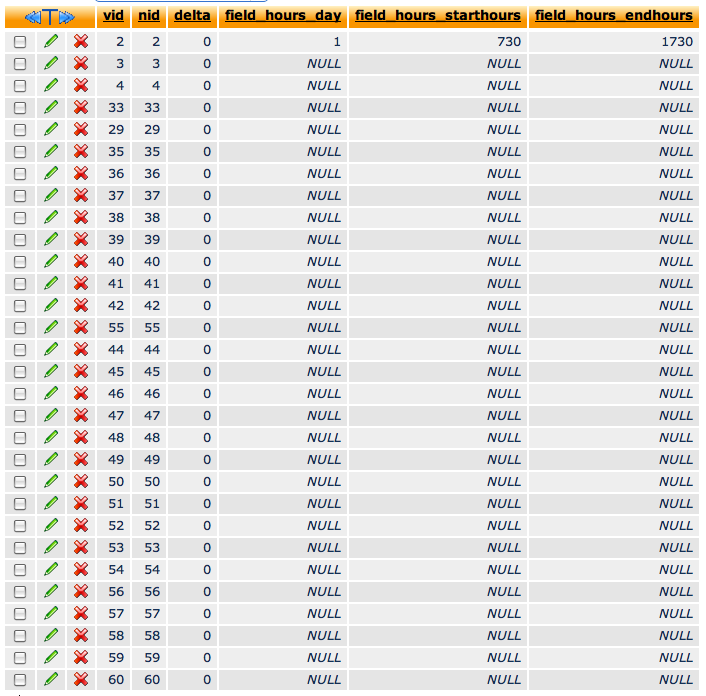
I added Monday hours of 7:30AM - 5:30PM. All others are left blank.
When I submit the form, the view page shows the hours correctly.
When I go back into edit, Sunday's hours are 7:30AM - 5:30PM. All others are left blank.
I'm attaching a screen capture of the content_field_hours table values.
Thanks!
Comment #24
troybthompson commentedThe new version appears to be working! I'll let you know if anything weird happens as I start putting the data in. Thank you for looking into this.
Comment #25
johnvclosing this issue.