

Closed (fixed)
Project:
Upload element
Version:
6.x-1.x-dev
Component:
Code
Priority:
Critical
Category:
Bug report
Assigned:
Unassigned
Reporter:
Created:
11 Mar 2009 at 12:44 UTC
Updated:
30 Apr 2009 at 22:26 UTC
Jump to comment: Most recent file

Comments
Comment #1
gmvasey commentedAn HTTP error 0 occurred.
/drupal/upload_element_js/form-55636b5b16166a88a114e669fd9fbc8b/rotor_item_node_form/rotor_image
Is the error message
Comment #2
mrfelton commentedDid you upgrade from an earlier version of the module? if so, which one? Are you creating a new rotor item? or updating an existing one? Web browser/version? Drupal version?
Comment #3
tracer76 commentedI have a similar problem. I updated to the latest 6.x-2.0 and my rotor-views that i had on frontpage disapered and i cant get them back, trying evrything but nothing works.
Comment #4
gmvasey commentedDrupal 6.3, Firefox latest version. Had last version installed and it worked but I uninstalled, deleted and then installed new version. Trying to create first rotor item.
Comment #5
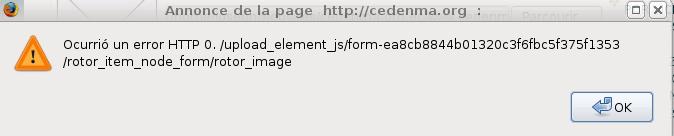
Reflexe commentedI get the same error, it is a new installation of the module, drupal 6.10, Rotor Banner 6.x-2.0, browser firefox 3.0.7
The browser message is:
HTTP 0. /upload_element_js/form-ea8cb8844b01320c3f6fbc5f375f1353/rotor_item_node_form/rotor_image
Comment #6
linuxbcn commentedI can't find the problem.
Comment #7
mrfelton commentedComment #8
mrfelton commentedThis actually appears to be a problem with the upload_element module so I'm moving into the upload_element issue queue. The problem is briefly discussed here: http://drupal.org/node/278562 and if you look in filefield.module filefield_js() at around line 499 you will see that it looks like they get around this by setting $GLOBALS['devel_shutdown'] = false just before they output the javascript.
So, to those that have been having this problem (~I can't reproduce it) please try doing the same in upload_elements.pages.inc at line 128. The attached patch does this for you.
Comment #9
mrfelton commentedhere is the patch.
Comment #10
mrfelton commentedAnd some more info on the subject...
#279106: Upload Module Error 0?
#240777: Attach: An HTTP Error 0 occurred (on file upload)
http://drupal.org/node/226653
Which suggest it could be a memory issue, a conflict with memcache, using an outdated version of jquery, specific browsers, permissions... the list goes on!
Comment #11
Reflexe commentedI applied the patch in upload_elements.pages.inc , no results, same error... tried a couple more browsers, but still the same or no response.
Comment #12
Reflexe commentedJust wondering:
In filefield.js
There is this: s*/g on line 14, is it well formed? My editor put it in red as an error.
Edit: Maybe I am completely wrong, I am not a dev ;)
Comment #13
alan d. commentedMmm.. yep, could be one of maybe 4 or 5 different causes. If disabling the Devel module doesn't help, then the submitted patch will not help.
The error you are getting suggests that you are not having valid XML returned by the AJAX call. The first thing to help with this is to get the actual raw response that the system is returning.
1) Load the page and try an Ajaxed action. Copy and paste the new URL returned by the JScript alert, and paste this into another browser window.
OR if you have FireBug installed on FF
2) Enable firebug, load the site, enable Net monitoring by FireBug on the site, load the form, select the Net tab, clear the Firebug console, try an Ajaxed action. The response can be seen in the console window.
OR
3) Send through a URL to the problem site. You can use my contact form if you do not want to publicly display this.
If the response is a full HTML page, we only require the error message part that was returned.
Alan
Comment #14
eff commentedI get the same exact error when I try to add a new rotor item. I was able to do it previously, but now it does not function.
I also get a different error when tying to edit an existing rotor item:
Fatal error: Call to undefined function: property_exists() in /home/riohva/public_html/sites/all/modules/upload_element/upload_element.module on line 240
Line 240 forty is included here:
Any other help would be greatly appreciated.
Comment #15
alan d. commentedThe function does not exist for PHP versions < 5.1, I will update the requirements for the module. I've only tested on PHP 5.2 upwards
Taking a function from http://au2.php.net/function.property_exists may help.
Try adding this to your settings.php file:
[Edit]
Can you please give me some feedback if the above function is enough to get this running on PHP4.
I will have to install an older version of Apache just to get PHP4 running, but this appears to be the only PHP 5 only function that I can see in the code.
Thanks
Comment #16
alan d. commentedThe latest dev version should address the issues discovered above. This should be packaged within the next 12 hours as a new DEV release.
You can access the changes instantly via CVS @ http://cvs.drupal.org/viewvc.py/drupal/contributions/modules/upload_elem...
Only the files upload_element.module & upload_element.pages.inc have been changed.
1) Adds suggested fix for the Devel shutdown issue reportted by Tom #8
2) Replaces all property_exists calls with isset to bypass this issue with PHP4.
3) Adds a simplistic error logging mechanism to the thumbnail generator. This should make it a bit easier to track down any future errors.
Please test and let me know if these resolve your errors, and I'll tag a new release ASAP.
Comment #17
eff commentedThank you!!!! I am running PHP4 and that fixed the problem.
I had a permissions issue with my live /sites/files/rotor/ directory as well, and I was able to figure that out when everything else worked.
Thank you for the prompt fix!
Comment #18
alan d. commentedChanged the title to reflect the issue
Comment #19
alan d. commentedThe latest release, 6.x-1.2, has the changes, reopen is you have any issues.
Comment #20
kenorb commentedYou can try: http://www.drupal.org/project/php4
to have defined compatible property_exists() function.
Comment #21
alan d. commentedThere were no special PHP5 based functions, so converting property_exists to a isset worked fine. The isset on classes only causes problems with magic getters __get($key) functions in PHP which Drupal does not use.