Closed (fixed)
Project:
View Alias
Version:
6.x-2.0-beta9
Component:
Code
Priority:
Normal
Category:
Bug report
Assigned:
Reporter:
Created:
12 Mar 2009 at 14:20 UTC
Updated:
14 Sep 2010 at 17:49 UTC
Jump to comment: Most recent file


I'm getting the following error on the pathauto page- admin/build/path/pathauto
warning: Invalid argument supplied for foreach() in /sites/all/modules/view_alias/view_alias.module on line 92.
And none of my views are listed under "Views available for aliasing".
I tried reinstalling, but same issue.
| Comment | File | Size | Author |
|---|---|---|---|
| #15 | viewalias_screenshot.png | 136.25 KB | madnomad |
| #13 | FirefoxSchnappschuss004.jpg | 37.67 KB | mllr |
| #1 | view-alias-arg-validator.png | 70.33 KB | emackn |



Comments
Comment #1
emackn commentedI need to fix that message.
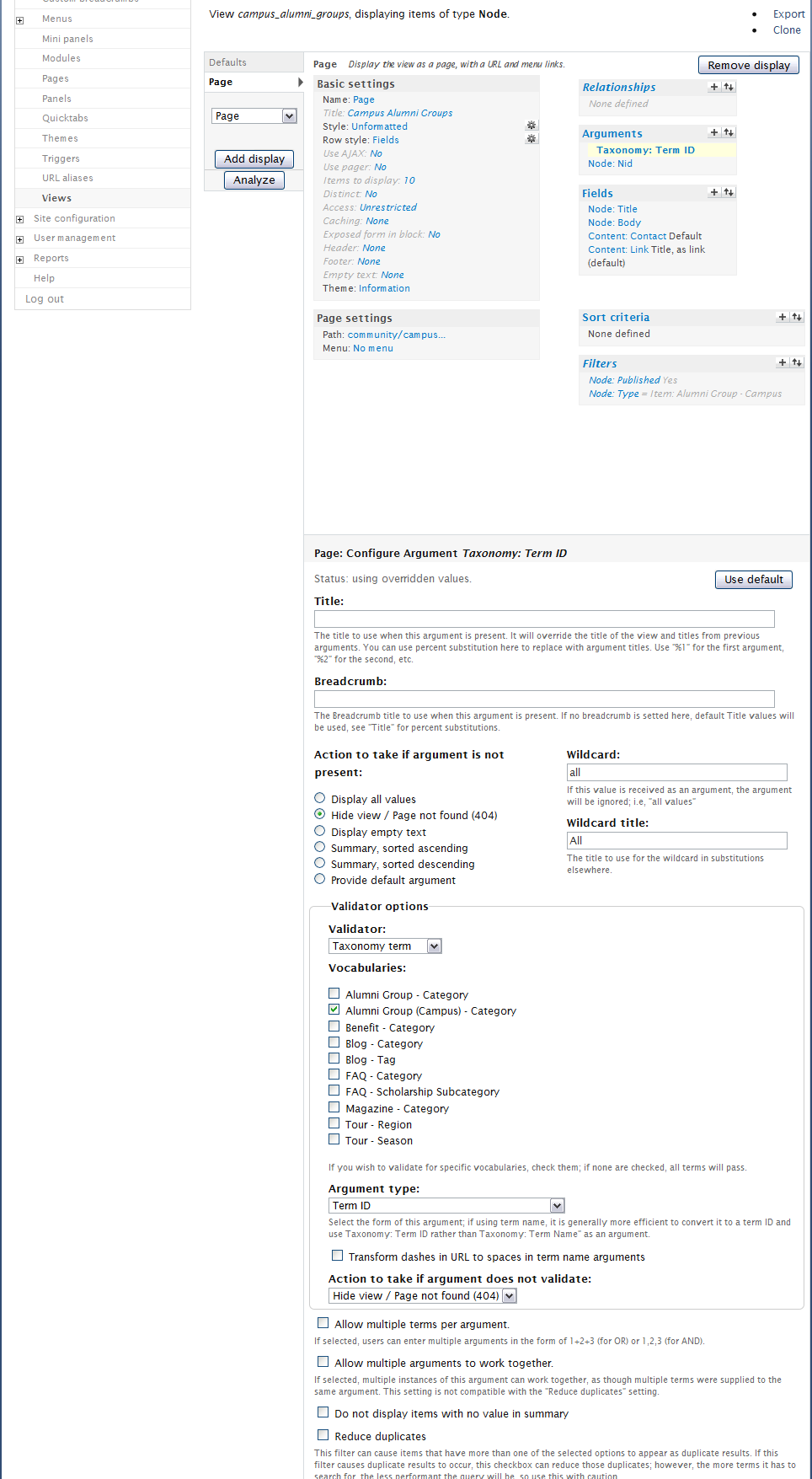
One thing, do the arguments on the page displays use define the validator options?
If you do, and still have problems, could you export one of your views that you think should work so I can import it.
Thanks.
Comment #2
emackn commentedAny update on your issues?
Comment #3
Jboo commentedI'm also having this problem. I get the following error messages:
I have the validator options set, and have exported the view below...
Comment #4
emackn commentedOk.. im on to something, By mistake, I developed the view_alias upgrade while running the pathauto 6.2.x-dev tree. Fix coming soon.
Comment #5
emackn commentedFix is in beta3 release, should be up soon.
Comment #6
Jboo commentedThanks for the quick fix. The errors have gone, but in the "View Alias settings" section I just have this without any of my views details:
View , display , on path , with arguments.
Is there something I might have missed?
Thanks again for your help.
Comment #7
emackn commentedUgh! ... I really need to write some tests. ;) Let me look at this real quick.
Comment #8
emackn commentedOk, beta4 should be showing up soon.. Don't know how I did it.. but a block of code was deleted between beta2 and beta3, and that caused the issues.
Comment #9
Jboo commentedThanks for looking at this so quick. I'm now not getting anything listed under the "View Alias settings". I don't even have...View , display , on path , with arguments....listed for some reason.
Comment #10
Flying Drupalist commentedI also don't see anything under view alias settings.
Comment #11
emackn commentedCan you double check that you are selecting specific vocabularies to use as arguments and specifying a taxonomy argument validator?
Check to see if new release helps. This fixes the warning message when no views are found.
Comment #12
jponch commentedI also don't see anything available under "Views Available for Aliasing" and I have my argument Validator set to "Taxonomy term" and my argument type set to "Term ID" so it seems like the view should be available?
Comment #13
mllr commentedI had the same problem with no views available to select. I think I found the solution:
First: the argument has to be an term-id, not a term
Second: be sure to select taxonomy under validator
Both details are stated on the views alias module page under "General Use", but maybe it should be more precise.
I’m using a german language version, so I’m not sure about the terminology. Take a look at the screenshot :-)
frank
Comment #14
jstoller@mllr: That is half-true...
I have three views, with 14 displays between them, that all use the same taxonomy for a term-id argument. I noticed that all but one of these views (with one page and one feed display) were showing up under "Views Available for Aliasing". The missing view appeared to be nearly identical to the ones that worked, except for some differences in the sorting options.
I had to use the PHP Code validator on all these views, rather than the Taxonomy Term validator, so when I first started troubleshooting this I couldn't figure out why any of my views were showing up. Then I remembered I had played with the Taxonomy Term validator at one point when I was first setting up the views, earlier in my site development process. So I switched the validator for my missing view to Taxonomy Term, selected the vocabulary I'm using, saved the view, then switched the validator back to PHP Code and saved the view again. After that the two view displays appeared in my alias settings.
I'm glad I found this workaround, but it's a little kludgey. I strongly suggest adding a field to the Term ID argument options in the Views interface itself, allowing users to specify which vocabulary they want to use, rather than restrict their choice of argument validator.
Comment #15
madnomad commentedemackn, thanks for the module - just what I was looking for.
My views aren't showing up on the pathauto config page - admin/build/path/pathauto - under "Views available for aliasing"
I have two arguments - Term ID and Node ID.
Term ID is validated against its vocabulary [see screen shot]
Path is using .../%/%.
I'm using 6.x-2.0-beta6
from #11 above:
>> Can you double check that you are selecting specific vocabularies to use as arguments and specifying a taxonomy argument validator?
What do you mean by "selecting specific vocabularies to use as arguments"?
thanks much.
Comment #16
quicksketchAnyone experiencing this issue it *may* be caused by #649824: Typo Causes Overridden Displays not to Work, which will not list any of your views unless your Taxonomy: Term ID arguments on on the Default display.
Comment #17
emackn commentedTry beta7, it has the fix quicksketch has mentioned.
Comment #18
Methos76 commentedLine 123 of views.module should be changed to :
$sql = "SELECT DISTINCT(vv.name) FROM {views_view} vv JOIN {views_display} vd ";
old line was
$sql = "SELECT DISTINCT(vv.name) FROM drupal_views_view vv JOIN drupal_views_display vd ";
where table names are hardcoded which produced an error, cause i didn't use the tableprefix 'drupal_'
Comment #19
iamer commentedThis doesn't work if the views are actually stored in files in a module.
Isn't there a more generic way to list the views and displays without querying the database directly ?
Comment #20
emackn commentedGood point, I didn't think about views in code. I wonder is the views_cache has the info I need. Also created a new issue for this, #676004: Support views in code.
Anyway, for right now, there isn't. but you could just save your views so they get into the database, create your aliases, then revert the views. Not ideal, but that gets you the one time creation of aliases for your views.
Comment #21
iamer commentedOk, I posted a patch in the new issue.
Comment #22
denniemans commentedHow can I get this module working? This is exactly what I need..!
Comment #23
emackn commentedAre you having the same issue? Or is this a support request? If so, create a new issue plz.
Comment #24
denniemans commentedGot it working by validating the argument to be a taxonomy term!
Comment #25
dzungnova commentedI'm using 6.x-2.0-beta9 still same issue. Please help me.
Thanks
Comment #26
emackn commentedAdded this to the README.txt file on HEAD and project page.
Comment #27
emackn commented