

 Come together with the global Drupal community in Rotterdam, 28 Sept – 1 Oct 2026. Sessions, contribution, connection, and Early Bird savings until 8 June.
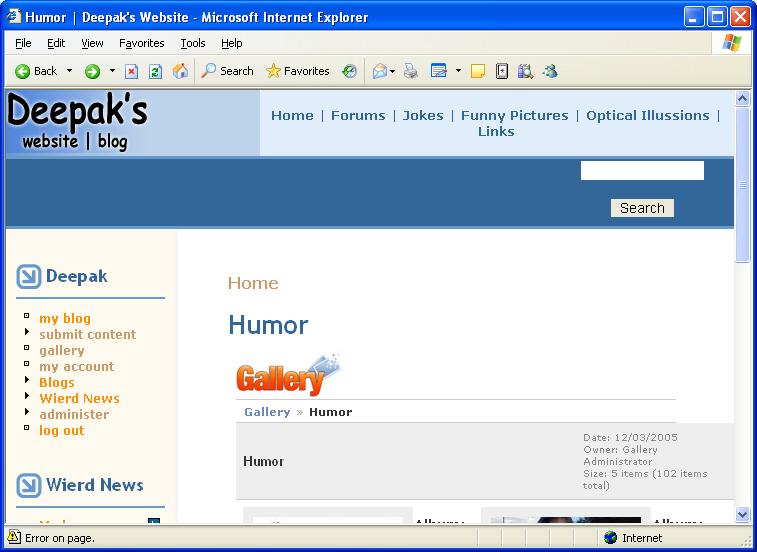
I am using Gallery module with Gallery 2. Everything works fine, except gallery doesn't completely feel like part of the Drupal site. For starters, on all my gallery albums, I see duplicate gallery title: one outputted from Drupal and one from Gallery 2.
Please see attached screenshot.
| Comment | File | Size | Author |
|---|---|---|---|
| gallery_issue.JPG | 56.5 KB | deepak@dipak.org |

Comments
Comment #1
kiz_0987 commentedYou can use the enhanced gallery.module to get rid of this problem (basically via a css statement) -- http://drupal.org/node/32393 . You could also change your css file to remove it.
Comment #2
deepak@dipak.org commentedThe repeating title problem still exists. This is what I did (and nothing else):
1) I downloaded the patched version.
2) I put the css file in the same folder as gallery (and by looking at html for my gallery pages, I know its getting loaded)
3) I modified main.php in the Gallery2 folder.
Is there something I missed?
Comment #3
kiz_0987 commentedCan you PM me a link to your website and I'll take a look.
Comment #4
deepak@dipak.org commentedIt's sad, but I can't figure out how to send you a PM, since http://drupal.org/privatemsg doesn't seem to be a valid path. I e-mailed you instead.
Comment #5
kiz_0987 commentedThe reason that the css changes do not work in the enhanced gallery.module is that they are designed for the G2 Matrix theme, not Siriux. Siriux can be made to get work with Drupal (as you have done) but it is not ideal as it uses many of the same definition names as the Drupal theme, so you will run into problems with precedence. The Matrix theme is well behaved as it uses a prefix to its definitions, such as gbBlock etc, but Siriux does not. For this reason you have 2 elements with class "breadcrumb", one from Drupal, one from Siriux. You want to avoid display of the Siriux one.
Check the drupal_g2.css file for comments about titles and breadcrumbs and you will see definitions like:
Try
And similar for the other definitions. You will have to play around. I suggest that you use the DOM Inspector in Firefox to debug your css rules to get this to work. That's what I used to figure out the issue here.
Comment #6
deepak@dipak.org commentedI tried your trick and it did work. I used the DOM inspector to also figure out how to get rid of the 2nd title. In case someone else wants to use Siriux theme with gallery, here are the statements I added to drupal_g2.css:
Comment #7
kiz_0987 commentedComment #8
(not verified) commented