Closed (fixed)
Project:
Nitobe
Version:
6.x-3.2
Component:
User interface
Priority:
Normal
Category:
Support request
Reporter:
Created:
16 Mar 2009 at 14:07 UTC
Updated:
4 Apr 2009 at 14:25 UTC
Jump to comment: Most recent


This theme is so excellent, it has done everything needed.
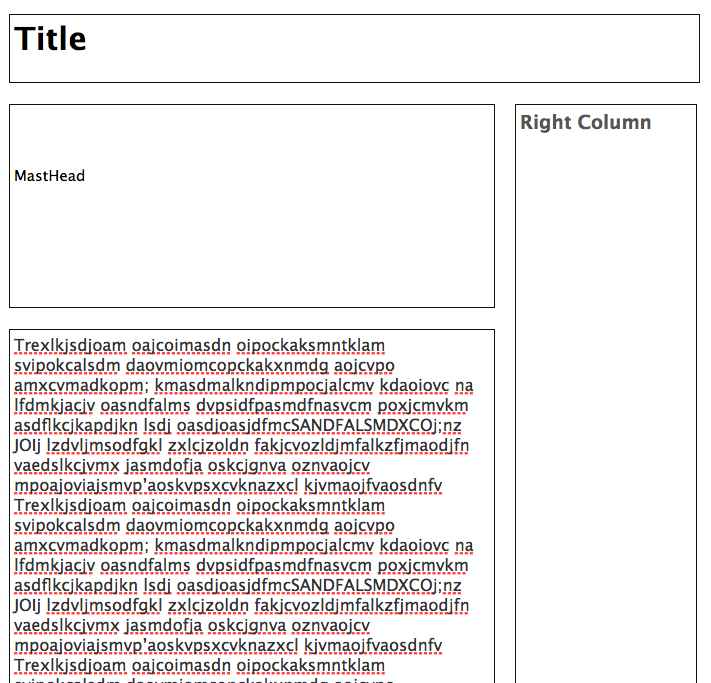
The last change we are trying to make is to have the right hand column start right beside the masthead pictures. So this would involve shortening the width of the mast head area and then having the right hand column start in that new space. Because we are using such large masthead pictures on our site, this will let the visitors see some text content right away.
I have been looking into layout.css.. would it be as simple as shortening the masthead area width - would that automatically make the right hand column move up?
I've attached a basic layout pic for clarity.
thank you so much.
| Comment | File | Size | Author |
|---|---|---|---|
| layout.jpg | 66.34 KB | expotv |

Comments
Comment #1
Anonymous (not verified) commentedIf you modify any of the
grid_classes inlayout.css, it will affect a lot of other things in the theme. Instead, you will want to modifypage.tpl.phpLook for this line:
<div id="masthead" class="grid_16"><?php if (!empty($masthead)) { print $masthead; } ?></div>You will need to do a few things with that line. The first is to move it to the
centercontent area. Cut the line and paste it just after this line:<div id="center" class="<?php print $nitobe_center_class; ?>">Then change the class attribute of the
mastheaddivelement fromgrid_16togrid_12.I don't know if this will do exactly what you're looking for, but it should get you on the right path.
Comment #2
Anonymous (not verified) commented