

Closed (won't fix)
Project:
Views (for Drupal 7)
Version:
6.x-2.11
Component:
Code
Priority:
Normal
Category:
Bug report
Assigned:
Unassigned
Reporter:
Created:
17 Mar 2009 at 13:26 UTC
Updated:
25 Dec 2011 at 22:45 UTC
Jump to comment: Most recent file




Comments
Comment #1
grasmash commentedI'm also getting a page not found error when trying to access "My recent posts"
The page also provides this error message:
Any suggestions?
Comment #2
HS commentedComment #3
grasmash commentedI went through the source code and could not figure out where the "My recent posts" tab was created.
However, I came up with a simple workaround that removes the tab from the user's view.
-create a block that is shown only on the "tracker" page. I located mine in the content area so as not to displace any other elements.
-leave the title blank
-in the body of the block, paste:
-depending on the theme that you're using, you will have to replace ul.tabs li:eq(1) with ul.[list_class_name] li:eq(1) -- the current example works with the deco theme
if you'd rather just remove the that tabs bar altogether, paste this instead:
This uses jQuery to remove the "My recent posts" tab through the DOM after the page loads. Badabing Bababoom.
Comment #4
HS commentedThanks mate for the above but is there a better option than running a script? A long term fix as opposed to a hack?
Surely this is not intended behavior.
Comment #5
dtarc commentedsubscribing, i'm having the same problem
Comment #6
blackdog commentedThe problem seem to go away if you disable the core tracker, and then the user argument works aswell.
Comment #7
blackdog commentedThe problem here seem to be that the default View has the same page path as the core tracker, so when using arguments (tracker/%uid) there's a conflict. If you change the Views page path, everything's fine.
Comment #8
HS commented@blackdog
Thank you for your response.
1. How do you disable core tracker? and how will it help?
2. How will changing the Views page path remove the 'My recent post' tab or make it work?
Thanks in advance!
Comment #9
grasmash commentedI think that blackdog is saying that drupal's core tracker module and view's recent posts view both user the path "tracker"
This creates a conflict. So, edit the view that shares the path "tracker" (I've renamed mine to Recent Papers and I don't remember the original name), navigate to the page display, and change the value of path from "tracker" to something else.
Comment #10
HS commentedIt is a conflict with Drupal's core tracker.
The my recent posts tab is not views generated.
It is core drupal functionality.
Views tracker + Drupal tracker user the same path. For some reason this displays views generated content and also the My recent posts tab from Drupal core.
Change the path in the view to make the tab disappear.
Thanks to everyone who helped!
Comment #11
merlinofchaos commentedYou should either disable tracker.module or disable the tracker view.
Comment #12
HS commentedThanks merlinofchaos. Any drawbacks in uninstalling tracker.module? or any issues leaving both core tracker and views tracker running together?
Comment #13
richguynextdoor commentedI had this same problem. The solution that I found was to navigate the views editor. In the list there was a "tracker" view.
When I clicked on the edit option, I then went to the page view and changed the path.
The path was set to "tracker." I just changed it to "recentposts" and everything works fine now.
The tab still exists, and now works properly.
Comment #14
HS commented@richguynextdoor
You will find that the tracker with the 'my recent post' tab is the core tracker and will not pull custom nodetypes assigned by views. For example if you set your views tracker to leave out all updated 'page' content types, it wont show up on the tracker where the tab exists. Because that is the core tracker (/tracker) your views tracker is now located at (/recentposts) and not (/tracker).
Thats the question I raised above, is there a drawback running both the core and views tracker? waste of resources?
Comment #15
b0b commentedThe Tracker and the tracker View used to work without a conflict so the recent Views update broke this. What was nice about the two working together was I could filter out certain node types from the tracker and still have the "my recent posts" tab.
That will not be possible with either proposed "fix" to this issue. It's either all node types on the tracker with a "my recent posts" tab. Or the ability to control which node types appear in the tracker but no "my recent posts" tab.
Comment #16
HS commentedBob above is correct. They co-existed in harmony until I upgraded. The issue wasn't addressed so I had to turn to the above instructions.
Comment #18
b0b commentedJust figured this out... duh, the My Recent Posts tab can be rebuilt with just Views instead of Tracker.
Turned off the Tracker module.
Then I took the Tracker (Recent Posts) view that I had and set-up a second Page in it with an Argument of "Node: User posted or commented" and then added it as a My Recent Posts tab on the Recent Posts page.
Comment #19
antlib commentedHey Bob (and anyone else who might be able to enlighten me!)
I've been trying to create a replacement My Recent Posts by following instructions for the last couple of hours but haven't had much luck. Any chance of providing a little more info?
It would seem also that everytime I add an Argument of "Node: User posted or commented", it changes the Recent Posts tab too. Oh and how do you make the new tab show on the same view as Recent Posts?
Sorry for being a bit thick - I've only been working with Drupal for a few weeks :")
Stan
Comment #20
antlib commentedComment #21
b0b commentedMake sure you're creating a second "Page" view for My Recent Posts by using the "Add Display" button on the left. So you'll have two page views, one for Recent Posts and one for My Recent Posts.
When you add the argument for "Node: User posted or commented" to the My Recent Posts page make sure you select "Override" so your not changing the Default Argument also.
And you add it as a tab under "Page Settings" of each page view...
Recent Posts
Path: recent-posts/recent-posts
Menu: Default Menu Tab (weight -10)
My Recent Posts
Path: recent-posts/my-recent-posts
Menu: Menu Tab (weight 1)
Comment #22
venusrising commentedI am also getting this issue with views. I am not sure if I need to clone the view OR alter the existing one.
Comment #23
xiaowan commentedThanks, very helpful
Comment #24
Yuki commentedThanks
Comment #25
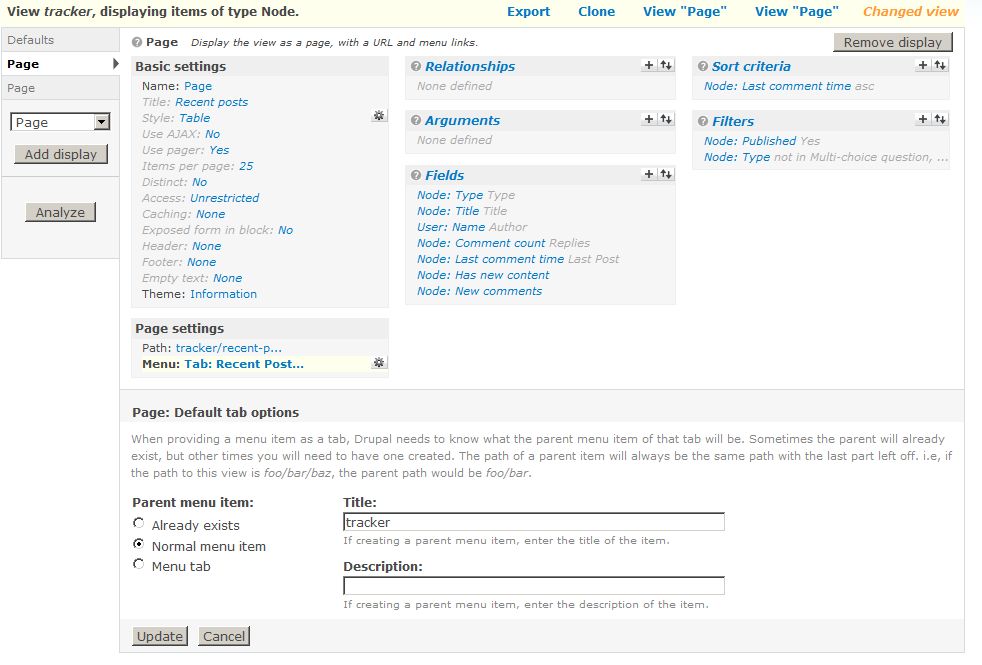
r_honey commentedHello bob, I tried following your instructions, but all that I could manage was an extra page:
in addition to
Neither could I get an additional tab on the same page itself, nor does tha page added shows the particular user's posts (instead showing all of them). I am new to Views. So, could you please posts detailed steps as to how I can produce the desired effect (Recent posts with a "My Recent Posts" tab).
I have attached 2 images showing my current settings for the 2 page views.
Comment #26
b0b commentedIt looks like you're close.
On your "Recent Posts" page remove the argument completely. Only the "My Recent Posts" page should have the "User posted or commented" argument.
Then under the Page Settings section
Recent Posts
------
Path: tracker/recent-posts
------
Menu: Default menu tab (you have "Normal menu entry" selected now)
Title: Recent Posts
Weight: -10
------
My Recent Posts
------
Path: tracker/my-recent-posts
------
Menu: Menu tab
Title: My Recent Posts
Weight: 1
------
Comment #27
r_honey commentedThanx for the reply Bob. I got some things working, but some are still stuck. Again there are 3 attachments with this post, Default & the 2 page views.
I was almost about to complain that I am not getting the tabs in the tracker, when I noticed that I also need to specify "Normal menu item" as parent for the Default tab (you cn see this in the second attachment). Specifying this, I now have tabs inside tracker as desired.
But the tab "My Recent Posts" always shows all the posts irrespective of the logged in user. I suspect that I have not specified the argument for "User posted or commented". But I could not find a place also to do so.
Has this anything to do with the Tracker module itself. As mentioned in the posts above, I have disabled the Tracker module, and only using the View to render the tracker.
Comment #28
b0b commentedIf you go to the "My Recent Posts" views set-up then click on "User posted or commented" under Arguments what are your settings for the argument?
Action to take
"Provide default argument" should be checked
Default argument type
"User ID from logged in user" should be checked
Comment #29
r_honey commentedThat's it. Everything sorted out. Thanx a ton b0b.
Comment #30
Shai commentedBob, AWESOME!
Tracker should be dropped from core and the Views tracker view could be beefed up a bit with a second tabbed display.
If Tracker is not dropped from core, I do think Views should use a different path for the Views tracker view to prevent the name space collision.
Shai
Comment #31
esmerel commentedLooks like people have figured out a solution. If people want some specific features added to views, a new feature request should be opened.
Comment #32
Hanscraft commentedBob's instructions definitely aren't working for me. I cannot get the tabs to show up at all.
My website: http://www.godaisies.com/drupal2/recent-posts
Comment #33
MrGeek commentedBobs instructions not working for me either - I'm not getting any new tabs to display.
Comment #34
b0b commentedCan you provide screen shots of your two tab settings?
Comment #35
MrGeek commentedI figured it out after re-reading this thread a dozen times.. had to use "/listname/tab1" and "listname/tab2" for the paths..
Comment #36
iamjon commentedMarking this as closed
Comment #37
esbon commentedCan someone let me know how to change the filter of the built in tracker to a specif content type?
Comment #38
esbon commentedI also figured out how to make the tabs and filters work from the instructions above. Thanks bob! What I need to do is put the my recent posts tab in the user tab, the same way the default tracker does. Please someone help me.
Thanks
Comment #39
b0b commentedYou basically need to copy the My Recent Posts display and change the Path under Page Settings to "user/%/my-recent-posts".
Comment #40
esbon commentedThanks, it is working now
Comment #41
romancos commentedSame here http://4models.info/tracker/1
warning: array_key_exists() [function.array-key-exists]: The first argument should be either a string or an integer in /home/romancos/public_html/modules/views/includes/view.inc on line 1346.
warning: mysqli_real_escape_string() expects parameter 2 to be string, object given in /home/romancos/public_html/includes/database.mysqli.inc on line 329.
warning: Illegal offset type in /home/romancos/public_html/modules/views/includes/view.inc on line 1350.
warning: Illegal offset type in /home/romancos/public_html/modules/views/includes/view.inc on line 1385.
recoverable fatal error: Object of class stdClass could not be converted to string in /home/romancos/public_html/modules/views/views.module on line 755.
warning: Illegal offset type in isset or empty in /home/romancos/public_html/modules/views/views.module on line 762.
Comment #42
romancos commentedWell just temporary workaround is to disable tracker view. Now this works...
Comment #43
merlinofchaos commentedIt's not actually temporary; you can't enable tracker.module if you enable tracker view or vice versa. They don't work together.