I realize the inconsistency between the front page and all other pages is intentional, but it would be great if we could come up with a solution to make them both look the same--for picky people such as myself. ;)
In my opinion the theme is PERFECT aside from this one thing. Great improvements since Marina!
Okay, so, to summarize the issues already solved:
--To display the banner image on all pages instead of just the front, we copy the text from page-front.tpl and paste it into page.tpl (replacing all text)
--To make blocks have rounded corners on all pages instead of just the front, we remove "$is_front AND " from lines 7 and 27 in block.tpl
--To prevent blocks from being too far apart on non-front pages, change the "block not-front" "margin-bottom" from 40px to 20px in style.css
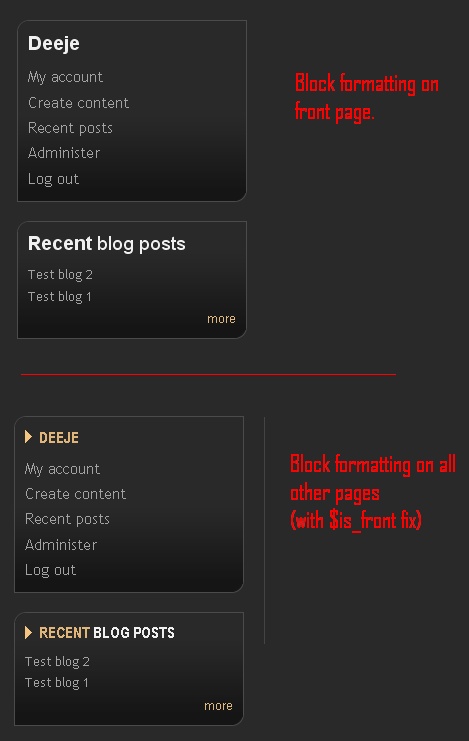
There is one last issue that I haven't been able to solve just yet, and that is the difference in formatting between blocks on the front page and other pages AFTER these fixes. The text is different and there is a vertical divider that seems out of place on non-front pages. Take a look at the image to see what I mean.
If anyone can offer a suggestion for making blocks on both pages display the same way, I'd appreciate if you'd let me know : )
Thx
Deeje


Comments
Comment #1
Surf New Media commentedIn template.php file change the following on line 296:
Replace:
$rounded_regions = array(sidebar_first);with this:
$rounded_regions = array(sidebar_first, sidebar_last);For the border issue, you can change the CSS border to be on the right part of the page, rather than the left size. I would suggest changing the margin too. Here is the code that worked for me in the CSS file:
Comment #2
strndy commentedHi, great theme! But I've got problem.
I've tried this(#1), but it doesnt work. How can I make the frontpage and other pages identical? Problem is only in left sidebar(#sidebar-first) only in block's design. As you can see in atached images.
thx
Comment #3
Surf New Media commentedI don't remember exactly what I did to get it to work, but it has to do with the CSS file for front and not-front pages. I believe this code should help for the internal pages:
Comment #4
strndy commentedI don't think, that only css code can fix it. There's a difference between block code.
block.tpl.php is used only on homepage. And I really don't know how to change it.
Comment #5
jwolf commentedWe have a new group at groups.drupal.org - maybe someone in the TopNotchThemes group can help with this -> http://groups.drupal.org/topnotchthemes
Comment #6
elijah lynnsubscribing
Comment #7
elijah lynnNot sure of everything else I did but I basically copied this from the style.css:
and added it to my local.css except changed "body.front" to "body.not-front" like so:
This works in conjunction with deleting the page.tpl.php file and then renaming the page-front.tpl.php file to page.tpl.php and also deleting the "is front" statements from the block.tpl.php file.
Also, adding this puts the blocks the same distance as the rest:
I am really not sure what is going on yet but I think Drupal by default adds the classes, "front" and "not-front" to the body tag and this is where things get confusing. Someday I will figure it out.
Disclaimer: I am a Drupal (and CSS) noob. If the above helps you, great, if not, sorry. I am posting this here as a "note to self" as well as to possibly help anyone else.
Comment #8
michelleI just got rid of page.tpl.php and changed page-front.tpl.php to page.tpl.php and so far it's working... It's only been 5 minutes so I can't guarantee there's no gotchas doing this but I thought I'd throw it out there as an easy fix.
Michelle
Comment #9
greenchuck commentedI did two things to make this work:
1. Copy this into local.css
/*Make not-front blocks look like front blocks*/
body.front #sidebar-first .block h2.title, body.not-front #sidebar-first .block h2.title {
background: transparent;
font-family: Helvetica,Arial,Verdana,"Bitstream Vera Sans",sans-serif;
font-size: 1.4285em;
font-weight: normal;
padding: 0;
text-transform: none;
}
body.front #sidebar-first .block h2.title .first-word ,body.not-front #sidebar-first .block h2.title .first-word{
font-weight: bold;
}
#sidebar-last .block h2.title {
background: none;
font-size: 0.9375em;
font-weight: bold;
padding: 0;
text-transform: uppercase;
}
2. remove "$is_front AND " from lines 7 and 27 in block.tpl
Comment #10
cazam commentedI found a slightly different way around this as the ways above were not working for me much to my dismay.
I changed page-front.tpl.php to page-tpl.php as suggested. I also left the original page-front.tpl.php in there.
Then in the page.tpl.php code I removed a few lines:
so you end up with:
I did this as I wanted the large image, but I did not want the mission or the grey bar to print on top (I want to change my mission on all pages...next challenge, I also want to change the image for every page, another challenge)
Anyway I hope some people benefit from my discovery.
CAZAM
http://www.cazam.eu