

Closed (fixed)
Project:
Lightbox2
Version:
6.x-1.x-dev
Component:
User interface
Priority:
Normal
Category:
Bug report
Assigned:
Unassigned
Reporter:
Created:
23 Mar 2009 at 16:57 UTC
Updated:
22 Aug 2011 at 15:06 UTC
Jump to comment: Most recent file


Comments
Comment #1
stella commentedThis is currently not supported. Until then you can use the version that comes with Drupal.
Drupal 7.x is not ready for production sites and should not be used.
Cheers,
Stella
Comment #2
szy commented@stella, bricef said 'or 7.x'... :]
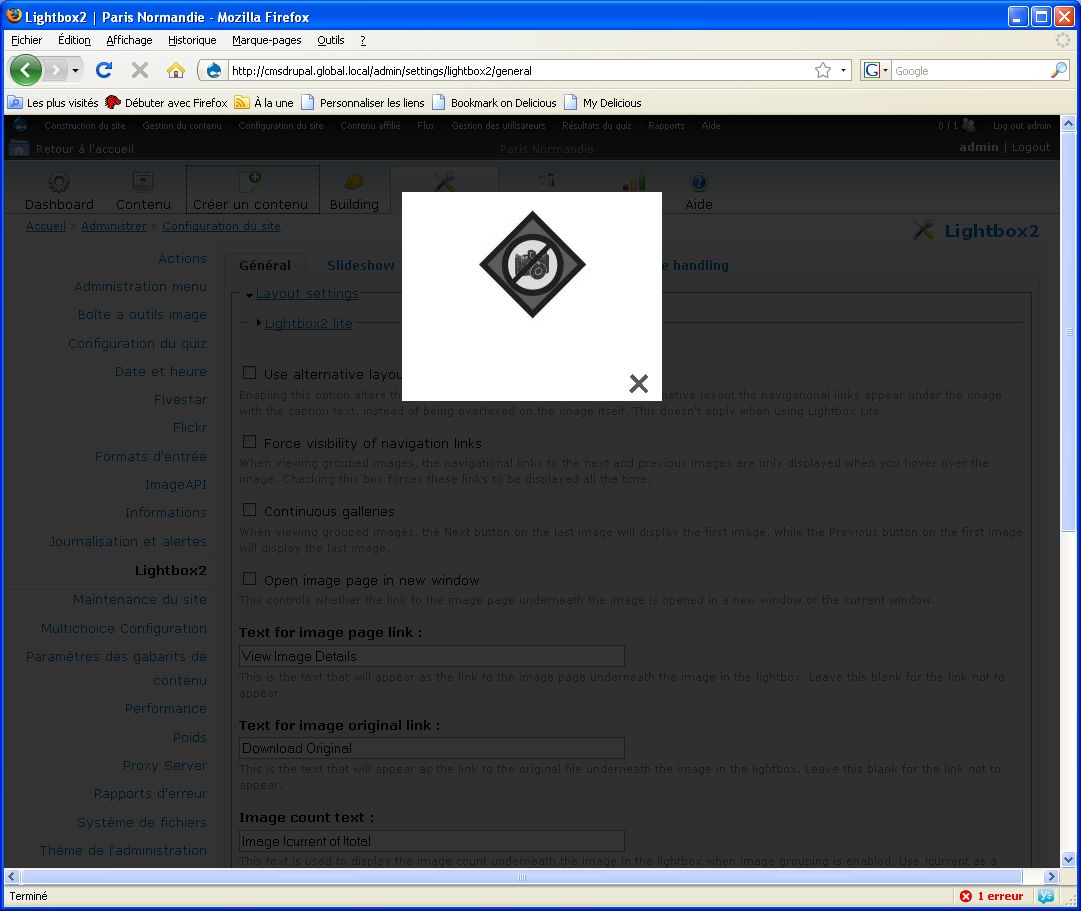
Yes, it happens for me too - in 6.x. When I click for anything on my site
(in the public part of it - not only admininstration) lightbox opens a broken
image, just like bricef has shown it.
It happens after the latest dev updates - JQuery 2.x, Popup Reference,
and others - there must be a conflict between one of them and Lightbox.
Szy.
Comment #3
stella commentedYes, I saw that. The first part of my comment was referring to the 6.x bit. :)
No support has been added to lightbox2 for jquery 1.3.x yet and to add this support is a feature request. Resetting issue status.
Comment #4
szy commentedSorry :), and thank you for your work :]
Szy.
Comment #5
tic2000 commentedA solution that works for me.
Note that I didn't test on all the option that the lightbox 2 module has to offer, but just on a simple image and on a group of images and it worked with no problem.
As the release notes of jQuery 1.3 mention "@" no longer works in selectors. It was already deprecated in 1.2. So all I did was to look for "[@" in all js files that come with lightbox module and replace the occurrences with "[". I uploaded all the files on the server, re-enabled the jQuery Update module and my gallery works.
Now if this solution can be used with no drawbacks I don't know. If drupal 6 came with jQuery 1.2 at least it should be no problem I think, since "@" was deprecated anyway and I did test on my site (with drupal 6.10) without jQuery Update and the modified files worked (again I say, I only tested on images).
Later edit:
I did test the lightframe (with external links and node content) and lightshow options and they work too. On lightframe when using the example in readme.txt from "Controlling iframe property when grouped example" it only showed 2 of the pages and not 3 as the number of links. I don't know if this is normal, or this is the way it was before because one link was used twice.
I have no video in place to test lightvideo too.
Comment #6
mrgoltra commentedsubscribing.
Comment #7
davidwhthomas commentedI had the same problem, all links became blank lightbox popups.
jQuery: 1.3.2
Lightbox2: 6.x-1.9
I patched the js files as suggested above to conform to the new 1.3.2 syntax, basically find + replacing
[@with[The patched files are attached.
testing and working.
DT
Comment #8
davidwhthomas commentedand here's the patched js files themselves in a zip, for those who like it that way :)
DT
Comment #9
stella commentedComment #10
jcmarco commentedRelated with this issue #358082: jQuery 1.3 in Drupal 6.x
Patch tested and works fine, allowing the use of the admin screen and not opening modal screens in any link
Comment #11
adrinux commentedPatches do fix the problems, Admin menu links work as they should, lightbox links work as they should.
And here's davidwhthomas's changes re-rolled in a single patch, for the lazy patcher ;)
Comment #12
batbug2 commentedSeems fine to me.
Comment #13
AlexisWilke commentedIs that change compatible with jQuery 1.2?
Thank you.
Alexis
Comment #14
tic2000 commented@ was deprecated in jQuery 1.2. That means that using it or not was the same thing.
The simple answer is yes, it works with jQuery 1.2
What do we need to get this added in lightbox2 release? Since it doesn't brake absolutely nothing (Drupal 6 came wtih jQuery 1.2.3) and it makes this compatible with jQuery 1.3.
Comment #15
AlexisWilke commentedtic2000,
Well! Yes! We should fix lightbox2 because a lot of people are using jQuery Update for other modules to function properly...
And if it is to work with all versions, I do not see a problem. 8-)
Thank you
Alexis Wilke
Comment #16
tic2000 commentedThe maintainer of the module can do it, not us. We can test the patch and report any problem we find with it. Till now I found none and as I said in my previous reply, it can't brake anything this patch for D6. In D5 it's another story.
Comment #17
AlexisWilke commentedtic2000,
I know how that works, I have several modules too, you can check out my profile... 8-)
Worked for me and you and several others so I'm changing the status!
Thank you.
Alexis
Comment #18
stella commentedCommitted! Thanks everyone for the good work, especially davidwhthomas, adrinux!
Cheers,
Stella
Comment #19
RobertPope commentedNow I have this error
Error: [Exception... "'Syntax error, unrecognized expression: )' when calling method: [nsIDOMEventListener::handleEvent]" nsresult: "0x8057001e (NS_ERROR_XPC_JS_THREW_STRING)" location: "" data: no]
Comment #20
tic2000 commentedThis to me seems like a problem in your browser. I see some of this errors in FF too and they are not consistent. Some times they appear, some times don't. But they don't affect the javascript in the page. I don't know if it's the same for you or if it's another issue.
Comment #21
RobertPope commentedI don't know - but when I disable the jquery update module everything works -....except my navbar - wich needs 1.3.2
Comment #22
stella commented@roberttwobears: if you disable lightbox2 but not jquery_update do the errors disappear?
Comment #23
RobertPope commentedyes - the errors disappear with jquery update enabled, but the Lightbox2 module off
Thanks Stella
Comment #24
sdrycroft commentedI'm experiencing the same problems as roberttwobears. The problem disappears when disabling the Lightbox2 module or the JQuery Update module. I only get this problem with the 6.x-2.x version of JQuery Update (and not 6.x-1.x).
Comment #25
RobertPope commentedreverted and disabled jquery till this is resolved
Comment #26
tic2000 commentedStrange, I have both last jquery update module and Lightbox 2 and I don't see this error anywhere with latest FF, IE7, Safari or Chrome.
Comment #27
AlexisWilke commentedtic2000,
Yeah. I do not have any problems either and I'm running over 10 sites already. They don't all use Lightbox2 but those that do have many other modules.
It sounds to me that one of the other modules used by roberttwobears and sdrycroft must be in conflict, somehow.
Thank you.
Alexis Wilke
Comment #28
sdrycroft commentedCheers Alexis, I suspect you may be right. If I get the time, I'll try and track down where the conflict lies.
Comment #30
jdeg commentedAnyone can solve this issue?
Comment #31
shane birley commentedI am still experiencing this issue. Everything I have tried so far points at Lightbox2.module - of course, I could be wrong but if I disable it, everything works.
Comment #32
Nick Robillard commentedAfter applying the patch, I'm still getting the "Syntax error, unrecognized expression: )" error. Same as Shane though - when I disable lightbox2, all is well.
I don't see any more @ symbols used in selectors in any files (after patching) so I'm not sure what's causing this...
UPDATE: Updating to 6.x-1.x-dev solved this problem. I'm now running jquery 1.3.2 and jquery ui 1.7.2 just fine. Thanks to the devs for being on top of this. :)
Comment #33
Nick Robillard commentedComment #34
baxr6 commentedStill causing an error for me, even after doing all of the above.If i visit
admin/settings/lightbox2/automatic
and click "reset to defaults" the collapsible part starts working but if I change Image Node Settings to lightbox it stops working again.I ended up comparing the source and found that the only real thing added was the js file auto_image_handling.js.So it seems the issue is definately located in this file somewhere.
Comment #35
AlexisWilke commentedFor those with the problem, could you create a site with just jQuery & Lightbox2 and test on that site, with no other module turned on?
Thank you.
Alexis
Comment #36
baxr6 commentedFirfox Version: 3.5
Firebug Version: 1.4.0b7
Fresh install of drupal 6.13
turned on optional core module
Upload
Added lightbox2-6.x-1.9 module
added jquery_update-6.x-2.x-dev (jquery 1.3)
Note: as soon as I enabled jquery_update I recieved an error in firebox
Error: uncaught exception: Syntax error, unrecognized expression: ) Line 0
uninstalled lightbox2 and delete
Note: error is gone
Installed and enabled lightbox2-6.x-1.x-dev
every thing is fine so I now go to admin/settings/lightbox2/automatic and under "Image Node Settings" I changed "Automatic handler for image nodes" to "Lightbox" and save.
Note: Now the collapsible fieldset's stop working and firebug shows an error.
Error: uncaught exception: Syntax error, unrecognized expression: ) Line 0
Next I click "Reset to defaults" and everything is back to normal and firebug shows no errors.
Next I copy the source html with "Automatic handler for image nodes" set to "Lightbox" and upload the file to the root directory with the name test.html.
I then remove only one line from the test.html file.
<script type="text/javascript" src="/drupal/sites/all/modules/lightbox2/js/auto_image_handling.js?r"></script>And the test file starts to function properly.
Just for testing purposes I used the "Break On Next" feature in firebug and browsed to admin/settings/lightbox2 It keeps stopping on the following
File: sites/all/modules/jquery_update/replace/jquery.js
Break: Line 2467:
return typeof jQuery !== "undefined" && !jQuery.event.triggered ?Hope this helps....If you need anything further let me know.
Comment #37
mash200 commentedi'm really sorry if this is a stupid newbie question but i've tried to find a soluiton elsewhere to no avail!
i have D6.13 installed and whichever jquery version is standard in core. i've tried lightbox2 6.x-1.9 and 6.x-1.x-dev (as suggested in other posts) and lightbox2 still wont work. it did (6.x-1.9) with 6.12 through bitnami though (thought that was SO slow!)
the lightbox2 options are there in display fields in my custom content type, and it displays the correct initial image but on clicking it links to the uploaded image file rather than opening in lightbox. i'm using cck/imagefield/imagecache, with field type 'field' and widget 'image'.
should i apply the patch(s)? and if so, how do i do it? there don't seem to be any .js files in the lightbox2 module.
very confused!!!
Comment #38
mash200 commenteddont know if i'm doing something wrong but still no joy. have tried with a new, fresh install (6.12), and still lightbox2 or thickbox don't function but do appear as format options. it seems as if the js just doesn't execute correctly. when clicking on thumbnail (imagecache preset selected in either views or display fields with lightbox) just shows image in new browser window rather than as a lightbox overlay :(
modules installed:
imagefield
lightbox2 (tried both 6.x-1.9 and 6.x-1.x-dev)
cck
imagecache
filefield
imageapi
views
using WAMPserver2 on vista. the only change from this install to when it did work is that before i was running the latest bitnami wampstack with bitnami app drupal 6.12, which was unbelievably slow.
how do i patch jQuery? it seems from other posts that its not easy (or possible?) to even find out the version of jQuery running.
please help!
Comment #39
stella commentedYou can find out which version of jquery you're running by going to your site's status report. Do you have jquery update module installed? There should be no problem if you're not using jquery update 6.x-2.x. If you're not running this version of jquery update, please open a separate issue.
Comment #40
baxr6 commentedany ideas on the Automatic handler for image nodes problem yet
Comment #41
open social commentedSame problem here, all links turn into Lightbox with no content but the link description. We run Ubercart (including all image modules) and Internationalization modules. Any suggestions?
Other sites show no problems. We run Drupal 6.13 and Jquery 1.2.6.
Any suggestions? Many thanks in advance.
Comment #42
stella commentedTry the attached patch, or the latest dev version (available later today).
Comment #43
open social commentedPatching worked fine! Thanks!
Comment #44
baxr6 commentedyes confirmed all issues resolved for me.
Comment #46
andrewmacpherson commentedThis issue has arisen again:
#642256: Lightbox2 replaces links with links to non-existing preview image files
I've marked that new issue as a duplicate of this one.
I note that the problem was fixed as of comment #42, in July. Is there any chance of a new supported release, anytime soon, i.e. 6.x-1.10 ?
Comment #47
macmladen commentedI've run into issues with Lightbox2 and jQuery_update module.
I am using it on site with latest Drupal and Ubercart with Admin module for clean, D7 like admin interface.
If I enable Lightbox2 and jQuery update, I get most of links not working but opening modal window. If I disable Lightbox2 or jQuery_update everything works fine, so I figured out that those two are not working together.
Is there any cure for this?
I used both Lightbox2 1.9 and dev versions with same result.
Comment #48
stella commentedYou may need to clear your Drupal and your browser cache after upgrading lightbox2 to the dev version.
Comment #49
macmladen commentedI've done that (Drupal: flush all) and browser but didn't help.
I'm using Admin for administration and Acquia Prosper, but I disabled both for Garland with clearing but nothing helped.
Then I just shut off jQuery_update and it is fine now.
For people that use caching (drupal caching, or boost) it is essential to flush them too.
Comment #50
nyleve101 commentedComment #51
lwanga.matovu commentedFrom today onwards, I PROMISE to participate in forums.
I just spent three days trying to work this issue, till I spent one minute implementing this fix.
Stella, you rock, girl!
Comment #52
bendiy commentedsub
Comment #53
Jerome F commentedDo you know if this fix was applied to 1.9 version ?
I have the same issue with jquery update, which is used by Kaltura and image cycle modules.
I can't see any thing about #411162 patch in 1.9 notes
http://drupal.org/node/356019
Comment #54
AlexisWilke commentedJerome,
You shouldn't believe the notes... they often lie!
Checking out the code is much more likely to tell you clearly.
And since the author did not mark this entry as fixed, I would think it just isn't applied yet.
Thank you.
Alexis Wilke
Comment #55
stella commentedThis is currently only available in the dev release.
Comment #56
Jerome F commentedThank you for your quick answer Stella & Alexis. I'm going to be patient then, and use the dev on my developpement site ;-D
Comment #57
stella commentedComment #58
not_Dries_Buytaert commentedSorry, if this has already been noted in this topic:
The lightbox image which pops up (as the topic starter reports) is located at '.../sites/all/modules/lightbox2/images/brokenimage.jpg'
Enabling the option 'Use lightbox2 lite' on the webpage 'admin/settings/lightbox2' is a workaround that may be useful. This disables the 'automatic image URL re-formatting', 'grouping' and 'alternative layout' features of Lightbox.
jQuery 1.3.x is included with module 'jQuery Update' 6.x-2.x (http://drupal.org/node/409588) btw.
Comment #59
miro_dietikerFYI: you really NEED to update drupal cache in admin/settings/performance after patching this.
Else whoever previously already visited your installation will result in this issue (as long as lightbox2.js is candidate for a local cache - which is).
So hit the button.
Comment #61
harryadu commentedBut, if those features are disabled, it takes away the parts that we would like to use... e.g The next and back buttons, and the image grouping. If there an update to resolve this issue?
Comment #62
not_Dries_Buytaert commented@stella: No new dev version has been released, yet. So, in which patch has this been solved? http://drupalcode.org/viewvc/drupal/contributions/modules/
@miro_dietiker: Thx. I assume you mean, after implementing my workaround (not as a solution to fix the bug).
@harryadu: Agree.
Comment #63
modctek commentedsubscribing
Comment #64
ani7a commentedThanks a lot!
Same problem here :D
Comment #65
raven_web commentedThank you...
lightbox2-6.x-1.x-dev seems to be working just fine with jQuery Update.
Comment #66
stella commentedComment #67
thinkpadius commentedthank you! resolved with dev version.
Maybe it might be worth referring to this issue in the FAQs section, or highlighting the differences between lite and full settings of the module for better understanding. It may not be worth it, because if people are like me then they switched to lightbox2 lite as soon as they got trouble and never looked further (until they wanted to group images.)
thanks again for the help.
Comment #68
jacobmn commentedI agree that this should be added to the known issues or module description as a caveat until it's fixed in the next release. I had the same problem trying to use another jquery plugin that wanted 1.4.2.
Comment #69
geerlingguy commentedSubscribe.
Comment #70
asb commentedComing from #835764: Skinr 6.x-2.x-dev incompatible with Lightbox, subscribing
Comment #72
geerlingguy commentedCould you possibly release a new version sometime, so I don't keep hitting this issue and scratching my head? :D
Last stable release was almost two years ago! A lot of random threads that are popping up would go away if a new version were pushed out...
Comment #73
drjonez commented:|
Comment #74
gpk commentedFor the record 6.x-1.10 was the first release to contain this fix.
Comment #75
brayo4 commentedHaving truble getting the "rel = lightframe" to work for nodes, it just opens node in a new page. I tried "rel=lightmoadal" and that seems to work, that is trigger the lightbox and display content as expected. The lightbox trigger does not seem to work.... just curious, does lightbox2 work with the jquery versions below????
jQuery UI 1.8.11
jQuery Update 1.5.2
thx.....