

Closed (fixed)
Project:
Bibliography Module
Version:
7.x-1.0-rc7
Component:
User interface
Priority:
Normal
Category:
Support request
Assigned:
Unassigned
Reporter:
Created:
26 Mar 2009 at 17:25 UTC
Updated:
21 Feb 2019 at 16:19 UTC
Jump to comment: Most recent, Most recent file

Comments
Comment #1
rjerome commentedHave you checked the "view full text" setting on the "admin/user/access" page?
Ron.
Comment #2
kentamani commentedHello Ron,
Thank you for you quick response!
Yes, I checked off the permission of "view full text" for all users in the access page.
But it seems not to be changed anything and the full text field appears again as it is...
Otherwise can we comment out some lines of source code relating to "full text"?
Ken.
Comment #3
rjerome commentedPerhaps I misunderstood, did you mean the full text field on the input form or the output? If you meant the input, then I guess your right, there is no way to turn it off (I never realized that before, but it's because the full text is stored in the "node" table rather than the "biblio" tables). I could add an option to turn the the full text input filed off, I don't think that would be a big problem.
Ron.
Comment #4
kentamani commentedYes, I meant the full text field on the input form, where user normally fill in reference information. I want to disable it because of our copy rights matters.
It would be really great if you could provide an option of switch on/off the "Full Text" field.
I also think this option will be useful for many people who have to avoid some potential legal troubles.
Thanks, ken.
Comment #5
rjerome commentedThis option is now in the 5.x-dev version and will be carried into the upcoming 1.17 version.
Ron.
Comment #6
kentamani commentedHi Ron,
Many thanks for the turn on/off function of the input full text field!
However it does not work well in my system...; I checked off the full text input field in the biblio settings but then an empty input field appears in the user input page... in my case below the title field.
It looks like a normal input full text field but without field title (i.e. Full Text:) and help text below (i.e. You may enter a full text or HTML version of the publication here).
The turn-on full text field works fine but something is happening when this function was turned off.
I can't figure out whether this occurrence is due to the code itself or due to my biblio configuration...
I am not sure whether you can trace my problem but can you check this?
Thanks, Ken
Comment #7
rjerome commentedI'll take a look, I have to admit that I didn't test that code prior to committing it, I just assumed it would be flawless :-)
Comment #8
rjerome commentedIt took me a while to find out what was going on there, but it's fixed now.
Turns out testing might be useful after all :-))
Ron.
Comment #9
kentamani commentedMany thanks, Ron!
The fulltext function now works very fine. It was really great help for us :-)).
Greetings, ken.
Comment #11
Aaron Rester commentedDoes this functionality still exist in the latest build for D6? I can't seem to figure out where to go to hide the Full Text input.
Comment #12
rjerome commentedIt would seem that I never added it to the 6.x branches. I presume you would like it?
Comment #13
physiotek commentedpersonnally yes i would like it.
it's a matter of copyright and to be the most user-friendly possible.
thanks!
Comment #14
sazevedo@ua.pt commentedHi,
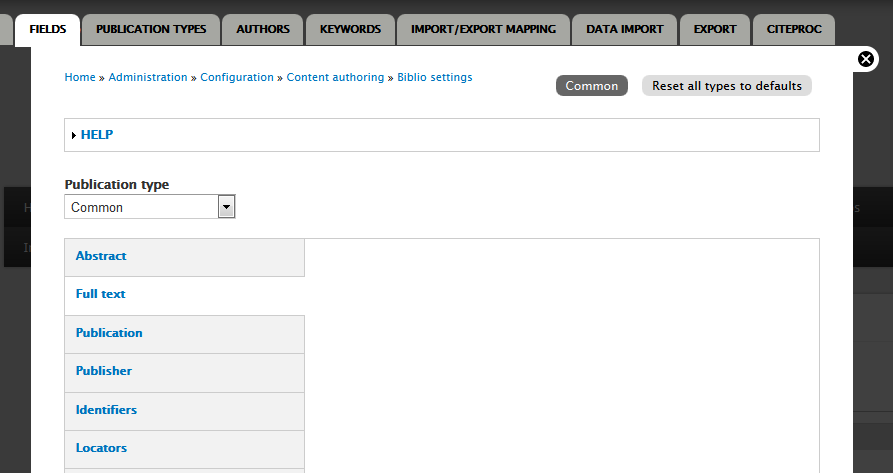
I'm having this problem in Drupal 7, How can I hide Full text?
The image of the setting is attached
Comment #15
vegardjo commentedSame issue (and screenshot) as #14 for me in 7.x-10-rc7. Seems no way to disable this. Have also tried to disable the body field with Display Suite, but that isn't respected either. Any pointers to how to fix this?
Comment #16
vegardjo commentedForgot to open the issue again. Also a workaround for people searching for this. In you custom module or template.php file, use a hook_form_alter:
Comment #17
liam morlandIf you need further help, please re-open and provide details.