Closed (fixed)
Project:
ImageCache Actions
Version:
6.x-1.5
Component:
Miscellaneous
Priority:
Normal
Category:
Bug report
Assigned:
Unassigned
Reporter:
Created:
28 Mar 2009 at 10:12 UTC
Updated:
23 Jun 2010 at 22:00 UTC


Hi!
I Love this module and its powerful functions. But I can not get transparency to work as intended.
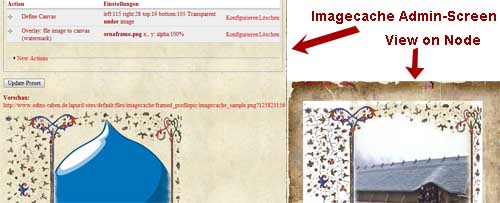
When I create a preset with tranparent png-images as eigther background-canvas or overlay-watermark, the preview in the admin-screen works great and shows the site-background shining through the tranparent watermark.
But when I view the image in a production-state node, the transparency does not work. There is always a white background behind the image.
This occurs in Firefox and IE7+. I crawled my theme files and made sure the image background is always set to "none", I even tried different themes, but it is all the same.
What really makes me wonder is that on the same site, with the same theme it works in the preview mode, but not in the production-view.
Can someone please help me?
Thank you!
Attached you see a comparism of admin-screen to live-view.
| Comment | File | Size | Author |
|---|---|---|---|
| reference.jpg | 38.3 KB | xqbzzr |

Comments
Comment #1
xqbzzr commentedAh - I played a bit and first added the action to convert the incoming picture to PNG. Now it all works!
So it may not be a real bug, but some basic concept of GD handling image formats.
Comment #2
dman commentedI documented it as much as I could (in places where I knew it would be an issue). I guess I should do so on the 'define canvas' screen also :-/
Using transparency effects on a jpeg does not magically make the jpeg able to support transparency when it is saved out again. It is still, by default, a jpeg - and that just doesn't DO that!
The convert-to-png (the right solution in your case!) is a bit of a cheat. In order to remain compatible with the rest of the systems expectations it changes the file format to png but still hides it in a file named .jpg. Luckily all browsers can figure it out.
Note that PNGs are generally HUGE in filesize compared to jpg, and I haven't been able to find any way to increase compression on them using the GD toolkit - if it's even possible.
Unless you want your incidental images (nice illustration of the use, BTW) to be 300+ KB each, maybe you could try just flattening your result unto a textured background. Not quite as pretty always, but necessary sometimes.
Comment #3
xqbzzr commentedYeah, a short hint in the admin screen would be great. Converting back to jpg with a fitting background will not work in this case, because the setup is used on different backgrounds. But that would work indeed.
The only thing i can imagine with decreasing file size would be to indicate the png to 8 bit, similar to gif. I am not aware if GD library will support this, but anyway we would loose soft-alpha capability.
I think for now, my friends will have to live with a little time to display the images.
And this is a very low price for such a functionality - THIS MODULE ROCKS!!!
Thank you!
Comment #4
dman commentedClosing old issues.