

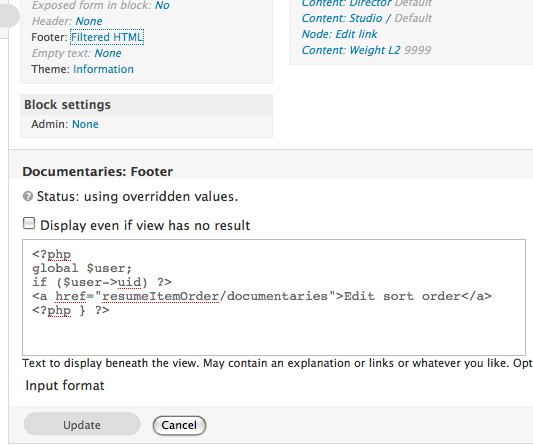
I am building some views and I'd like to put some custom code in the footer of the view that shows a link to an edit page only if the user is logged in. I have a PHP snippet I am using to do this, and it worked fine on a few of my views, then all of the sudden I was unable to select the input format I wanted to use in the footer. The "Input format" header shows up, but there is no way to select what I want that format to be. It shows up under the basic settings as "filtered HTML" even if I set the default input format to PHP evaluator.
I can still access all the regular input formats on my other pages (ie. create content >page), this problem seems to be isolated to all of my views. The ones I originally set to PHP evaluator still show up as PHP and say PHP Evaluator in the basic info box, however if I edit them the input format options don't show up either. An image of the issue can be seen at http://drupal.org/files/issues/noinputformat.jpg which will hopefully make it easier to understand what I mean.
I am very confused.
Thanks for your help!

Comments
Since "Input format" still
Since "Input format" still show up it appears the field set is there. Are you getting any JavaScript errors or added in modules that use jQuery/JavaScript?
Jquery Media
Yes, I am using the jquery media plugin. I also having lightbox2 installed. You think that might be causing the issue? I am not getting any javascript warnings or errors.
Since the "Input formats"
Since the "Input formats" area using jQuery and you can no longer access I would suspect a conflict. I would try disabling jquery media plugin and lightbox 2 separately and see if the problem goes away.
I tried that earlier, and it
I tried that earlier, and it didn't help. I also just tried going to the extreme and uninstalling the Devel Module (just in case) as well as disabling Lightbox 2, Jquerey, Jquery media, WYSIWYG and TinyMCE, but am still getting the issue.
It wouldn't be a huge deal, except that I have "edit sort order" buttons (that link to draggableviews' pages) in the footer that I only want to show when a user is logged in (and I also need the PHP to call the current arguments in to the links).
Thanks for giving me your time to help me. any other suggestions? Do you think its a views' issue or another conflicting module?
Input formats no longer showing up as options in Views 2
I was having the same problem in Drupal 6. This is what worked for me:
Go to admin/build/views/tools
put a check next to "Disable javascript with Views. "
Views no longer looked the same but enabled me to select the different input formats.
I am experiencing the same
I am experiencing the same problem with Panels 3. As they are both using jQuery, I wonder if this is the root cause.
Founder @ Glass Analytics
Interestingly, disabling
Interestingly, disabling Views resulted in it beginning to work for Panels again. There is definitely a conflict here.
Founder @ Glass Analytics
For me, it was "image assist"
For me, it was "image assist" - I had disabled and re-enabled at some point. Image assist options changed on re-enable so that it was appearing on all paths instead of being restricted to node and comment paths which is usually the default. Resetting to default and restricting to node and comment paths fixed the problem and input formats is restored in views.
me too
Thanks for that fox. The same thing happened to me, your post saved me a hell of a lot of work.
Thatnk you! This worked for me too
Img_assist came with all paths enabled, after I changed it to restricted paths (already offered) the Input formats in Views started working again :)
The point is there.. Image Assist
Yup.. after i restricted path to: admin/build/views/ajax/display
in Image Assist module, then it start working again.
https://www.drupalnote.my (Drupal tutorial in Malay)
http://parasolx.net (my personal blog; Drupal)