Active
Project:
Table Wizard
Version:
6.x-1.3
Component:
Code
Priority:
Normal
Category:
Bug report
Assigned:
Reporter:
Created:
30 Mar 2009 at 17:09 UTC
Updated:
2 Dec 2013 at 05:09 UTC
Jump to comment: Most recent, Most recent file


I haven't been able to get TW to recognize my table's primary key, even when the table has a unique primary key derived from a auto-increment field which contains verified unique numbers. TW list's "0" for PK. Because of this I can't proceed with listing it as a primary key....
Next, I tried uploading from a CSV file, and using one of the CSV's fields as a primary key with unique 1-25 numbers, but TW still doesn't see it.
I'd be glad to provide more data but I'm more of a site builder than a coder. However, I'm more than happy to help in any way that I can. I've got a big migration (from Fellowship of Reconciliation's old HTML site: http://forusa.org into a site using Organic Groups and other fanciness) that I'm working on over the next few months and Node Import isn't cutting it. I notice that TW is in active development and I saw you all's presentation at Drupalcon so I'm pretty psyched about TW's possibilities.
| Comment | File | Size | Author |
|---|---|---|---|
| #27 | Aktuelles.sql_.txt | 1.86 KB | fuerst |
| #19 | phpmyadmin_bugreport.jpg | 98.13 KB | jds |
| #19 | drupal_table_wizard_bug_report.jpg | 34.4 KB | jds |
| #8 | phpmyadmin_primary_key.png | 421.26 KB | attheshow |
| #8 | tw_analysis_no_primary_key.png | 349.49 KB | attheshow |



Comments
Comment #1
mikeryanAre you sure the MySQL table has that field defined as the primary key? It sounds like you're talking about the input data having a primary key, but you need to actually define the primary key index in MySQL for the field to be recognized as the primary key.
Comment #2
webchickI don't know if this is related, but I've also noticed that the module exhibits this behaviour if the table has zero rows in it. Here's a random example from the project I'm trying to import:
There are no rows in the table (as evidenced by AUTO_INCREMENT=1). And as you can see, it has a single-column primary key. Yet, when I go to analyze it, I get:
Comment #3
webchickDigging further, this appears to be by design, since all the logic for building the $pks array and such happens within this block:
I'm not sure why it's desirable to not be able to analyze a table with no data in it (it might be nice to create views ahead of time for tables that will eventually contain data), but at the very least it seems like we could give people a more descriptive error message so that they know why it's not working.
Should I open a separate issue for this, or..?
Comment #4
webchickOh, also note that my flag is in this case is 3 (TW_COLS_NONEMPTY). I'm not yet adept enough with the code to know a) what the heck a flag is :) b) why it's set to that and c) how I would change it to something like TW_COLS_ALL instead.
Apologies if this is a red herring.
Comment #5
mikeryanAhhh, this explains a lot... The original design center was importing and analyzing tables full of data, so consideration of tables that are yet to be populated wasn't considered. So, if a column was empty for all rows, it was considered not to matter...
The page right now defaults to showing only non-empty columns (TW_COLS_NONEMPTY), and empty columns automatically are treated as "ignore" (so they won't appear on views). I think I need to change this to default to viewing all columns, displaying the isempty flag, and letting the user explicitly mark them to be ignored...
Comment #6
mikeryanOK, I've committed this... The "flags" are now based on ignore status rather than empty status, the PK cannot be ignored, I've fixed up the help and some labels on the analysis page...
Comment #8
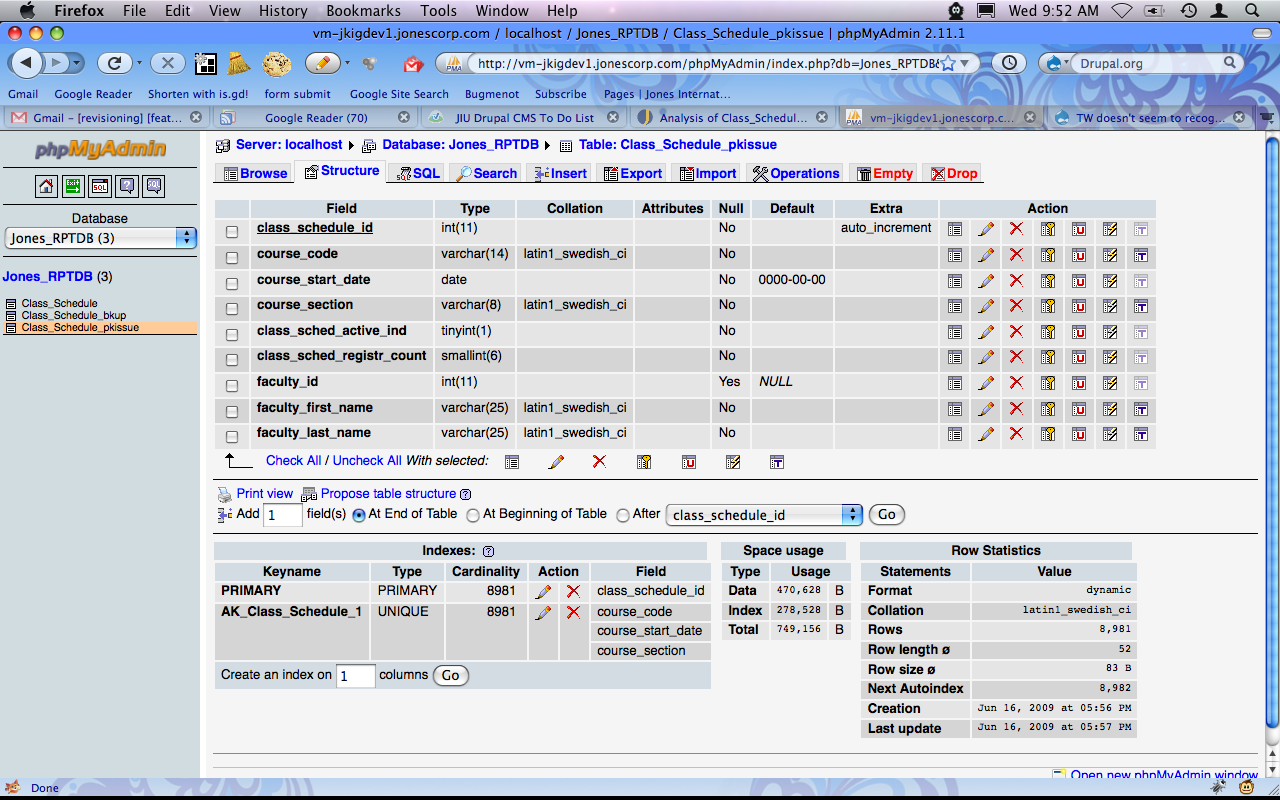
attheshow commentedI'm also seeing the initial issue referenced here. This is happening for a table that's in a non-Drupal database that's on the same server. I've attached a couple of screenshots.
Comment #9
mikeryanThe "Could not analyze" message means that the Schema module failed to inspect the table successfully. I'll try replicating your table in an external database to see if I can reproduce it - I wonder if it might be the "date" field.
Comment #10
mikeryanI created the table as shown and had no trouble analyzing it. I then removed the auto_increment column, turned the 3-column unique key into the primary key, and tried again - no problem.
What version of MySQL are you using? I've seen some reports for the Schema module that I can't reproduce and may involve a later version than I have (5.0.41), it's probably time I pick up the latest 5.1 and test against that...
Comment #11
attheshow commentedThis is MySQL 5.0.51 and Schema 6.x-1.3. I should also note that I'm using Table Wizard 6.x-1.x-dev (2009-Apr-08), so my code is a little behind the times.
Comment #12
attheshow commentedCould this be because it's outside of my primary Drupal database? Can Schema analyze tables in additional databases that are defined in your settings.php file?
I thought I tested this previously with a separate database and was able to analyze it with TW.
Comment #13
attheshow commentedOh, I think I found my issue. I need Schema 1.4 at least to inspect external database tables. Just found this in the Schema issue queue: #411538: Support inspection of external databases
Comment #14
attheshow commentedThat worked. After upgrading to Schema 1.4rc1, I was able to successfully analyze my table with Table Wizard. Thanks for the help!
Comment #16
cjdavis commentedI am seeing the same problem with tables imported from CSV files - after setting a primary key, tw doesn't see it until I remove it from tw and then re-add it as an existing table.
The initial import goes fine, I get the message to set a primary key as expected. I go into phpmyadmin and change my PK field to int(10), unsigned, not null, set it as PK, and then add the auto-increment option. I return to tw and re-analyze, no luck - the PK is not seen.
If I then remove the table in tw and then simply add it as an existing table, tw picks up the PK immediately.
A separate bug (but maybe not separate?) is that after the successful add, the default view created does not work until I resave it - the page URL simply displays the tw admin page. Once saved it works fine. I'll move this to a separate issue if it is not related.
Comment #17
mikeryanI can't reproduce this - I did the same as you did with a test file, importing, resetting the first field to an unsigned, not null, auto-increment PK. Reanalysis did work - the field was recognized as a primary key.
Is there any other information you can provide to help reproduce this? What versions of the Table Wizard and Schema modules are you using? MySQL?
In the future, please don't re-open old issues - if you read through this issue, you can see that the circumstances of the original problem (analyzing empty tables) don't apply in this case, whatever you're seeing is a different issue.
Thanks.
Comment #18
saltcod commentedHi Mike,
Apologies if this isn't the place for this post, but I had a related experience and found a solution. Please move/delete/instruct if inappropriate.
------------------------------
I was exporting CSVs from my localhost and uploading into TW. It would see the table fine, but not the Primay Key. No matter what I did at that localhost end, TW wouldn't recognize it.
What I did:
I imported the csv file through TW. Deleted the primary key field in phpmyadmin on the server and added a new one using:
Then went back to TW -> Add Existing Table and it successfully recognized the primary key field.
Comment #19
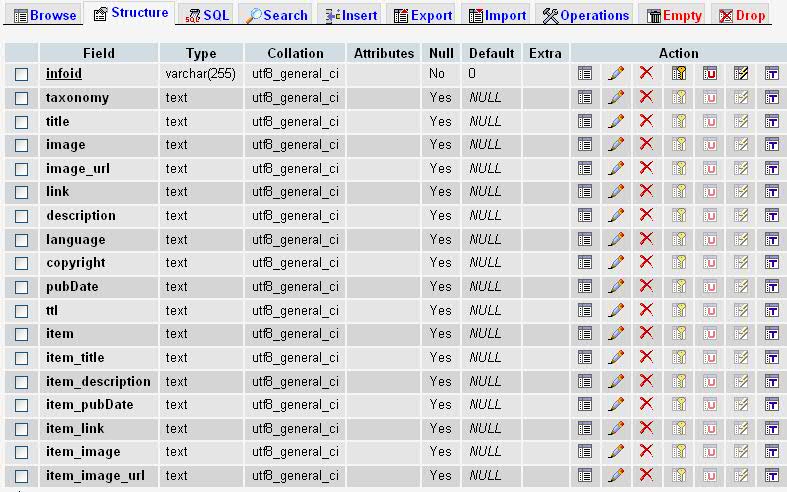
jds commentedI'm confirming this issue. I have a table with a primary key and I Table Wizard says that there is no primary key (See pictures).
I'm using:
Drupal 6.14
Schema 6.x-1.5
Table Wizard 6.x-1.1
PHP 5.1.6
MySQL 5.0.45
I've tried several things such as changing the data type of the primary key (int, varchar etc). Nothing seems to be working.
Comment #20
mikeryanPlease go to /admin/build/schema/inspect - what does the analysis there show for your table?
Thanks.
Comment #21
mikeryanNo further information provided
Comment #22
jbrauer commentedHere's the schema output from a table with this situation.
Comment #23
mikeryanIs there anyone out there currently seeing this problem, who can describe how to reproduce it as well as describe their MySQL configuration? I have never been able to get this to happen, and I suspect it's ultimately something on the MySQL end (access to information_schema?).
Comment #24
itangalo commentedThanks for an awsome module.
I think I've reproduced this error, and hope I can provide the some information to help along the way.
phpMyAdmin and Schema module tells me that my PK column ("xkey" in example below) is interpreted as text, which probably prevents it from being used as primary key:
It could be changed rather quickly in phpMyAdmin, but having an option in TW would be great.
I thought my database was set to utf8_swedish_ci, but I now realize that it was in utf8_general_ci. Don't know if this matters, but my import contains some local characters.
Perhaps this thread might be useful: http://drupal.org/node/563054#comment-2591444
Don't know enough to provide any exact information, but on instructions I can post screenshots or other information from the import.
Cheers,
//Johan Falk, [NodeOne](http://nodeone.se)
Comment #25
mikeryanThe last instance reported was due to not changing the type of the PK field to one suitable for a PK. Note the message displayed when importing a CSV file using Table Wizard:
Please, anyone thinking about reopening this issue yet again - carefully reread the original report and see if that fits your circumstances. If not, open a new issue.
Comment #26
deepakgoyal commentedI had same problem and I fixed as soon as i Change my sql version 5.5 to 5.1..
Comment #27
fuerst commentedSame for me: At MySQL 5.1 the PK will be recognized and used. In MySQL 5.5 it is ignored. Although Schema can see it:
BTW: 8 of the 29 fields of this table are missing in Table Wizard when using MySQL 5.5. Schema can see them. The SQL Create definition is attached.
Comment #28
ianchan commentedTW isn't picking up table fields that are serial or int. The serial field holds the primary key and without it, I am not able to generate a view for the table data. We are using MySQL 5.5.15.
This is a great module. Thanks in advance for reviewing this issue.
Comment #29
ndewhurstI am running into the same issue as #28, where TW doesn't recognize fields created with the "serial" and "int" schema types. Everything works fine on a local site using MySQL 5.1.66, but not on a remote site (over which I have limited control) using MySQL 5.5.31. Both sites are running Drupal 6.22 and Table Wizard 6.x-1.7.
Comment #30
Alex Andrascu commentedI think this has to do with the fact that drupal_write_record is failing on MySQL 5.5.
I've tried to get around it with no avail for now.
Thanks,
Alex
Comment #31
MixologicThe patch at #1100896: Reserved SQL keywords being used works to solve this issue.
Comment #32
Mixologic