Closed (fixed)
Project:
Multiselect
Version:
6.x-1.x-dev
Component:
Code
Priority:
Minor
Category:
Bug report
Assigned:
Reporter:
Created:
2 Apr 2009 at 17:49 UTC
Updated:
7 Aug 2009 at 18:30 UTC
Jump to comment: Most recent file


right now, it cannot display unicode characters such as 'Tröegs'
| Comment | File | Size | Author |
|---|---|---|---|
| #16 | multiselect_taxonomy_ampersand.png | 89.25 KB | attheshow |
| #13 | multiselect_html_entity_decode.png | 5.84 KB | reinholdlange |
| #7 | character_test2.png | 58.49 KB | attheshow |
| #4 | characters_display_issue.jpg | 96.38 KB | skyredwang |


Comments
Comment #1
attheshow commentedI'm unable to replicate this issue. I tried creating an item in my multiselect field and used the title above. It appears correctly on my system and I'm able to move it from side to side.
Comment #2
skyredwangWhen a user create a list of items, the characters display correctly(from left to right, and right to left). But, when a user comes back to edit this list. for example, an item called "Mom's cookie" will display "Mom's cookie"
Comment #3
attheshow commentedIn the last comment, you wrote the exact same phrase twice. I'm not sure what you meant to communicate there.
Comment #4
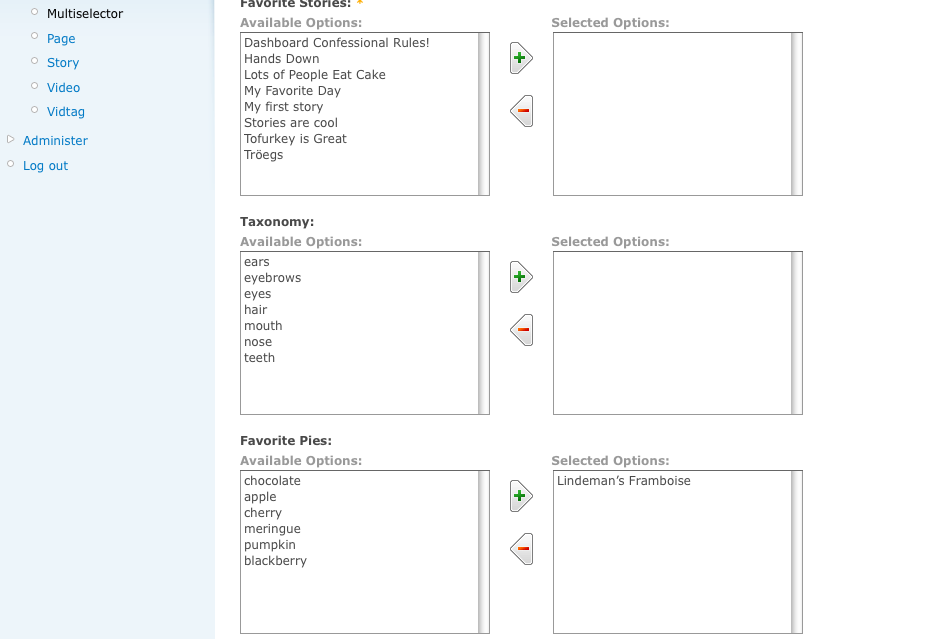
skyredwangsorry, Drupal.org's filter changed the escaped characters back to normal. here is a screen shot. Please notice the third item on the right side. It should be "Lindeman's Framboise"
Comment #5
attheshow commentedCould you try temporarily switching the field back to a regular CCK "select" and see if you get the same behavior?
Comment #6
skyredwangconfirm: it displays correctly, using the regular CCK Select
Comment #7
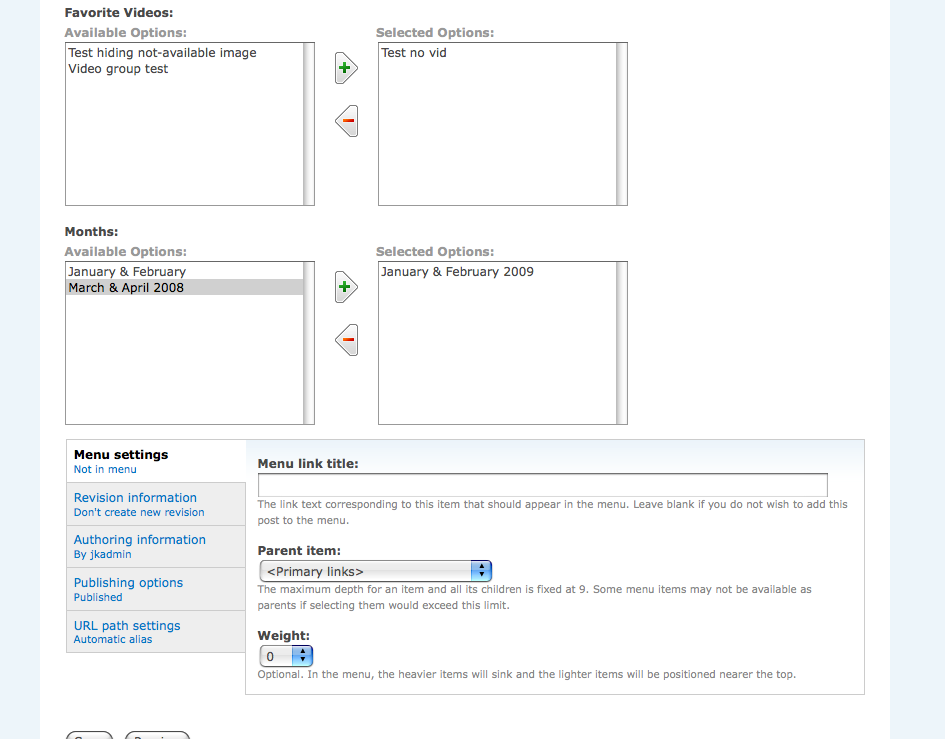
attheshow commentedSo I tried creating this character in MS Word and adding into the "available options" on one of my CCK fields. That didn't work to reproduce the bug though (see screenshot attached). Do you have any ideas of what else I might try to duplicate the errors that you're seeing?
Comment #8
skyredwangattheshow,
I feel one fact is weird. When you are creating the list, there is no problem of displaying the characters. But after you save it and come back to edit it, the problem occurs. I felt something happened after the node_save().
Comment #9
attheshow commentedOk, I tried saving the node and then editing it again. No change. Everything still looks fine on my test site.
Comment #10
attheshow commentedComment #11
skyredwangYou need htmtlentites.decode() each entry.
I changed the title of this issue
Comment #12
attheshow commentedClosing issue. No other users have reported this and I'm not able to replicate it.
Comment #13
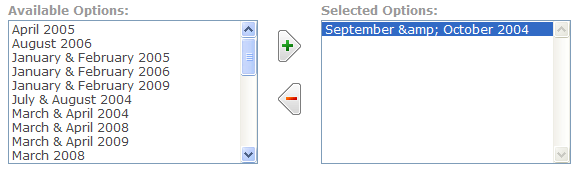
reinholdlange commentedThank you so much for this module, attheshow. I use it extensively and feel as though it adds a lot to the UI. - I too have come across this issue; please take a moment and have a look at the attached screenshot. Thanks.
Comment #14
attheshow commentedAre you using the views module to build your list of items? Where is the & code coming from?
Comment #15
reinholdlange commentedThanks for your reply, attheshow. - I am using the Taxonomy module to create terms, these terms are exposed via CCK (Content Taxonomy) and then I use Multiselect to render the edit form.
Comment #16
attheshow commentedI just tried this and wasn't able to duplicate the issue using a Content Taxonomy CCK field (see attached screenshot). What else should I try to duplicate this?
Comment #17
skyredwangLooks like this issue is fixed in 1.5, please check.
Comment #18
reinholdlange commentedattheshow - thank you for your continued work on this; I am much obliged. I upgraded to 1.5 and am still seeing the phenomenon. For your information, on the 'edit' page of the node(s) I am working on, when I add a term containing an ampersand, the term is moved and correctly displayed in the 'Selected Options' field. However, once I hit 'Save' on the edit form, and then return to it, I see the encoded html entity (&).
Thanks.
Comment #19
attheshow commentedI just made a change related to this for issue #276091: Shows HTML code in selected items list when using a view to select nodes. This change should appear in the dev version. Can someone test and see if this remedies the issue here?
Comment #20
reinholdlange commentedI will test and report back to you. Thank you so much for working on this.
Comment #21
attheshow commentedNo response, so I'm assuming this is working. Marking as fixed.
Comment #22
attheshow commented