

 Come together with the global Drupal community in Rotterdam, 28 Sept – 1 Oct 2026. Sessions, contribution, connection, and Early Bird savings until 8 June.
This line (flashvideo.module line 1336) apparently affects all uploaded files:
$tempfile->filepath = str_replace($path .'/', '', $tempfile->filepath);
If you have set your $path ("Video Import Directory" in the FlashVideo FFMPEG settings in the admin) expecting your video files to get placed in the files/ root, you're mistaken. What happens is the concatenation ($path . '/') returns simply '/' and ALL uploaded files are then renamed something on the order of this:
sitesdefaultfilesimagesMyPictureName.jpg
sitesdefaultfilesgarland_logo.gif
etc.
This is a disaster. FlashVideo just destroyed all my galleries on my development server! Why is it even affecting non-video files? At least make it so that you can't set the Video Import Directory to "".
| Comment | File | Size | Author |
|---|---|---|---|
| destroyed-files.png | 35.53 KB | transio |

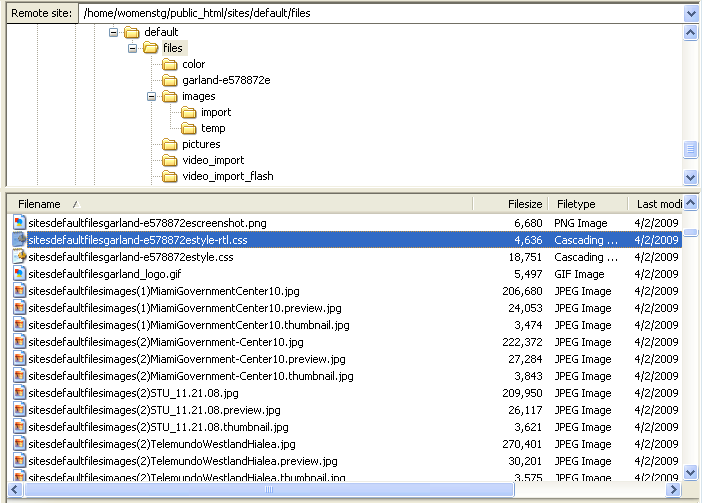
Comments
Comment #1
attheshow commentedI've never heard of such a thing ever happening to any users of this module. Can you detail the steps we would take to duplicate this issue?
Comment #2
attheshow commentedNo response from original poster. Closing issue.
Comment #3
james marks commentedActually, this just happened to me as well, and not just the files in my directory but in all subdirectories as well.
It renamed them, concatenating the directory, subdirectory/ies and filename, moved them out of the files subdirectories into the files directory, and then created a node for each one of them in the content type that I had set up for FlashVideo. When I filtered the content list by the content type, the list went on for at least 10 pages.
If this hadn't happened on a dev server backed up by subversion, I'd be in deep doo doo.
I'm working on recreating the problem now and will report my findings.
Comment #4
james marks commentedIt looks like it
So I had
Comment #5
james marks commentedI run multiple domains under the same Drupal installation so files are stored in: [drupal]/sites/[domain_name]/files/
Here are the steps I took to reproduce the problem:
Every file in files directory and subdirectories is renamed, concatenating the filepath and filename, and moved to files directory as:
and a new node is created for each file so renamed and moved.
*I'm guessing the problem is caused by my leaving the "Video Import Directory" field blank which is obviously an error on my part, made while trying various settings while trying to get FlashVideo to work, but I had no idea that leaving this field blank would have such disasterious consequences on files in subdirectories.
Setting the "Video Import Directory" field to "flashvideo" then reuploading and resaving video appears to solve the problem, resulting in
However, it's still a pretty disasterous and somewhat unexpected problem to deal with given that it processes not only all the files in the files directory but all the files in all the subdirectories of the files directory as well. (Literally hundreds of files were renamed and moved.)
Comment #6
james marks commentedComment #7
james marks commentedComment #8
james marks commentedRelated bug report: "Error on cron run - filesize(): stat failed" http://drupal.org/node/449456
Comment #9
travist commentedMark,
I just fixed this issue and checked it in. I also took care of a major issue if the Output directory is the same as the Import directory (which would cause recursive file copying madness).
Thanks,
Travis.